Add folding marks to PDFs
Use PDF Press to mark fold positions for brochures, inserts, cards, and bindery work. It is built for brochure printers, bindery operators, and finishing teams, with local browser processing and a live preview before export.
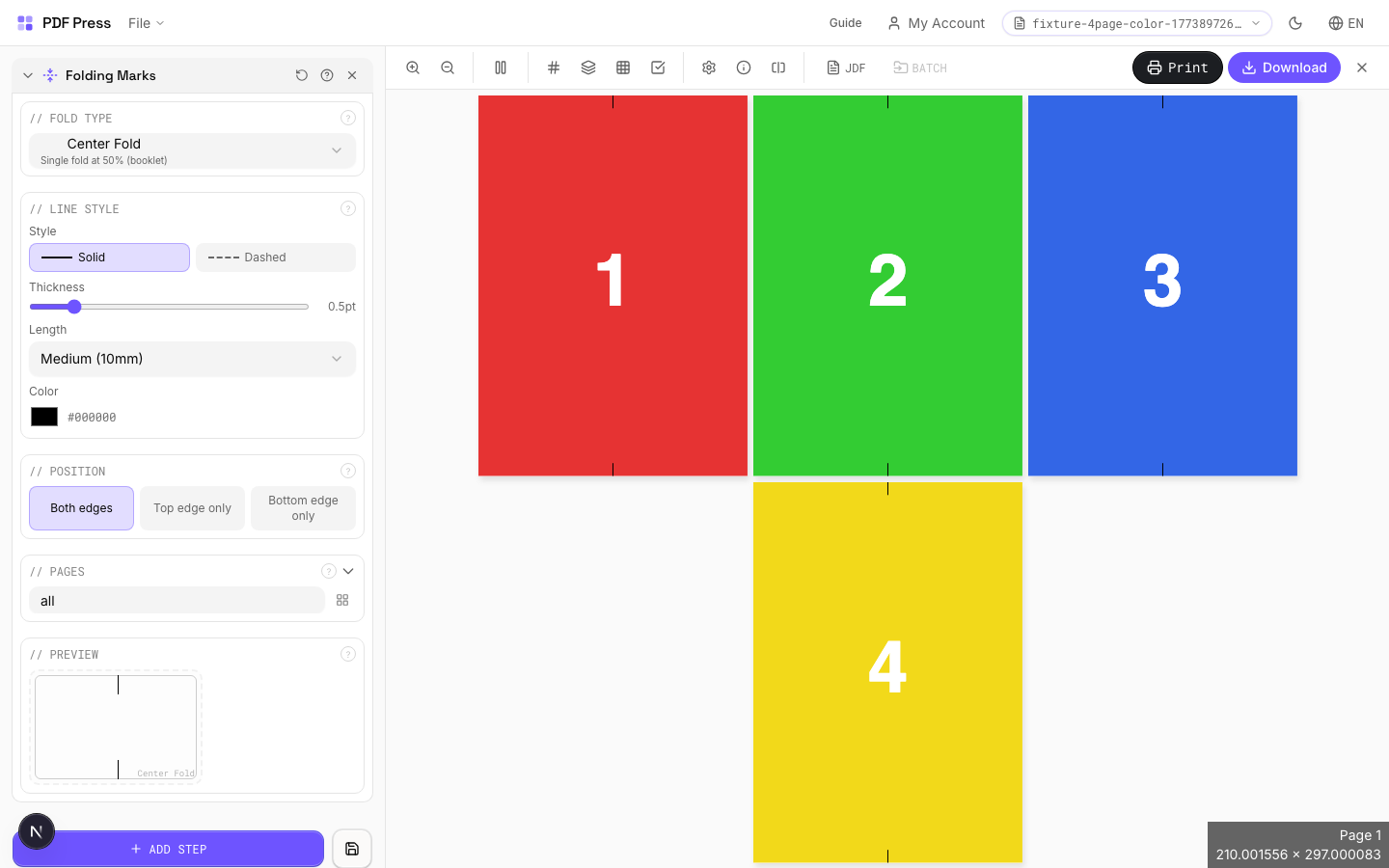
Direct answer
What is add folding marks to PDF?
Adds fold guide lines to pages: thin printed rules showing where to score and fold the sheet.
Folding marks are short dashed or solid lines printed at the sheet edge, indicating fold positions for bindery and finishing equipment. Essential for brochures, mailers, greeting cards, packaging, and any multi-panel product. Supports standard fold patterns (half, tri-fold, Z-fold, gate fold, accordion) and custom fold positions for non-standard layouts.
How to use Folding Marks
Upload files
Start with your source PDF or image files. Processing happens locally in the browser.
Add Folding Marks
Configure Fold Type, Fold Positions, Line Style and any production settings that match the job.
Preview the result
Check page order, marks, scaling, and output geometry before committing the export.
Download output
Export the finished PDF for proofing, press, finishing, or another PDF Press step.
Best use cases
Key settings
Fold Type
Choose a standard fold pattern or enter custom fold positions.
Half fold: one fold at center (2 panels). Tri-fold (letter fold): two folds creating 3 panels: inside panel is slightly narrower to nest cleanly. Z-fold (accordion): two parallel folds with panels alternating direction. Gate fold: two folds bringing outer edges to center. Roll fold: panels fold inward sequentially. Custom: enter exact fold positions in your preferred unit for non-standard layouts.
Fold Positions
Enter custom fold positions as distances from the left or top edge.
Each position represents a fold line measured from the leading edge of the sheet. Enter multiple positions separated by commas. Values are in your selected unit (inches/mm/points). Example: for a custom tri-fold on Letter paper, enter "3.667, 7.333" (in inches) for equal panels.
Line Style
Configure the appearance of fold mark lines: style, weight, length, and color.
Solid lines are most visible; dashed lines (standard in commercial print) distinguish fold marks from crop marks at a glance. Line weight: 0.25–0.5pt is typical: thin enough to be unobtrusive but visible to finishing operators. Line length: how far the mark extends from the sheet edge into the margin area. Color: typically light gray or cyan to differentiate from trim marks.
Position
Which edges of the page receive fold marks: top, bottom, or both.
Both edges is standard: marks at top and bottom of the sheet let the finishing operator align the fold from either direction. Top-only or bottom-only can be used when one edge has artwork extending to the sheet edge.
Pages
Specify which pages to process using a range expression.
Examples: 'all' = every page. '1-5' = pages 1 through 5. '1,3,5' = specific pages. '1-10 odd' = odd pages 1-9. '2-20 even' = even pages 2-20. 'last' = last page. 'last-2' = third from last. Ranges are 1-based. Combine with commas: '1-5, 8, 12-15'.
Preview
Live rendering showing fold mark positions and appearance on the page.
Expert tip
Place fold marks at every fold position. For a tri-fold brochure, remember the inside panel is typically 1-2 mm shorter than the outer panels, so adjust your fold mark positions to match.
Fold marks that extend into the live area will be visible on the finished piece. Keep them strictly in the bleed or trim zone.
Production recipes using Folding Marks
Zine / Mini Booklet
Small-format DIY zine from a single sheet of paper (8-page or 16-page fold).
Greeting Cards
Folded greeting cards imposed for duplex printing and fold finishing.
Saddle-Stitch Finishing Marks
Finishing marks specifically for saddle-stitch bindery operations.
Desk Calendar
Desk tent calendar with fold-and-stand construction.
Frequently asked questions
What is the Folding Marks tool used for?
Adds fold guide lines to pages: thin printed rules showing where to score and fold the sheet.
Who should use add folding marks to PDF?
It is built for brochure printers, bindery operators, and finishing teams. Common use cases include Brochures, Mailers, Greeting Cards, Packaging.
Do my PDF files upload to a server?
No. PDF Press runs the PDF processing workflow in your browser, so your files stay on your device.
Can I use Folding Marks with other PDF Press tools?
Yes. You can combine it with other PDF Press tools in a multi-step workflow, then preview and export the final PDF.