Paper Folding Schemes: Every Fold Type Explained for Print
Master every paper folding scheme used in commercial printing. Learn half folds, tri-folds, z-folds, gate folds, roll folds, french folds, map folds, and more -- with panel counts, sizing rules, and imposition tips.
Why Folding Schemes Matter in Print Production
Every brochure, mailer, greeting card, and map you have ever held was designed around a specific folding scheme -- a precise sequence of folds that transforms a flat printed sheet into a finished product with a defined number of panels, a controlled reading order, and a predictable finished size. Choosing the wrong fold, or designing for one fold while imposing for another, is one of the most costly mistakes in commercial printing. At best, the piece looks amateurish. At worst, the content reads out of order, panels are misaligned, or the piece cannot fit its intended envelope.
Folding is not merely a finishing operation. It is a design constraint that dictates panel count, panel widths, grain direction, paper weight limits, and the imposition layout on the press sheet. A tri-fold brochure has six panels, but three of those panels are different widths. A gate fold has four panels, but the two outer panels must be slightly narrower than the center panels. A map fold combines two perpendicular fold directions, creating a complex imposition that many prepress operators get wrong on the first attempt.
This guide covers every folding scheme you will encounter in professional print production. For each fold type, we explain the mechanics, panel count, panel sizing rules, common products, and the imposition considerations that determine whether the job succeeds or fails on press. If you are working with brochure imposition or any folded product, this is your reference.
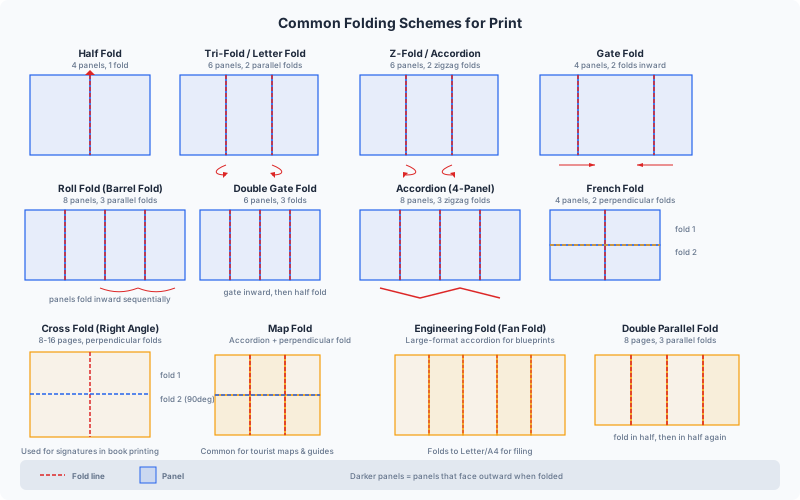
Half Fold (Single Fold)
The half fold is the simplest and most common folding scheme. A single fold down the center of the sheet creates two panels on each side, for a total of four panels (front cover, inside left, inside right, back cover). The finished size is exactly half the flat sheet size.
Panel count: 4 (2 per side)
Panel sizing: Both panels are equal width. For a letter-size sheet (8.5 x 11 in / 216 x 279 mm), the finished size is 5.5 x 8.5 in (140 x 216 mm). For an A4 sheet (210 x 297 mm), the finished size is 148.5 x 210 mm. Panels are always exactly half the sheet width.
Common products:
- Greeting cards and invitations
- Simple menus (single fold, 4 panels)
- Church bulletins and event programs
- Saddle-stitched booklet covers
- Half-sheet flyers folded for mailing
Imposition considerations: The half fold is the foundation of booklet imposition. In a saddle-stitched booklet, every sheet is half-folded and nested inside the others. For a single half-fold piece (like a greeting card), imposition is straightforward: page 1 (front cover) and page 4 (back cover) print on one side, pages 2 and 3 (inside spread) print on the other. The fold line runs exactly at the sheet midpoint, so registration is simple. When ganging multiple half-fold pieces on a press sheet, ensure the fold direction aligns with the press grain direction to get a clean, crisp fold without cracking.
Grain direction: The fold should run parallel to the paper grain. Cross-grain folds on heavy stock (over 170 gsm / 65 lb cover) will crack, exposing the paper core and ruining the printed image along the fold line. If you must fold cross-grain, score the paper first.
Scoring rule: Any stock above approximately 170 gsm (65 lb cover) or 0.25 mm (0.010 in) caliper should be scored before folding, regardless of grain direction. Scoring compresses the fibers along the fold line, preventing cracking. For coated stocks, the scoring threshold is lower -- around 130 gsm (80 lb text) -- because coated surfaces are more prone to cracking.
Letter Fold (Tri-Fold / C-Fold)
The letter fold, also called a tri-fold or C-fold, is the most popular folding scheme for brochures and direct mail. Two parallel folds divide the sheet into three panels on each side, creating six panels total. The right panel folds inward first, then the left panel folds over it, producing a piece that fits a standard #10 business envelope.
Panel count: 6 (3 per side)
Panel sizing rules (critical): The three panels are not equal width. The panel that folds in first (the inside flap) must be approximately 1.5 to 3 mm (1/16 to 1/8 inch) narrower than the other two panels. This narrower width allows the flap to tuck inside without buckling or creating a bulge. For a letter-size sheet (11 in wide), typical panel widths are: left panel 3.6875 in, center panel 3.6875 in, right/inside panel 3.625 in. For A4 (297 mm wide): left 99.5 mm, center 99.5 mm, right/inside 98 mm.
Failing to account for this width difference is one of the most common prepress errors. If all three panels are equal width, the inside flap forces the piece open slightly, it will not lie flat, and it may jam in inserter machines during mailing.
Common products:
- Marketing brochures (the classic tri-fold)
- Restaurant menus
- Tourist information leaflets
- Self-mailers (folded, tabbed, and mailed without an envelope)
- Product spec sheets
Imposition considerations: When imposing tri-fold brochures 2-up on a press sheet, align the fold lines precisely. The two fold lines must be at exactly the correct panel widths -- not at even thirds of the sheet width. Many imposition tools default to equal thirds, which will produce pieces that do not fold correctly. In PDF Press, verify your panel widths in the preview before sending to press. Also be aware that the inside flap panel prints upside-down relative to the other panels on the same side of the sheet -- this is correct and intentional, as the fold inverts it for reading.
Mailing compliance: For USPS automation-compatible self-mailers, the folded tri-fold must be sealed with at least one wafer seal or tab on the open edge. The finished size must be at least 3.5 x 5 in and no more than 6.125 x 11.5 in for letter rate. Pieces that are too thick (more than 0.25 in / 6.35 mm) or too rigid may not fold cleanly; keep paper weight at or below 100 lb text (148 gsm) for unscored tri-folds.
Z-Fold (Accordion Fold)
The z-fold, also called an accordion fold or fan fold, creates three panels of equal width by folding the sheet in alternating directions -- the first fold goes forward, the second fold goes backward, forming a Z shape when viewed from the edge. This produces six panels total (3 per side), identical in count to the letter fold but with fundamentally different characteristics.
Panel count: 6 (3 per side)
Panel sizing: Unlike the letter fold, all three panels in a z-fold are exactly equal width. There is no inside flap that needs to be narrower, because no panel tucks inside another -- each panel folds in the opposite direction from its neighbor. For a letter-size sheet (11 in), each panel is 3.667 in (93.1 mm). For A4 (297 mm), each panel is 99 mm.
Key difference from letter fold: The z-fold opens fully flat in one motion and stays flat. The letter fold requires you to lift the outer flap to access the inside flap. This makes z-folds superior for content that is designed to be read as a single wide spread when fully opened -- maps, timelines, comparison charts, and landscape photographs.
Common products:
- Direct mail pieces that open to a wide spread
- Rack cards with fold-out content
- Event schedules and program guides
- Instruction inserts for pharmaceutical packaging
- Timeline and chronological displays
Imposition considerations: The z-fold is mechanically simpler to impose than the letter fold because all panels are equal width. However, the alternating fold directions mean that panel orientation alternates on the same side of the sheet. On side A, the left panel reads normally, the center panel reads normally, and the right panel reads normally (all upright). But the folding sequence means that when folded, the back panel is inverted relative to the front. Ensure your design accounts for which panel faces outward when folded -- it is easy to accidentally put the "back cover" content on the wrong panel. For detailed z-fold imposition guidance, see our z-fold imposition guide.
Extended accordion folds: The z-fold principle can extend to 4, 5, 6, or more panels by continuing the alternating fold pattern. These are commonly called accordion folds and are used for concertina-style booklets, fold-out maps, and panoramic photo displays. Each additional panel adds one fold. The key imposition challenge with extended accordion folds is ensuring that all fold lines are precisely parallel and evenly spaced -- even a 0.5 mm cumulative error across 6 panels becomes a visible misalignment at the edges.
Gate Fold (Open Gate and Closed Gate)
The gate fold is a high-impact folding scheme where the two outer panels fold inward to meet (or nearly meet) at the center, like double doors opening. It creates four panels on each side (8 total for a closed gate fold) and is prized for its dramatic reveal effect -- the reader opens the "gates" to see a wide interior spread.
There are two variants:
Open gate fold: Two folds bring the outer panels inward so their edges meet at the center without overlapping. This creates 4 panels per side, 8 panels total. The two inner panels (the full-width spread visible when the gates are opened) are each the same width as the two gate panels. The finished width is half the flat sheet width.
Closed gate fold (also called a gatefold with cover): The open gate fold is then folded in half along the center, creating a piece with a front cover, back cover, the gate reveal inside, and the full spread behind the gates. This adds a third fold and produces a finished size that is one-quarter of the flat sheet width.
Panel sizing rules (critical): The two gate panels (the "doors") must each be slightly narrower than one-quarter of the flat sheet width -- approximately 1 to 2 mm (1/32 to 1/16 in) narrower per gate panel. This ensures the gate edges do not overlap at the center and the piece folds flat. For a letter-size sheet (11 in flat): each gate panel is approximately 2.71875 in (69 mm), and the two center panels are each 2.78125 in (70.7 mm).
Common products:
- Premium corporate brochures and annual reports
- Real estate property presentations
- Automotive and luxury brand brochures
- Product launch announcements
- Event invitations with a dramatic reveal
- Magazine and catalog inserts (gatefold ads)
Imposition considerations: Gate folds require precise fold-line placement. The two gate folds are not at the quarter points of the sheet -- they are offset inward by the clearance amount. When imposing gate fold pieces 2-up, ensure the clearance is applied consistently on both pieces. For closed gate folds, the center fold is at the exact midpoint, but the gate folds are offset. Most folding machines have adjustable fold plates for this, but the settings must match the imposition exactly. For detailed gate fold imposition guidance, including closed-gate variants, see our dedicated guide.
Paper weight consideration: Gate folds have four layers of paper at the center when closed. Heavy stock (above 130 gsm / 80 lb text) creates visible bulk at the center and may not fold cleanly without scoring. Many gate fold brochures use lighter stock (100-120 gsm / 70-80 lb text) to keep the piece thin enough to lie flat and fit in a standard envelope.
Roll Fold (Barrel Fold)
The roll fold, also known as a barrel fold, creates four or more panels that wrap progressively inward, with each panel folding over the previous one in the same direction. Unlike the z-fold (which alternates direction), the roll fold always folds inward, creating a nested, rolled structure. A standard 4-panel roll fold has 8 panels total (4 per side).
Panel count: 8 (4 per side) for a standard 3-fold roll fold. Can extend to 10, 12, or more panels with additional folds.
Panel sizing rules (critical): Each panel that wraps inside must be progressively narrower than the panel outside it. This is the most complex panel sizing of any common fold type. For a 4-panel roll fold on letter-size paper (11 in wide), typical panel widths from outside to inside are:
- Panel 1 (outermost/back): 2.8125 in (71.4 mm)
- Panel 2: 2.8125 in (71.4 mm)
- Panel 3: 2.75 in (69.9 mm)
- Panel 4 (innermost): 2.625 in (66.7 mm)
The innermost panel is the narrowest because it must fit inside all the other panels without forcing the piece open. The size reduction per panel is typically 1.5-3 mm (1/16-1/8 in) depending on paper thickness. Thicker stock requires larger size reductions.
Common products:
- Compact information pieces with many panels (product catalogs, price lists)
- Pharmaceutical inserts (drug information leaflets)
- Travel guides and pocket maps
- Instruction manuals for small products
- Restaurant menus with many sections
Imposition considerations: Roll fold imposition is tricky because no two panels are the same width (except sometimes the two outermost panels). Each fold line must be placed at a specific position that accounts for the cumulative reduction. When ganging multiple roll-fold pieces on a press sheet, it is essential to orient all pieces the same way so the fold direction is consistent across the sheet. Folding machines set up for roll folds require precise plate adjustments for each fold, and any imposition error in fold-line placement will cascade through all folds. For more details, see our roll fold imposition guide.
Content design impact: Because the innermost panel is significantly narrower than the outermost panel, graphic designs that span adjacent panels must be adjusted for the width differences. A background image that runs across all four panels on one side must be aligned at the fold lines, which are unevenly spaced. Many designers create their roll-fold layouts using guides placed at the actual fold positions rather than at regular intervals.
French Fold (Right-Angle Fold)
The french fold is a two-step folding scheme where the sheet is first folded in half in one direction, then folded in half again perpendicular to the first fold. The result is a piece with four panels (visible faces) but only one printed side -- the inside panels are blank, showing only unprinted paper. This is the defining feature of the french fold: it allows full-color printing on only one side of the sheet while producing a piece that appears to be printed on both sides.
Panel count: 4 visible panels (the interior is unprinted). The front, back, and two inside panels all come from the same side of the sheet.
Panel sizing: All four panels are equal size. The finished piece is exactly one-quarter the area of the flat sheet. For a letter-size sheet (8.5 x 11 in), the finished size is 4.25 x 5.5 in (108 x 140 mm). For A4 (210 x 297 mm), the finished size is 105 x 148.5 mm (approximately A6).
Common products:
- Greeting cards and invitations (the most common use)
- Event programs and menus
- Art prints and gallery announcements
- Promotional mailers with a premium feel
- Church bulletins
Cost advantage: The french fold's primary benefit is cost savings. Printing one side of a sheet is significantly cheaper than printing both sides (simplex vs. duplex). On a sheet-fed offset press, single-side printing means one pass through the press instead of two, cutting press time nearly in half. On digital presses, single-side printing reduces cost by approximately 30-40%. The french fold delivers a four-panel finished piece at single-side printing cost.
Imposition considerations: French fold imposition requires careful panel orientation. When the sheet is folded twice, panels 1 and 4 are on the same half of the sheet, and panels 2 and 3 are on the other half. But because the second fold is perpendicular to the first, the panel orientation is not intuitive -- panel 4 prints upside-down relative to panel 1 on the flat sheet. This is correct and essential for the piece to read correctly after both folds. Many prepress operators catch this "upside-down panel" and incorrectly "fix" it, producing a piece that reads upside-down when opened. Always fold a test print before sending a french fold job to production.
Paper weight: French folds work best on lighter stocks (80-120 gsm / 50-80 lb text) because the two perpendicular folds create four layers of paper at the corner, and heavy stock creates excessive bulk. For invitation-quality french folds, 100 gsm (70 lb text) uncoated stock is the sweet spot -- substantial enough to feel premium, light enough to fold cleanly without scoring.
Map Fold (Combination Fold)
The map fold combines two or more folds in different directions to create a compact piece that unfolds to a large flat sheet. The classic map fold uses a combination of accordion (z-fold) folds in one direction and one or more half folds in the perpendicular direction. This produces a piece with 8, 12, 16, or more panels depending on the number of folds in each direction.
Panel count: Varies. A common map fold combines a 3-panel z-fold with a perpendicular half fold, producing 12 panels total (6 per side). A 4-panel accordion with a perpendicular half fold produces 16 panels (8 per side).
Panel sizing: Panels created by accordion folds are equal width. Panels created by half folds are equal height. The finished size is determined by the number of folds in each direction: for a 3-fold accordion + 1 half fold on a 24 x 18 in sheet, the finished size is 8 x 9 in.
Common products:
- Road maps and city maps (the original use case)
- Hiking trail maps and park guides
- Large format information displays that must fit a pocket
- Tourist guides and transit maps
- Technical diagrams and schematics
- Board game instructions
Imposition considerations: Map folds are among the most complex folding schemes to impose correctly. The combination of two perpendicular fold directions means that panel orientation varies across the sheet -- some panels print right-side-up, others print upside-down, and some print rotated 180 degrees, depending on where they end up in the folding sequence. The only reliable way to impose a map fold is to physically fold a dummy sheet with panel numbers written on each face, then unfold it to see the flat layout. This reveals the correct orientation and position of every panel.
Folding machine setup: Map folds typically require two passes through a folding machine (or a machine with two folding stations oriented perpendicular to each other). The first pass makes the accordion folds, the second pass makes the cross folds. Registration between the two passes must be precise, because any misalignment in the first fold cascade through to the second. Some high-end buckle folder configurations can handle map folds in a single pass using right-angle fold plates.
Paper considerations: Map folds create many layers at the folded corners. A 3x2 map fold (12 panels) produces 6 layers at the thickest point. Paper weight should not exceed 100 gsm (70 lb text) for map folds with more than 8 panels, and lighter stocks (60-80 gsm) are preferred for large maps. All fold lines should be scored for stocks above 90 gsm to prevent cracking, especially on coated papers.
Parallel Fold (Double Parallel Fold)
The parallel fold (specifically the double parallel fold) creates four equal panels by making two parallel folds that divide the sheet into quarters, with both folds going in the same direction. The right quarter folds inward, then the left quarter folds inward over it, creating a piece that is one-quarter the width of the flat sheet with 8 panels total (4 per side).
Panel count: 8 (4 per side)
Panel sizing: Similar to the letter fold's inside-flap rule, the innermost panel should be approximately 1-2 mm (1/32-1/16 in) narrower than the other panels to allow the piece to fold flat. The outer panels can be equal width. For a letter-size sheet (11 in wide): two outer panels at 2.78125 in each, the wrap panel at 2.75 in, and the innermost panel at 2.6875 in.
Common products:
- Compact brochures with more content than a tri-fold
- Billing inserts for utility companies and banks
- Legal disclosures and terms-and-conditions inserts
- Pharmaceutical patient information leaflets
- Product warranty cards
Imposition considerations: The parallel fold is often confused with the roll fold, but they differ in folding sequence. In a parallel fold, the two outer panels fold inward simultaneously (or in quick succession) and nest inside the center panels. In a roll fold, each panel wraps progressively over the previous one. The imposition layout is different because the panel that faces up in the center of the folded piece differs between the two fold types. Always specify which fold type you intend when communicating with your print shop -- "double parallel" vs. "barrel fold" eliminates ambiguity.
Folding direction: In a double parallel fold, the fold direction is the same for both folds (both fold inward). This differs from the z-fold where fold directions alternate. On a buckle folder, both fold plates are set on the same side of the sheet path, creating nested rather than alternating folds.
Cross Fold and Right-Angle Fold
A cross fold (also called a right-angle fold) is any fold where a subsequent fold is made perpendicular to the previous fold. This is the principle behind the french fold (one cross fold) and the map fold (multiple cross folds), but it also describes a broad category of folds used in booklet and signature production.
Panel count: Doubles with each fold. One fold = 4 panels. Two cross folds = 8 panels. Three cross folds = 16 panels. Four cross folds = 32 panels.
Signature production: Cross folds are the foundation of book printing. A signature is a large sheet printed with multiple pages, then folded through successive right-angle folds until it reaches the trim size of the book. A standard 16-page signature starts as a flat sheet with 8 pages printed on each side, then receives three right-angle folds to produce a folded unit where the pages are in the correct reading order. A 32-page signature receives four right-angle folds.
Common products:
- Book signatures (8, 16, 32 pages)
- Magazine sections
- Newspaper sections
- Large-format brochures that fold down to a small finished size
Imposition considerations: Cross-fold imposition is where imposition software earns its keep. The page layout on the flat sheet for a 16-page signature is non-intuitive -- pages are not in sequential order, some are rotated 180 degrees, and the arrangement depends on the folding sequence (which edge folds first). This is called a folding imposition or sheetwork layout. PDF Press's Booklet tool handles the most common cross-fold signatures (4, 8, 16 pages), automatically placing pages in the correct positions for the folding sequence.
Lip and trim: After cross-folding, the open edges of the signature are trimmed to free the pages. The outermost fold (the "closed head" or "closed face") becomes the spine edge and is not trimmed. For signatures with three or more cross folds, a slight lip (offset) may be needed on the second fold to ensure the folding machine gripper can catch the sheet for the third fold. This lip is typically 3-5 mm and is removed during final trim.
Creep: In cross-folded signatures, the inner pages protrude slightly beyond the outer pages because each fold adds paper thickness. This is called creep or push-out. For thick paper or signatures with many pages, creep compensation (also called shingling) must be applied during imposition -- inner pages are shifted inward so their content is not clipped during final trim. PDF Press accounts for creep automatically in booklet imposition.
Specialty Folds: Engineering, Die-Score, and Exotic Schemes
Beyond the standard folds, several specialty folding schemes serve specific industries and product types. These folds often require custom folding equipment, die-cut scoring, or hand folding.
Tent fold / table tent: A single fold where the sheet is not folded flat but left standing in an inverted V shape. Used for table tents in restaurants, event name cards, and point-of-sale displays. The two panels face outward in opposite directions, and the fold edge is the "spine" at the top. Imposition is identical to a half fold, but the stock is typically heavier (200-350 gsm / 80-130 lb cover) to maintain the standing structure.
Iron cross fold (altar fold): All four edges of the sheet fold inward to meet at the center, creating a piece that opens from the center outward in four directions. This produces a dramatic reveal effect and is used for premium invitations and luxury brand presentations. It requires die-scored fold lines (not machine-foldable) and is almost always hand-folded. Imposition places the center panel of the finished piece in the center of the flat sheet, with the four flap panels extending outward.
Short fold (step fold): Multiple parallel folds where each fold is offset from the previous one, creating panels of different widths that are visible as steps or tabs when the piece is folded. Used for tabbed brochures, index cards, and step-by-step instruction pieces. Panel widths decrease progressively from front to back, with each tab typically 10-15 mm (3/8-5/8 in) shorter than the one in front of it.
Fold-out poster: A single large panel attached to a smaller brochure or magazine, folded inward to match the trim size. The fold-out panel is typically 2-3 times the width of the host page. Imposing a fold-out requires the large panel to be printed separately or on an oversized sheet, with the fold positioned to allow it to tuck cleanly inside the bound product.
Die-scored folds: For very heavy stock (above 300 gsm), corrugated board, or plastic sheets, standard machine folding is not possible. Instead, a die with a scoring rule creates a compressed channel in the material where the fold will occur. The fold is then made by hand or on a simple folding jig. Packaging (folding cartons, boxes) relies entirely on die-scored folds. Imposition for die-scored products must include registration marks for the die and bleed beyond all cut edges.
Choosing the Right Fold for Your Project
Selecting a folding scheme is not just a design decision -- it involves practical constraints that limit your options. Here is a decision framework based on the most common factors:
How many panels of content do you need?
- 4 panels: Half fold or french fold
- 6 panels: Letter fold (tri-fold) or z-fold
- 8 panels: Roll fold, double parallel fold, gate fold, or single cross fold
- 12+ panels: Map fold, extended accordion, or multiple cross folds
Does it need to fit an envelope?
- #10 envelope (4.125 x 9.5 in): Letter fold on letter-size paper is the standard fit
- A5 envelope (C5, 162 x 229 mm): Half fold on A4, or z-fold on A4
- DL envelope (110 x 220 mm): Tri-fold or z-fold on A4
Should it open flat for maximum impact? Choose a z-fold or accordion fold. These unfold completely flat in one motion, making them ideal for wide spreads, maps, and panoramic images. Letter folds and roll folds do not open flat as easily because of the nested panels.
Do you need a dramatic reveal? Choose a gate fold. The two opening panels create a theater-curtain effect that is perfect for product launches, real estate presentations, and annual reports. For an even more dramatic reveal, use a closed gate fold -- the reader must first open the cover, then open the gates.
Are you printing on one side only? Choose a french fold. It is the only standard fold type that produces a multi-panel piece from single-side printing, offering significant cost savings on both offset and digital presses.
Paper weight and bulk: The more folds and the heavier the stock, the thicker the finished piece. A 3-fold roll fold on 150 gsm paper creates a piece with 4 layers at the thickest point -- approximately 2.4 mm (0.094 in). A map fold with 6 panels on the same stock would be 6 layers thick -- approximately 3.6 mm (0.142 in) -- which is too thick for many envelope sizes and too bulky for automated mailing equipment. Keep layer count times paper caliper below 3 mm for mailable pieces.
Setting Up Folding Schemes in Imposition Software
Modern imposition software like PDF Press handles the mathematical complexity of fold schemes, but you still need to understand the principles to set up jobs correctly and verify the output.
Booklet imposition (cross folds): Use PDF Press's Booklet tool for saddle-stitched and perfect-bound products. Select the binding type (saddle stitch or perfect), the number of pages per signature (4, 8, 16, or 32), and the tool automatically arranges pages in the correct cross-fold order with creep compensation. Preview the output and verify that the page sequence makes sense when you mentally fold the sheet.
N-up with fold-and-cut: For brochures that are printed multiple-up and then cut and folded, use the Grid or N-up tool to place multiple copies on the press sheet, then verify that the fold lines of adjacent pieces align. Misaligned fold lines between ganged pieces cause problems at the folding machine, where the operator sets the fold position once for the entire sheet.
Panel width verification: After imposing, measure the panel widths in the preview. For letter folds, confirm the inside flap is narrower. For roll folds, confirm the progressive width reduction. For gate folds, confirm the gate panels are narrower than the center panels. Even a 1 mm error in panel width can cause folding problems at production speed.
Score lines and fold marks: Enable cutter marks in PDF Press to add fold-line indicators to the press sheet. These marks guide the folding machine operator in setting up the fold plates. Place fold marks on the gripper edge and the far edge of the sheet, outside the trim area. The Cutter Marks tool in PDF Press lets you configure mark style (line, cross, or circle), length, weight, and distance from the fold line.
Grain direction notation: Always indicate grain direction on your job ticket. If the press sheet grain runs parallel to the long edge (long-grain), note "LG" on the layout. If it runs parallel to the short edge (short-grain), note "SG." The fold direction should ideally be parallel to the grain for the cleanest fold. When this is not possible (e.g., a map fold with perpendicular folds), ensure the primary fold (the fold the reader opens first) runs with the grain, and score the cross-grain fold.
Test folding: Before approving any folded job for production, always print a full-size proof and physically fold it. Check that: (1) all panels are in the correct reading order, (2) no content is clipped by the fold, (3) cross-panel images align at the fold lines, (4) the piece fits its intended envelope, and (5) the stock folds cleanly without cracking. No amount of on-screen verification substitutes for a physical fold test.
Try it yourself
PDF Press runs entirely in your browser. Upload a PDF, pick a tool, and download the result — fast and private.
Open PDF Press22 Professional Imposition Tools
Every tool runs locally in your browser — fast, private, and professional-grade.
Frequently Asked Questions
Related Articles
Ready to try professional PDF imposition?
PDF Press is a browser-based imposition tool with 22 professional tools. No installation required.
Open PDF Press