Crop PDF pages for print
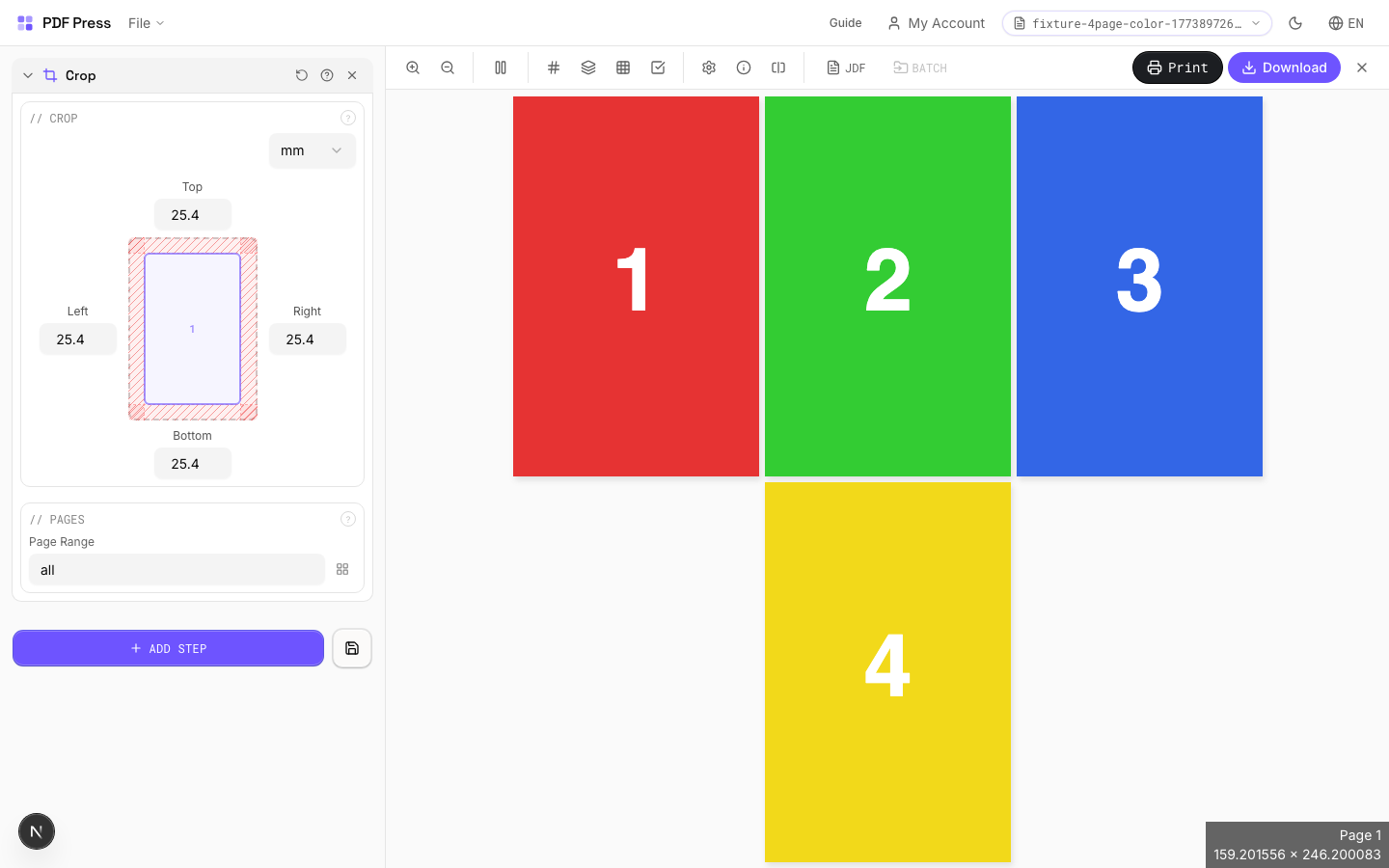
Use PDF Press to trim margins, printer marks, or unwanted page edges from PDFs. It is built for prepress operators cleaning files before imposition, with local browser processing and a live preview before export.
Direct answer
What is crop PDF?
Trims content from page edges — specify how much to remove from each side.
Values represent the amount to remove, not the remaining size. A crop of 72pt (1in) on all sides removes 1 inch from every edge, making the page 2in narrower and 2in shorter. Useful for removing unwanted margins, printer borders, bleed areas, or white space from scanned documents.
How to use Crop
Upload files
Start with your source PDF or image files. Processing happens locally in the browser.
Add Crop
Configure Crop, Pages and any production settings that match the job.
Preview the result
Check page order, marks, scaling, and output geometry before committing the export.
Download output
Export the finished PDF for proofing, press, finishing, or another PDF Press step.
Best use cases
Key settings
Crop
Set removal amounts for each edge: top, bottom, left, right.
Each value is subtracted from the corresponding page edge. Example: cropping 36pt (0.5in) from all sides on an A4 page (595×842pt) produces 523×770pt output. Use the same value on all sides to remove a uniform border. Different values per side let you trim asymmetrically (e.g., remove a binding margin from the left only).
Pages
Specify which pages to process using a range expression.
Examples: 'all' = every page. '1-5' = pages 1 through 5. '1,3,5' = specific pages. '1-10 odd' = odd pages 1-9. '2-20 even' = even pages 2-20. 'last' = last page. 'last-2' = third from last. Ranges are 1-based. Combine with commas: '1-5, 8, 12-15'.
Expert tip
Crop to the TrimBox to strip printer marks and bleed before re-imposing. This gives you a clean starting point. Use the CropBox variant if you want to preserve marks for reference.
Cropping is destructive. If you crop too tight and lose the bleed, you cannot recover it without the original source file.
Frequently asked questions
What is the Crop tool used for?
Trims content from page edges — specify how much to remove from each side.
Who should use crop PDF?
It is built for prepress operators cleaning files before imposition. Common use cases include Trim Margins, Remove Borders, Bleed Removal.
Do my PDF files upload to a server?
No. PDF Press runs the PDF processing workflow in your browser, so your files stay on your device.
Can I use Crop with other PDF Press tools?
Yes. You can combine it with other PDF Press tools in a multi-step workflow, then preview and export the final PDF.