Add headers, footers, and page numbers to PDFs
Use PDF Press to add page numbers, job IDs, dates, and custom text to PDFs. It is built for proofing, document control, and print production teams, with local browser processing and a live preview before export.
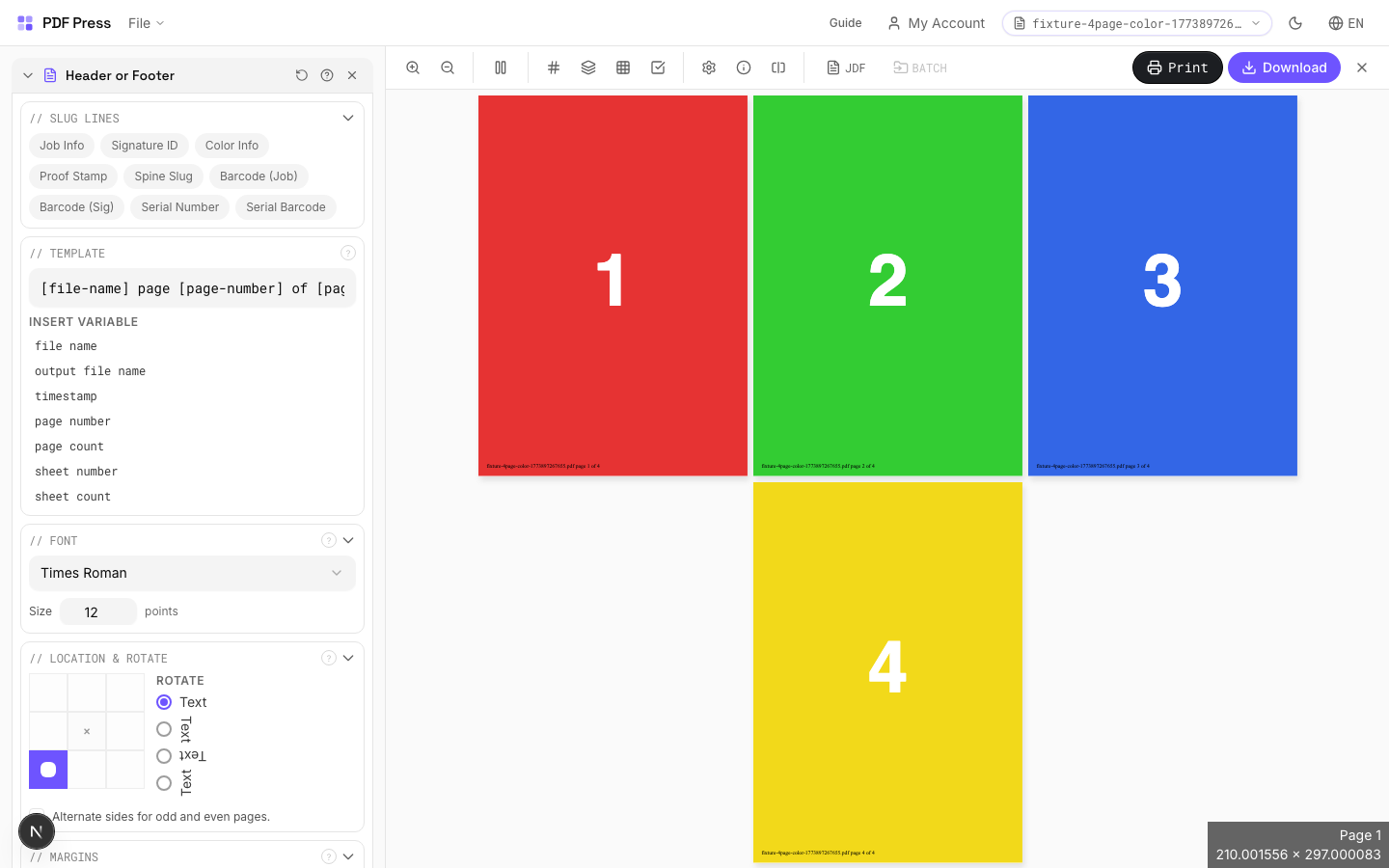
Direct answer
What is add header footer to PDF?
Adds customizable text to the top or bottom of every page — with dynamic variables for page numbers, filenames, and timestamps.
Supports variable tokens replaced at render time: [page-number], [page-count], [sheet-number], [sheet-count], [file-name], [output-file-name], [timestamp]. Number padding: [page-number:0001] produces 0001, 0042, etc. Timestamp formatting: [timestamp:%B %d, %Y] → "March 12, 2026".
How to use Header or Footer
Upload files
Start with your source PDF or image files. Processing happens locally in the browser.
Add Header or Footer
Configure Template, Font, Location & Rotate and any production settings that match the job.
Preview the result
Check page order, marks, scaling, and output geometry before committing the export.
Download output
Export the finished PDF for proofing, press, finishing, or another PDF Press step.
Best use cases
Key settings
Template
Type or compose the text to stamp on each page. Click variable buttons to insert dynamic tokens.
Available tokens: [page-number] (current page), [page-count] (total pages), [sheet-number] (sheet index), [sheet-count] (total sheets), [file-name] (input filename), [output-file-name] (output filename), [timestamp] (current date/time). Padding: [page-number:0001] zero-pads to 4 digits (0001, 0042, 0100). Timestamp: [timestamp:%Y-%m-%d] → '2026-03-12'. Combine freely: 'Page [page-number] of [page-count] — [file-name]'.
Font
Choose the typeface and point size for the stamped text.
Standard PDF fonts: Helvetica, Helvetica-Bold, Times-Roman, Times-Bold, Courier, Courier-Bold, etc. Size in PDF points: 8–10pt for annotations and sluglines, 12pt for readable body text, 14–18pt for prominent headers. These fonts are embedded in every PDF viewer — no font files needed.
Location & Rotate
Position the text using a 3×3 grid (8 positions — center cell is reserved for page content).
Choose from: top-left, top-center, top-right, center-left, center-right, bottom-left, bottom-center, bottom-right. The selected position sets the anchor point. Rotation: rotates the text at the anchor — 90° for vertical spine labels, 180° for inverted text. Alternate sides: mirrors the horizontal position on even pages — standard for book running headers where left pages show content on the left and right pages on the right.
Margins
Fine-tune the offset of the text from its anchor position.
Horizontal margin: distance from the left or right edge (depending on anchor). Vertical margin: distance from the top or bottom edge. Use margins to ensure text stays within the printable area and doesn't overlap content. Typical values: 18–36pt (0.25–0.5in).
Pages
Specify which pages to process using a range expression.
Examples: 'all' = every page. '1-5' = pages 1 through 5. '1,3,5' = specific pages. '1-10 odd' = odd pages 1-9. '2-20 even' = even pages 2-20. 'last' = last page. 'last-2' = third from last. Ranges are 1-based. Combine with commas: '1-5, 8, 12-15'.
Preview
Live rendering showing what the stamped text will look like with sample variable values filled in.
Expert tip
Put job name, date, and plate/separation info in the slug area using 6-7 pt text in a neutral colour. The marks should be clearly readable on a proof but must not encroach on the live area.
If the header or footer falls inside the trim area, it will be visible on the finished product. Always position them in the slug or bleed zone.
Production recipes using Header or Footer
Watermarked Proof
Draft proof with watermark and job information for client approval.
Branded Proof
Client proof with your shop's branding, job info, and color patches.
Newsletter
Folded newsletter (4-8 pages) for mailing or distribution.
Frequently asked questions
What is the Header or Footer tool used for?
Adds customizable text to the top or bottom of every page — with dynamic variables for page numbers, filenames, and timestamps.
Who should use add header footer to PDF?
It is built for proofing, document control, and print production teams. Common use cases include Page Numbers, Sluglines, Proofing, Bates Stamping.
Do my PDF files upload to a server?
No. PDF Press runs the PDF processing workflow in your browser, so your files stay on your device.
Can I use Header or Footer with other PDF Press tools?
Yes. You can combine it with other PDF Press tools in a multi-step workflow, then preview and export the final PDF.