Add color bars to PDFs
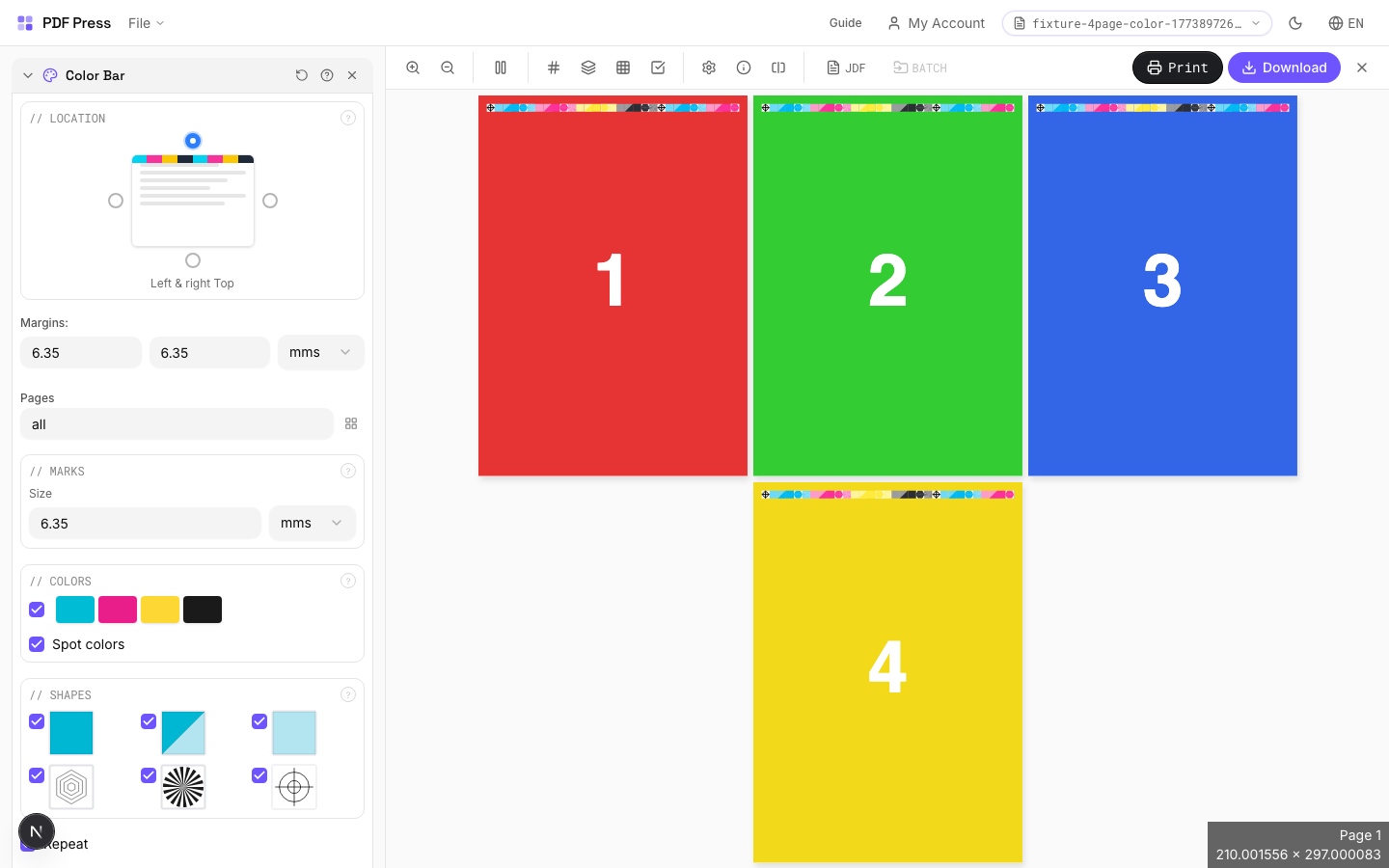
Use PDF Press to place CMYK calibration and density control strips on print PDFs. It is built for offset, digital, and packaging print operators, with local browser processing and a live preview before export.
Direct answer
What is add color bar to PDF?
Adds color calibration strips along page edges for press quality verification.
Color bars provide a reference target that press operators use to monitor ink density, dot gain, and color consistency throughout a print run. Bars include process color patches (CMYK), registration targets, and optional spot color swatches.
How to use Color Bar
Upload files
Start with your source PDF or image files. Processing happens locally in the browser.
Add Color Bar
Configure Location, Marks, Colors and any production settings that match the job.
Preview the result
Check page order, marks, scaling, and output geometry before committing the export.
Download output
Export the finished PDF for proofing, press, finishing, or another PDF Press step.
Best use cases
Key settings
Location
Position the color bar along a page edge using the selection grid.
Choose which edge of the page receives the color bar. The bar runs along the full length of the selected edge, positioned just outside the trim boundary.
Marks
Configure mark size, spacing, and repeat behavior.
Size controls how large each color patch appears. Repeat fills the available edge length with repeating bar patterns for more measurement points across the sheet.
Colors
Select which color patches to include in the bar.
Standard bars include CMYK process patches. Spot colors adds extra patches for any Pantone or custom inks defined in the document. Registration patches help verify plate alignment.
Shapes
Choose the shape of individual color patches.
Squares are the most common and easiest to measure with a spectrophotometer. Circles and rectangles are available for specific press proofing workflows.
Expert tip
On offset presses, place colour bars along the gripper edge for inline densitometry. On digital presses, place them on the trail edge where toner coverage varies more.
Colour bars increase the overall sheet dimension. Verify your press sheet has enough non-image area to accommodate them without clipping.
Production recipes using Color Bar
Perfect-Bound with Color Bar
Perfect-bound book signatures with inline color bars for press density control.
Children's Book
Full-color children's picture book with heavy stock and case binding.
Magazine Production
Full commercial magazine with saddle-stitch or perfect binding and press marks.
Annual Report
Corporate annual report with mixed content (text, charts, photos) and premium finishing.
Frequently asked questions
What is the Color Bar tool used for?
Adds color calibration strips along page edges for press quality verification.
Who should use add color bar to PDF?
It is built for offset, digital, and packaging print operators. Common use cases include Press Proofing, Color Management, Quality Control.
Do my PDF files upload to a server?
No. PDF Press runs the PDF processing workflow in your browser, so your files stay on your device.
Can I use Color Bar with other PDF Press tools?
Yes. You can combine it with other PDF Press tools in a multi-step workflow, then preview and export the final PDF.