N-up booklet maker for signatures
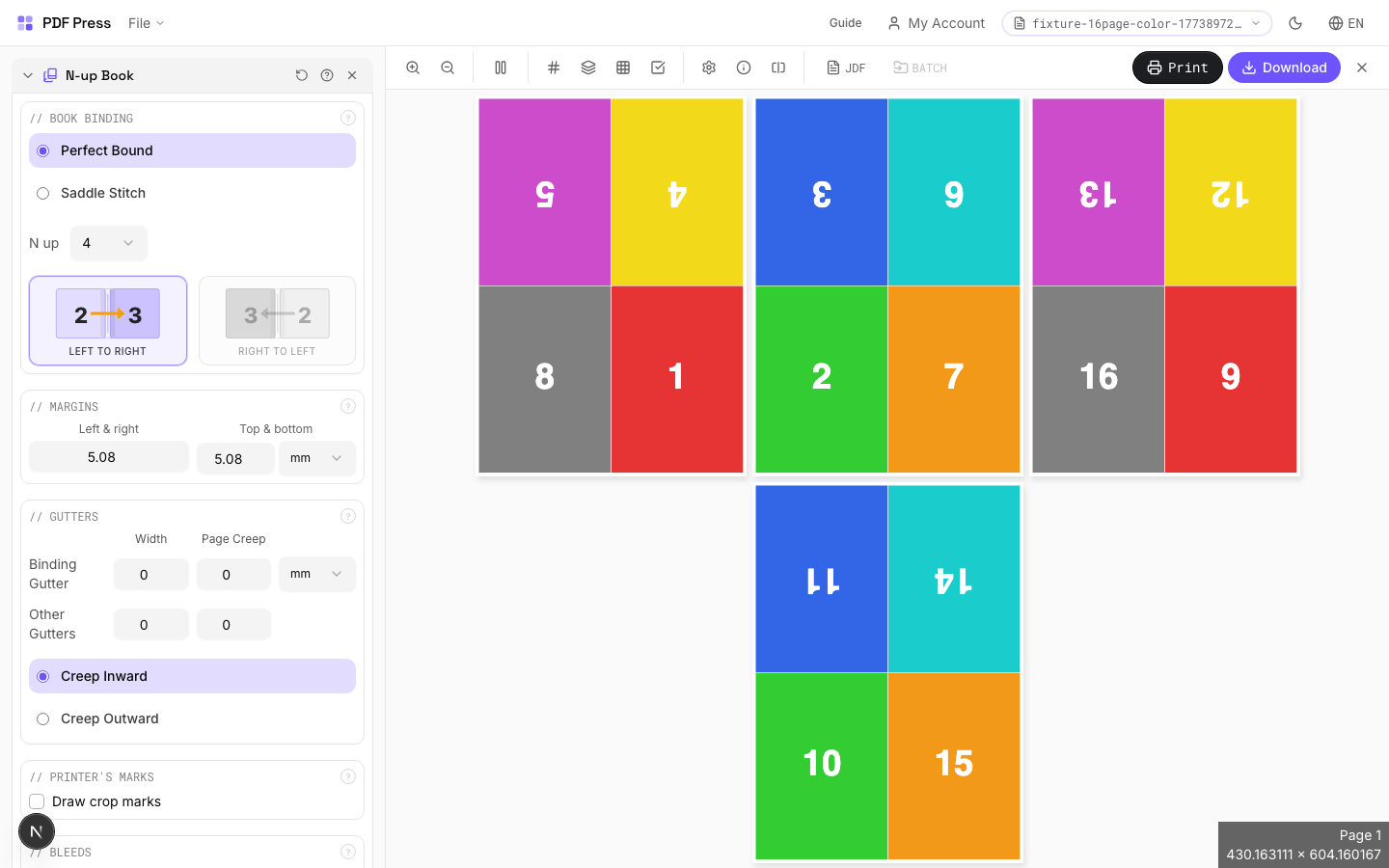
Use PDF Press to create 2-up, 4-up, 8-up, 16-up, and 32-up book signatures. It is built for commercial book printers and bindery teams, with local browser processing and a live preview before export.
Direct answer
What is n-up booklet maker?
Combines multi-page-per-sheet layout with book signature imposition.
Places multiple pages on each side of a large press sheet so that after folding and trimming, pages read sequentially. N-up count: 2 = folio (1 fold), 4 = quarto (2 folds), 8 = octavo (3 folds), 16 = sexto-decimo (4 folds), 32 = trigesimo-secundo. Larger N-up values require proportionally larger press sheets.
How to use N-up Book
Upload files
Start with your source PDF or image files. Processing happens locally in the browser.
Add N-up Book
Configure Paper Size, Printer's Marks, Bleeds and any production settings that match the job.
Preview the result
Check page order, marks, scaling, and output geometry before committing the export.
Download output
Export the finished PDF for proofing, press, finishing, or another PDF Press step.
Best use cases
Key settings
Paper Size
Sets the output sheet dimensions. This is the physical paper going through your printer or press.
Standard presets: Letter (8.5×11in), Legal (8.5×14in), Tabloid (11×17in), A4 (210×297mm), A3 (297×420mm). Landscape swaps width↔height. Lock icon links dimensions to preserve aspect ratio. Custom lets you enter any size in inches, mm, or points (1in = 72pt = 25.4mm).
Printer's Marks
Adds trim guides and alignment marks outside the live area for accurate cutting and registration.
Crop marks: short lines at each corner showing where to trim. Center marks: crosshairs at sheet midpoints for front/back alignment on duplex jobs. Line length (default 0.43in/31pt): how long each mark line extends. Line thickness (default 0.014in/1pt): mark stroke weight. Line distance (default 0.139in/10pt): gap between the mark and the artwork edge. Four-color black: prints marks in C+M+Y+K for visibility on color proofs. Knockout: adds a white halo around marks so they show on dark backgrounds.
Bleeds
Extends artwork beyond the trim edge to prevent white strips after cutting.
Three modes: 'No bleeds' trims exactly at the page boundary. 'Pull from document' uses bleed info already embedded in the PDF (TrimBox/BleedBox metadata). 'Fixed' lets you manually set bleed on each side, typically 3mm (0.125in / 9pt) for commercial print, 1-2mm for digital. Bleed values define how far past the trim edge the artwork extends.
Book Binding
Choose nested (saddle-stitch) or perfect binding for how signatures are assembled.
Nested: all sheets fold together into one section, then stapled through the spine — ideal for thin booklets (8–64 pages). Perfect: creates separate signatures that stack and glue at the spine. Creep direction (inward/outward) compensates for paper thickness pushing inner pages outward after folding. Reading direction: left-to-right (Western) or right-to-left (RTL languages like Arabic, Hebrew, Japanese manga).
Margins
Non-printable border around each output sheet edge.
Ensures content stays within the printable area of your press or printer. Typical commercial offset: 0.25–0.5in (18–36pt). Digital printers: 0.125–0.25in (9–18pt). Binding margin adds extra space at the spine edge for adhesive or thread.
Gutters
Spacing between adjacent pages on the same side of the sheet.
Binding gutter: space at the spine fold between facing pages — prevents content from being lost in the fold. Default 2.835pt (1mm). Other gutter: space between pages perpendicular to the spine. Increase gutters for thicker paper stock or tight binding methods.
Expert tip
Pick the N-up value (2, 4, 8, 16, 32) based on your press sheet size relative to the finished trim. For A5 final on SRA3 press sheets, 4-up is the optimal choice. Always enable creep compensation when binding is nested (saddle-stitch).
If the N-up value does not match the press sheet, you will get blank cells or clipped pages. Check the output sheet dimensions before making plates.
Production recipes using N-up Book
Perfect-Bound Book
PUR/hot-melt perfect binding for books with 48+ pages.
Perfect-Bound with Color Bar
Perfect-bound book signatures with inline color bars for press density control.
Case-Bound (Hardcover) Book
Smyth-sewn case-bound book with proper signature imposition and spine marks.
Children's Book
Full-color children's picture book with heavy stock and case binding.
Frequently asked questions
What is the N-up Book tool used for?
Combines multi-page-per-sheet layout with book signature imposition.
Who should use n-up booklet maker?
It is built for commercial book printers and bindery teams. Common use cases include Book Signatures, Commercial Print, Large Press Sheets.
Do my PDF files upload to a server?
No. PDF Press runs the PDF processing workflow in your browser, so your files stay on your device.
Can I use N-up Book with other PDF Press tools?
Yes. You can combine it with other PDF Press tools in a multi-step workflow, then preview and export the final PDF.