Greeting Card Imposition: Sizes, Folds & Multi-Up Print Layouts
Complete guide to greeting card imposition for commercial and short-run printing. Covers standard card sizes, fold orientations, matching envelopes, 2-up and 4-up layouts, bleed and safe zones, paper stock selection, scoring, coating, and step-by-step setup in PDF Press.
Why Greeting Card Imposition Matters
Greeting cards occupy a unique position in commercial printing. They are folded products -- meaning the flat printed sheet must be exactly twice the size of the finished card -- and they must fit inside an envelope whose dimensions are tightly standardized. Get the imposition wrong by even a millimeter, and the card either does not fold cleanly, does not fit its envelope, or wastes material at a rate that makes the job unprofitable.
The global greeting card market generates over $7 billion annually, encompassing everything from mass-produced holiday cards to short-run artisanal designs sold on Etsy and at craft fairs. Whether you are a commercial printer running 50,000 cards on an offset press, an independent artist printing 200 cards on a digital press, or a small business owner printing holiday cards on an office laser printer, the imposition principles are the same: arrange flat card blanks on a sheet to maximize yield, ensure accurate folding, and produce a card that fits its intended envelope.
This guide covers every aspect of greeting card imposition -- from standard sizes and fold orientations through paper selection, multi-up layouts, scoring and finishing, and step-by-step setup in PDF Press. If you are looking for a quick tutorial on printing greeting cards at home or in a print shop, see the greeting card printing tutorial. For deeper understanding of folding mechanics, see the folding schemes guide.
Standard Greeting Card Sizes and Their Envelopes
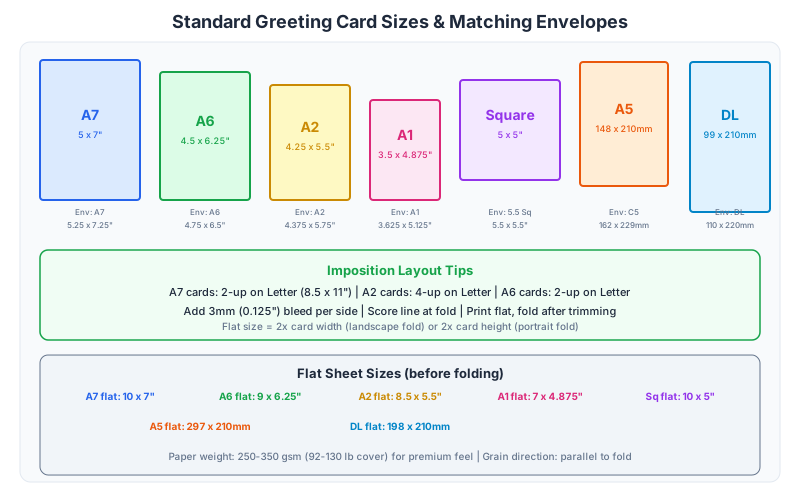
Greeting card sizes are defined by industry conventions that have evolved around envelope manufacturing standards. In North America, card sizes are named using the "A" envelope system (unrelated to ISO A-series paper sizes). In international markets, ISO-based sizes are more common. Here are the standard sizes you will encounter in production.
A7 (5" x 7" / 127 x 178mm)
The most popular greeting card size in North America. The flat (unfolded) sheet is 10" x 7" for a top-fold card or 5" x 14" for a side-fold card. The A7 card fits an A7 envelope (5.25" x 7.25" / 133 x 184mm). This is the standard size for holiday cards, birthday cards, wedding thank-you cards, and general-purpose greeting cards. When someone says "standard greeting card," they almost always mean A7.
A6 (4.625" x 6.25" / 117.5 x 158.8mm)
A slightly smaller card that fits an A6 envelope (4.75" x 6.5" / 120.7 x 165.1mm). The flat sheet is 9.25" x 6.25" (top-fold) or 4.625" x 12.5" (side-fold). A6 cards are commonly used for invitations, note cards, and cards where a slightly more compact format is preferred. The smaller size also makes A6 cards more economical to print -- more cards fit per press sheet.
A2 (4.25" x 5.5" / 108 x 139.7mm)
A compact card size, sometimes called a "note card." The flat sheet is 8.5" x 5.5" (top-fold) or 4.25" x 11" (side-fold). A2 cards fit an A2 envelope (4.375" x 5.75" / 111 x 146mm). This size is popular for thank-you notes, sympathy cards, and personal correspondence. Conveniently, the flat A2 card in top-fold orientation is exactly half of a US Letter sheet, making it easy to print 2-up on Letter with zero waste.
A1 (3.5" x 4.875" / 89 x 124mm)
A small card used for gift enclosures, place cards, and mini thank-you notes. The flat sheet is 7" x 4.875" (top-fold). Fits an A1 envelope (3.625" x 5.125" / 92 x 130mm). A1 cards are often printed 4-up or more on a standard press sheet.
5" x 5" Square (127 x 127mm)
Square cards are increasingly popular for modern, design-forward greeting cards and invitations. The flat sheet is 10" x 5" (top-fold) or 5" x 10" (side-fold). Square cards require square envelopes (5.25" x 5.25" or similar), which are available but cost more than standard rectangular envelopes and often require additional postage due to USPS surcharges for non-machinable mail.
A5 International (148 x 210mm)
In markets outside North America, ISO A5 is the standard greeting card size. The flat sheet is A4 (210 x 297mm) for a top-fold card. This is extremely convenient for imposition: two A5 cards fit perfectly on an A3 sheet (4 flat A4 sheets on A3), and the card fits a C5 envelope (162 x 229mm). European, Australian, and Asian greeting card markets predominantly use A5.
DL (99 x 210mm)
A tall, narrow card format based on the DL envelope (110 x 220mm). The flat sheet is 198 x 210mm for a side-fold card. DL cards are popular for invitations and promotional cards in European markets. They fit standard DL envelopes, which are the most common business envelope size in many countries.
Fold Orientations: Portrait Top-Fold vs Landscape Side-Fold
Every greeting card has a fold, and the fold orientation determines the card's reading direction, the flat sheet dimensions, and how the card is imposed on a press sheet. The two standard orientations are portrait top-fold and landscape side-fold.
Portrait top-fold (also called "tent fold" or "short-side fold") is the most common greeting card format. The card stands taller than it is wide, and the fold runs along the top edge. When you open the card, the front panel lifts upward like opening a book from the top. The flat (unfolded) sheet has the height doubled: for a 5" x 7" finished card, the flat sheet is 10" x 7" (height x width). The fold line runs horizontally across the center of the 10" dimension.
Landscape side-fold (also called "book fold" or "long-side fold") is the traditional book-style opening. The card is wider than it is tall, and the fold runs along the left edge (or right edge for right-to-left reading). Opening the card is like opening a book. The flat sheet has the width doubled: for a 5" x 7" finished card with a side fold, the flat sheet is 5" x 14" (height x width). The fold line runs vertically down the center of the 14" dimension.
Impact on imposition: The fold orientation dramatically affects how many cards fit on a press sheet. Consider an A7 card (5" x 7") on a Tabloid sheet (11" x 17"):
- Top-fold (flat: 10" x 7"): 1 column x 2 rows = 2 cards per sheet. The 10" dimension fits once in the 11" height (with 1" total margin), and the 7" dimension fits twice in the 17" width (with 3" total margin). Actually, let us check the other orientation too: 10" fits once in 17" width, 7" fits once in 11" height. That is still 1 card. Rotating: 7" in 11" = 1, 10" in 17" = 1. So the best arrangement is 2 cards: two 7" widths (14") in the 17" dimension, one 10" height in the 11" dimension.
- Side-fold (flat: 5" x 14"): 2 columns x 1 row = 2 cards per sheet. The 5" dimension fits twice in the 11" height (10", with 1" margin), and the 14" dimension fits once in the 17" width (with 3" margin). Same yield, but different sheet utilization.
In both cases, 2 cards fit per Tabloid sheet, but the unused space is distributed differently. On larger press sheets (SRA3, B2), the fold orientation can mean the difference between fitting 4 cards or 6 cards per sheet -- a 50% efficiency difference. Always calculate the flat sheet dimensions for your specific fold orientation before setting up the imposition.
Panel layout for imposition: A standard single-fold greeting card has four panels:
- Front cover (outside right panel for side-fold, outside bottom panel for top-fold)
- Inside left (or inside top) -- often blank or with a subtle pattern
- Inside right (or inside bottom) -- the main message area
- Back cover (outside left panel for side-fold, outside top panel for top-fold) -- typically has the brand logo, barcode, or is left blank
When creating the flat PDF for imposition, panels 1 and 4 are on one side of the sheet (the outside), and panels 2 and 3 are on the other side (the inside). For single-sided printing (inside left blank), you only need to print one side of the flat sheet, and the card inside is unprinted. For full-coverage printing (printed inside), you need duplex (two-sided) printing with precise front-to-back registration.
Matching Envelopes: Sizing Tolerances and Sourcing
A greeting card without an envelope is incomplete. Envelope matching is a critical part of the greeting card specification that must be determined before imposition -- because the card size determines the envelope size, and envelope availability may constrain which card sizes are practical for your project.
Sizing rule: The envelope must be 6-8mm (0.25-0.3") larger than the finished card in both dimensions. This clearance allows the card to slide in and out easily without catching or bending. Too tight (less than 3mm clearance) and the card is difficult to insert; too loose (more than 12mm clearance) and the card slides around inside the envelope and feels cheap. The sweet spot is 6mm clearance on each dimension.
Standard card-to-envelope pairings:
- A7 card (5" x 7") → A7 envelope (5.25" x 7.25") -- 6.35mm clearance each way
- A6 card (4.625" x 6.25") → A6 envelope (4.75" x 6.5") -- 3.2mm and 6.35mm
- A2 card (4.25" x 5.5") → A2 envelope (4.375" x 5.75") -- 3.2mm and 6.35mm
- A1 card (3.5" x 4.875") → A1 envelope (3.625" x 5.125") -- 3.2mm and 6.35mm
- A5 card (148 x 210mm) → C5 envelope (162 x 229mm) -- 14mm and 19mm (generous fit)
- 5" x 5" square card → 5.25" x 5.25" square envelope -- 6.35mm each way
Sourcing considerations: Standard A-series envelopes (A2, A6, A7) are widely available from paper suppliers in white, natural, kraft, and a range of colors. Custom-sized envelopes are expensive to manufacture (minimum orders of 5,000-10,000 are typical), so it is almost always better to design your card to fit a standard envelope than to commission custom envelopes. Square envelopes and non-standard sizes (4" x 9" panoramic, 6" x 9" invitation) are available but may have limited color and finish options.
Postal considerations: In the United States, USPS charges a non-machinable surcharge (currently $0.46 in addition to standard postage) for envelopes that are square, rigid, or have non-standard aspect ratios. An envelope is non-machinable if its length-to-height ratio is less than 1.3 or greater than 2.5. Standard A7 envelopes (ratio 1.38) are machinable; 5.25" square envelopes (ratio 1.0) are not. This surcharge applies per card and can significantly affect the total cost of a mailing. Factor postal costs into your card size decision, especially for high-volume mailings.
Envelope flap direction: Greeting card envelopes typically have a pointed (diamond) flap on the long edge. The card is inserted with its fold edge at the bottom of the envelope (fold goes in first, open edges face the flap). This is not an imposition concern per se, but it affects the artwork orientation -- the front of the card should face the front of the envelope when inserted, and the card's top should align with the top of the envelope. Verify orientation during proofing.
2-Up and 4-Up Imposition Layouts for Greeting Cards
Greeting cards are almost always printed in multi-up configurations. The flat card blank is too small to justify running through a press individually (even a digital press), so multiple cards are imposed on a larger sheet, printed in one pass, then cut apart and folded. The two most common configurations are 2-up and 4-up.
2-up layout places two flat card blanks side by side on a sheet. This is the standard for small-format cards on Letter/A4 paper (office printing) and for large cards on Tabloid/A3 sheets. For an A7 card (flat: 10" x 7"), a 2-up layout on a Tabloid sheet (11" x 17") places two cards at 7" width in the 17" dimension, with 3" of unused space divided between margins and gutters. The 10" height fits within the 11" sheet height with 0.5" margins top and bottom.
4-up layout places four flat card blanks on a sheet, arranged in a 2x2 grid. This requires a larger press sheet. For A7 cards (flat: 10" x 7"), a 4-up layout needs a sheet at least 20" x 14" (plus margins), which corresponds to a 23" x 35" parent sheet or a B2 offset sheet. For smaller cards like A2 (flat: 8.5" x 5.5"), 4-up fits comfortably on Tabloid (11" x 17"): two cards at 5.5" width (11") and two at 8.5" height (17"), with minimal waste. For A5 cards in international markets, 4-up (four A4 flats) fits perfectly on an A2 or SRA2 sheet.
Higher imposition counts: On large offset press sheets (B1, B0), 8-up, 12-up, or even 16-up greeting card layouts are possible. These high-count impositions are standard for mass-market cards produced in runs of 10,000 or more. At these volumes, maximizing copies per sheet has an enormous impact on unit cost. A card that fits 12-up on a B2 sheet costs roughly half the paper and press time of one that only fits 6-up.
Imposition for double-sided cards: When both sides of the card are printed (outside and inside), the imposition must account for back-up (the alignment of front and back sides). There are two approaches:
- Sheetwise: Print the outside of all cards on one side of the sheet, then flip the sheet and print the inside on the other side using a second plate or second pass. The front and back grids must mirror each other so that each card's outside aligns with its inside after cutting. This is the standard method for offset printing and most digital presses with auto-duplex.
- Work-and-turn / work-and-tumble: Print both the outside and inside layouts on the same side of the sheet, then flip the sheet and reprint. After cutting the sheet in half, each half has fronts on one side and backs on the other. This method halves the number of plates needed but requires a sheet twice as large. It is economical for short runs on large-format presses.
Calculating yield: To determine how many cards fit on your specific sheet, use this approach:
- Calculate the flat card dimensions based on your finished size and fold orientation.
- Add gutters (typically 6mm for 3mm bleed on each side, or 0mm for overlapping bleeds).
- Reserve margins (10-15mm for commercial press, 5-10mm for digital press, 12-20mm for office printer).
- Divide the available sheet area by the cell dimensions (flat card + gutter) in both directions.
- Check both card rotations (0 and 90 degrees) to find the orientation that yields the most cards.
With PDF Press, you can skip the manual calculation entirely. Upload your flat card PDF, select the Grid tool, set your sheet size, and the tool shows you exactly how many cards fit. Adjust rows and columns to optimize the layout, then add a Cutter Marks step for trim guides.
Bleed and Safe Zone for Greeting Cards
Greeting cards have the same bleed and safe zone requirements as any printed product, but the folded nature of the card introduces additional considerations around the fold line.
Standard bleed: 3mm (0.125") on all four sides. Your flat card PDF should be the trim size plus 6mm in each dimension. For a 5" x 7" top-fold card (flat: 10" x 7"), the PDF with bleed is 10.25" x 7.25" (261 x 184mm). All artwork that extends to the trim edge must continue to the bleed edge. This applies to both the outside and inside artwork if the card is printed on both sides.
Safe zone: 5mm (0.2") inside the trim edge. Keep all critical content -- text, logos, essential graphic elements -- at least 5mm inside the trim line. For greeting cards, the safe zone is particularly important near the fold line because the fold creates a visual "gutter" that draws the eye. Text placed too close to the fold appears to disappear into the crease, and images that span the fold may show a visible line or misalignment at the fold.
The fold line as a boundary: The fold line is the most critical dimension in greeting card design. It must be positioned exactly at the halfway point of the flat sheet. If the fold line is off by even 0.5mm, the panels will not be the same size, and the card will not fold symmetrically. In your flat card PDF, the fold line should be a guide (not a printed line) at exactly half the fold-direction dimension. Scoring (a physical crease pressed into the card stock) happens at this exact position during finishing.
Bleed at the fold line: Unlike the trim edges, the fold line does not need bleed. There is no cut at the fold -- the paper is folded, not trimmed. However, artwork should extend seamlessly across the fold line with no gap, seam, or misalignment. If a background color or image spans the fold, it should be one continuous piece of artwork crossing the fold line, not two separate panels butted together (which might show a hairline gap).
Crossover images: When a photograph or illustration spans from the front cover across the fold to the inside or back cover, precise alignment at the fold is critical. Any misregistration between the front and back printing will be visible as a shift in the image at the fold. For crossover designs, use a generous safe zone (8-10mm) near the fold for text, and accept that the image may shift slightly at the fold on any given copy. Crossover designs are beautiful when done well but unforgiving of production tolerances.
Setting up bleed in PDF Press: When you upload your flat card PDF to PDF Press, configure bleed in the Grid tool's Bleeds section. If your PDF already includes bleed (the page size is trim + bleed), select "Pull from document." If your PDF is at the exact trim size, select "Fixed" and enter 3mm. PDF Press will account for the bleed when calculating gutter positions and crop mark placement in the imposed layout.
Paper Stock for Greeting Cards: Weight, Finish & Texture
Paper choice is one of the most important decisions in greeting card production, directly affecting how the card looks, feels, folds, and is perceived by the recipient. The right paper elevates a design; the wrong paper undermines it. Here is a comprehensive guide to greeting card paper stocks.
Weight and thickness:
- 14pt C1S (coated one side) -- the industry standard for mass-market greeting cards. "14pt" refers to caliper (thickness): 0.014 inches (0.356mm). C1S means the outside (print side) has a smooth coated surface for sharp image reproduction, while the inside has an uncoated surface that accepts handwriting well. This is the stock used by Hallmark, American Greetings, and most commercial card printers.
- 80lb cover (216gsm) -- a popular choice for digital printing. Heavy enough to feel substantial, light enough to fold without cracking (especially with scoring). Available in a wide range of finishes and colors.
- 100lb cover (270gsm) -- a premium weight that communicates quality. The extra thickness adds a perception of luxury but requires scoring to fold cleanly without cracking.
- 110lb cover (300gsm) -- the upper limit for most greeting card applications. Thick, rigid, and luxurious feeling. Must be scored before folding. Used for high-end invitations and premium card lines.
- 65lb cover (176gsm) -- a lighter option that folds more easily without scoring. Suitable for simple cards where cost is a priority, but may feel flimsy to recipients accustomed to commercial card weight.
Finish:
- Matte -- smooth, non-reflective surface. Matte finishes give a modern, sophisticated look and are easy to write on. Colors appear slightly muted compared to gloss. Fingerprints are less visible.
- Gloss -- shiny, reflective surface that makes colors pop and images look vibrant. Gloss is harder to write on (ink may smear or bead) and shows fingerprints readily. Best for photo cards and designs that depend on color intensity.
- Satin (semi-gloss) -- a middle ground between matte and gloss. Slightly reflective but not mirror-like. Good color reproduction, reasonable writability.
- Uncoated -- no coating at all. The natural paper surface is visible and tactile. Uncoated stocks absorb ink, producing softer, warmer colors with less contrast. Excellent for handwriting, rubber stamping, and letterpress. The "natural" or "artisanal" look that many independent card makers prefer.
- Soft-touch (velvet) -- a specialty coating applied after printing that creates a velvety, suede-like texture. Extremely tactile and luxurious. Soft-touch coating is applied as a laminate and adds cost, but the tactile experience is memorable and distinctive.
Texture:
- Smooth -- standard for most commercial cards. Clean, precise image reproduction.
- Felt -- a soft, fabric-like texture embossed into the paper surface. Communicates warmth and craft. Popular for invitations and personal cards.
- Linen -- a cross-hatched texture that evokes fine stationery. Classic and formal.
- Laid -- subtle parallel lines visible in the paper, created during manufacturing. Traditional and elegant.
- Eggshell -- a subtle, slightly rough texture. Less pronounced than felt or linen but adds tactile interest.
Imposition considerations for paper stock: Heavier papers (100lb+ cover) are thicker and may affect the number of cards that fit per sheet on some digital presses -- thick stock can limit the press's capacity to handle multiple sheets simultaneously. More importantly, heavy paper must be scored before folding (see next section), which is a finishing step that depends on the fold line position in your imposition layout. Textured papers may require higher ink coverage or special ICC profiles for accurate color, and the texture may interfere with fine detail reproduction. Always request a printed sample on your intended stock before committing to a production run.
Scoring vs Folding: Why Greeting Cards Need Score Lines
Scoring is the most overlooked step in greeting card production, and skipping it is the most common cause of ugly, cracked fold lines that ruin an otherwise beautiful card. Understanding when and why scoring is necessary -- and how it relates to your imposition layout -- prevents this costly mistake.
What scoring is: Scoring is the process of creating a compressed channel (a crease) in card stock along the intended fold line. A scoring tool (a dull blade or wheel) presses into the paper, compressing the fibers without cutting them. The compressed channel creates a hinge that allows the paper to fold cleanly and precisely along the score line without cracking, splitting, or deviating from the intended path.
When scoring is required: As a rule, any card stock heavier than 80lb cover (216gsm) must be scored before folding. At this weight and above, the paper fibers are too dense to bend without breaking. Folding unscored heavy stock produces a rough, cracked fold line where the paper fibers tear apart, exposing the white interior of the paper through any ink or coating on the surface. The heavier the stock, the more dramatic the cracking. Even 80lb cover benefits from scoring, though lighter stocks (65lb cover, text-weight paper) can usually be folded cleanly without scoring.
Scoring methods:
- Rotary scoring -- a scoring wheel pressed against the paper as it feeds through a machine. Fast and consistent, used for high-volume production. The most common method for commercial greeting card scoring.
- Platen scoring -- a flat die with a scoring rule (dull blade) presses down onto the paper on a flat surface. Used for short runs and precision work.
- Creasing -- similar to scoring but uses a male/female die set that channels the paper into a groove, creating a more defined fold. Creasing produces a cleaner fold than single-rule scoring and is preferred for heavy stocks (300gsm+) and coated papers.
- Bone folder (manual) -- for very small runs, a bone folder or scoring stylus with a ruler can create acceptable score lines by hand. Slow and inconsistent, but adequate for craft-scale production.
Score line direction and grain: Paper has a grain direction -- the alignment of the paper fibers created during manufacturing. Folding with the grain (parallel to the fiber direction) produces a cleaner fold than folding against the grain (perpendicular to the fibers). When possible, orient your greeting card layout so that the fold line runs parallel to the grain direction. When printing on pre-cut sheets, the grain direction is indicated by the second dimension in the paper description: "8.5 x 11" is grain-long (grain parallel to the 11" dimension), while "11 x 8.5" is grain-short (grain parallel to the 8.5" dimension).
Imposition and scoring alignment: In a multi-up imposition layout, all fold lines must be precisely aligned so that a single scoring pass can score all cards on the sheet simultaneously. For a 2-up layout of top-fold cards, the fold lines of both cards should be at exactly the same vertical position on the sheet. The scoring machine makes one pass across the full sheet width, scoring both cards at once. If the fold lines are misaligned (because of unequal margins or inconsistent gutter placement), each card needs a separate scoring pass, doubling the finishing time and cost. PDF Press's Grid tool naturally aligns fold lines when the same flat card PDF is repeated across the grid.
Score position in the PDF: The score line itself is not printed -- it is a finishing instruction applied mechanically after printing. However, some workflows include a score-line indicator in the PDF as a guide for the finishing operator. If your production house requires this, add the score line as a spot color path (similar to a die line for stickers) at the exact fold position. Name the spot color "Score" or "Crease" and set it to overprint.
Coating and Finishing Options for Greeting Cards
Coating and finishing elevate a greeting card from a simple printed piece to a tactile, premium product. These options are applied after printing but before cutting and folding, and they affect how you set up your imposition.
Aqueous coating is a water-based coating applied on-press (inline) or on a separate coating unit immediately after printing. It provides a uniform protective layer that enhances color vibrancy, resists fingerprints and scuffing, and speeds up drying time. Aqueous coating is available in gloss, matte, and satin finishes. It is the most affordable coating option and is included as standard by many commercial printers. For imposition, aqueous coating covers the entire sheet uniformly and does not require any special setup in your layout -- it is a press setting, not a file setting.
UV coating is a liquid polymer applied to the printed surface and instantly cured (hardened) by ultraviolet light. UV coating creates a thicker, more durable, and more dramatic finish than aqueous coating. Gloss UV produces an extremely shiny, almost glass-like surface. Matte UV creates a smooth, luxurious feel. Spot UV is the most interesting variation: UV coating applied only to specific areas of the card (a logo, a photo, text) while the rest of the surface is uncoated or matte-coated. The contrast between the glossy UV areas and the matte background creates a striking visual and tactile effect. Spot UV requires a separate plate or screen that defines which areas receive the UV coating -- this is typically provided as a spot color channel in your PDF, similar to a die line.
Lamination bonds a thin plastic film (12-30 microns) to the printed surface using heat and pressure. Gloss lamination creates a brilliant, reflective surface that makes colors appear richer and more saturated. Matte lamination creates a smooth, elegant surface with a subtle sheen. Soft-touch lamination creates a velvety, suede-like texture that is intensely tactile. Lamination provides excellent protection against moisture, scratching, and fading, making it ideal for cards that may be handled repeatedly or displayed. For imposition, lamination is applied to the full sheet before cutting, so no special layout considerations are needed. However, lamination adds thickness (0.012-0.030mm) that may affect scoring depth and fold quality -- heavier lamination requires deeper scoring.
Foil stamping applies a thin metallic or pigmented foil to specific areas of the card using a heated die. Gold, silver, copper, and holographic foils are the most popular choices. Foil stamping creates a luxurious, high-end appearance that catches light and immediately communicates quality. The foil is applied after printing (and after coating, if any) using a foil stamping press. Foil requires a separate die for each foil color, making it cost-effective only for simple designs (text, logos, borders) rather than large fill areas. For imposition, foil artwork is provided as a separate layer or spot color in the source PDF, and PDF Press preserves this layer through the imposition process.
Embossing and debossing create raised (embossing) or recessed (debossing) three-dimensional shapes in the card stock by pressing the paper between male and female dies. Blind emboss (no ink or foil, just the 3D effect) adds subtle texture and dimension. Foil emboss combines foil stamping with embossing for a raised metallic effect. Embossing is expensive due to die costs but creates a memorable tactile experience. For imposition, emboss artwork is defined as a spot color layer at the exact position of the 3D effect.
Edge painting (also called edge coloring or gilding) applies color or metallic finish to the cut edges of the card. This creates a bold, colorful edge that is visible when the card is closed. Edge painting is applied after cutting and is particularly effective on thick card stock (300gsm+) where the edge is thick enough to be visually prominent. Edge painting does not affect your imposition layout but requires that the cards be cut before painting, which may affect the production sequence.
Setting Up Greeting Card Imposition in PDF Press
Here is a step-by-step walkthrough for imposing greeting cards using PDF Press. This example uses an A7 card (5" x 7" finished, top-fold, flat size 10" x 7") imposed 2-up on Tabloid (11" x 17").
Step 1: Prepare the flat card PDF. Create a single-page PDF at the flat trim size (10" x 7" for a 5" x 7" top-fold card). The PDF should contain the outside of the card (front cover on the bottom half, back cover on the top half) with the fold at the exact vertical center. Include 3mm (0.125") bleed on all four sides. If the card is double-sided, create a two-page PDF: page 1 = outside, page 2 = inside.
Step 2: Upload to PDF Press. Open PDF Press in your browser and drag your flat card PDF onto the upload area. PDF Press loads the file locally (nothing is uploaded to a server) and shows a preview of the flat card.
Step 3: Add the Grid tool. Select the Grid tool from the tool panel. This creates a step-and-repeat layout of your flat card on a larger sheet.
Step 4: Set the paper size. Choose "Tabloid" (11" x 17") from the paper size presets, or enter custom dimensions matching your actual press sheet. For commercial offset printing, use your press sheet size (SRA3, B2, etc.).
Step 5: Configure rows and columns. For 2-up A7 cards on Tabloid: set 1 row, 2 columns. The two 7"-wide cards fit in the 17" sheet width (14" total, with 3" for margins and gutters). The single 10"-tall card fits in the 11" sheet height (with 1" for margins). For different card/sheet combinations, adjust rows and columns until the preview shows the optimal fill.
Step 6: Set gutters. If your flat card PDF includes bleed, set gutters to 6mm (3mm bleed from each adjacent card). If your PDF does not include bleed, set gutters to 0mm and configure bleed in the next step.
Step 7: Configure bleed. In the Bleeds section, choose "Pull from document" if your PDF includes bleed, or "Fixed" with 3mm if it does not.
Step 8: For double-sided cards, enable duplex. If your PDF has two pages (outside and inside), enable double-sided printing in the Grid tool. PDF Press will automatically arrange the back side as a mirrored grid that aligns with the front after the sheet is flipped.
Step 9: Add Cutter Marks. Add a Cutter Marks step after the Grid step. This places crop marks at the card boundaries, giving the cutter operator precise guides. Configure mark length (8-10mm), weight (0.25pt), and offset (3mm) to your production standards.
Step 10: Preview, verify, download. Review the real-time preview. Verify that cards are correctly positioned, crop marks are visible, and nothing is clipped at the sheet edges. Zoom in to check bleed and gutter alignment. When satisfied, download the imposed PDF. The output is print-ready -- send it to your printer or press.
After printing, the sheets are scored at the fold line position (half the flat card height from each edge), then cut apart on the crop marks, then folded along the score lines. The finished cards are ready for envelopes and shipping.
Cost Optimization: Getting More Cards Per Sheet
Greeting card production costs are dominated by three factors: paper, press time, and finishing (scoring, cutting, coating). Imposition directly controls the first two by determining how many cards are produced per sheet. Here are strategies for maximizing card yield and minimizing cost.
Choose the optimal sheet size. The most common mistake is defaulting to the smallest available sheet (Letter/A4) when a larger sheet (Tabloid/A3/SRA3) would yield significantly more cards per sheet. For A7 cards, moving from Letter (1 card per sheet) to Tabloid (2 cards per sheet) halves the paper cost per card. Moving to SRA3 or B2 may enable 4-up or 6-up, further reducing costs. Always calculate yield for multiple sheet sizes before committing.
Minimize gutters. Gutters consume sheet space without producing cards. Use the minimum gutter width your cutting method allows. For guillotine cutting with 3mm bleed: 6mm gutters (back-to-back bleeds). For no-bleed designs with white borders: 0mm gutters (cards butt together, single cut separates them). Saving 6mm per gutter across a 4-up layout saves 18mm of sheet space -- potentially enough for wider margins or an additional row.
Consider card size alternatives. If you have flexibility in card size, even small reductions can increase yield. An A2 card (4.25" x 5.5" flat: 8.5" x 5.5") fits 4-up on Tabloid (two rows of two). An A7 card (5" x 7" flat: 10" x 7") fits only 2-up on the same sheet. If your design works at either size, the A2 option halves the paper cost per card. Similarly, switching from 5" x 7" to 4.75" x 6.75" (a barely perceptible reduction) might enable one additional card per sheet on certain paper sizes.
Gang different designs. If you are printing multiple greeting card designs (a holiday card collection, for example), gang them on the same sheet. Instead of running each design separately (with its own setup costs and potentially underutilized sheets), place different designs in different grid positions on the same sheet. This is particularly effective for short-run production where each design needs only 50-200 copies. PDF Press's Gang Sheet tool handles mixed-design layouts.
Use work-and-turn for double-sided cards. If your press can handle it, work-and-turn imposition puts front and back artwork on the same side of the sheet, prints once, flips the sheet, and prints again. After cutting in half, each half has fronts on one side and backs on the other. This uses only one set of plates (vs. two for sheetwise printing), saving plate costs and press setup time.
Print on the right stock weight. Heavier stock costs more per sheet. If your design does not require 300gsm card stock, consider 250gsm or 216gsm -- the cost difference is 20-40% per sheet, and the perceived quality difference is often negligible after coating. However, do not go too light: a flimsy greeting card (below 200gsm) feels cheap and undermines the design regardless of print quality.
Batch finishing operations. Scoring, cutting, and coating are more efficient when done in batches. If you are producing multiple card designs, run all printing first, then score all sheets, then cut all sheets. Switching between finishing setups (different score positions, different cut positions) takes time and costs money. If all cards in a batch have the same flat dimensions, they can be scored and cut together with a single setup -- another reason to standardize on a consistent card size across your product line.
Try it yourself
PDF Press runs entirely in your browser. Upload a PDF, pick a tool, and download the result — fast and private.
Open PDF Press22 Professional Imposition Tools
Every tool runs locally in your browser — fast, private, and professional-grade.
Frequently Asked Questions
Related Articles
Ready to try professional PDF imposition?
PDF Press is a browser-based imposition tool with 22 professional tools. No installation required.
Open PDF Press