Gang Run Imposition: How to Combine Multiple Jobs on One Press Sheet
Learn how gang run imposition combines multiple print jobs on a single press sheet to reduce costs and waste. Complete guide to gang layouts, work styles, paper savings, and setup with free tools.
What Is Gang Run Printing?
Gang run printing (also called gang-up printing or combination run) is the practice of combining multiple print jobs onto a single press sheet so they can be printed simultaneously. Instead of running each job as a separate press run, a gang run places different designs, sizes, or quantities of work side by side on one large sheet, which is then cut apart after printing.
The concept is simple but powerful: a commercial offset press prints the same image across an entire sheet regardless of what that image contains. If you are printing 250 business cards and your press sheet is large enough for 2,000, the remaining space is wasted unless you fill it with other work. Gang run imposition solves this by filling every available square inch of the press sheet with useful output.
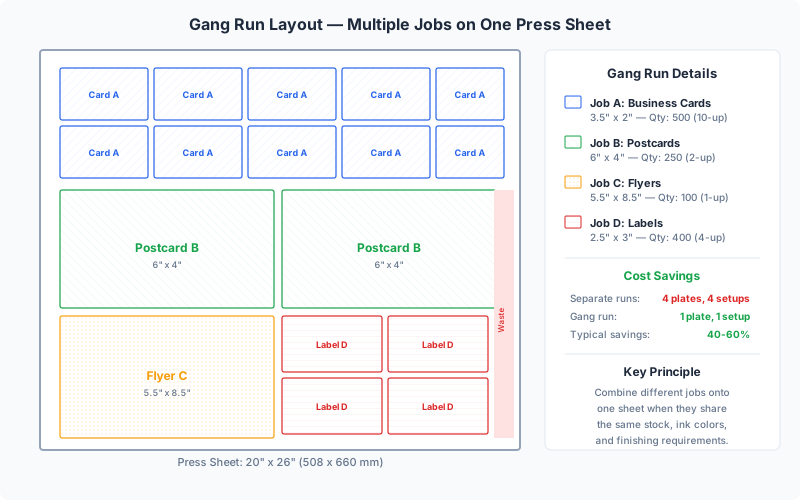
Gang run printing is foundational to how modern commercial print shops operate. It is used across offset lithography, digital presses, wide-format printers, and even screen printing. Virtually every online print ordering platform — from Vistaprint to GotPrint to 4over — uses gang run imposition behind the scenes to keep prices low. When you order 500 business cards online for a few dollars, your cards are being ganged up with dozens of other customers' orders on the same press sheet.
Understanding gang run imposition is valuable whether you are a print shop owner optimizing press utilization, a graphic designer preparing files for production, or a small business owner looking to minimize print costs. In this guide, we will cover the mechanics of gang runs, the different layout strategies, cost savings calculations, and how to set up gang run imposition using PDF Press — a browser-based imposition tool.
Why Combine Jobs on One Press Sheet?
Gang run printing exists because of a fundamental economic reality of commercial printing: setup costs dominate short-run economics. Every time a press starts a new job, there are fixed costs that apply regardless of how many copies you print — plate making, ink preparation, press makeready, color proofing, and cleanup. These setup costs can easily reach $200 to $500 per job on an offset press.
By ganging multiple jobs together, those setup costs are shared across all the jobs on the sheet. Here are the primary reasons printers and customers benefit from gang runs:
Dramatic Cost Reduction
The most obvious benefit. If setup costs are $300 and you gang 10 small jobs onto one sheet, each job's share of the setup cost drops from $300 to $30. For short-run jobs like business cards, postcards, and flyers, gang running can reduce per-unit costs by 60-80% compared to running each job independently.
Press Time Efficiency
A press that runs one 500-piece business card job uses the same sheet-processing time as a press printing a full gang sheet with 20 different business card designs. The mechanical time to feed sheets, apply ink, and deliver output is nearly identical. Gang running converts idle press capacity into productive output.
Paper Waste Reduction
Every press run has makeready waste — sheets used to get the press up to color and registration. Typical makeready waste is 50-200 sheets for offset. If each of 10 jobs produces 100 sheets of makeready waste independently, that is 1,000 wasted sheets total. Ganged together, the waste is just 100 sheets for all 10 jobs combined. The environmental benefit is significant: reducing print waste through gang running is one of the most effective sustainability strategies in the print industry.
Faster Turnaround for Customers
Because gang run printers batch jobs and run them on a regular schedule (often daily), your job might be printed within 24 hours of submission rather than waiting for an available press slot for a dedicated run. This batch processing model is what enables many online printers to offer 2-3 day turnaround at low prices.
Consistent Quality Across Jobs
When multiple jobs share a press sheet, they all receive the same ink coverage, pressure, and environmental conditions. This is particularly valuable when a client has several related pieces (business cards, letterhead, envelopes) that need to match in color — ganging them on the same sheet guarantees identical color reproduction.
Types of Gang Run Layouts
Not all gang runs are created equal. The way jobs are arranged on the press sheet affects cutting efficiency, waste, and compatibility between jobs. There are three primary gang layout strategies, each suited to different production scenarios.
Strip-Based (Shelf) Packing
The most common gang layout method, and the one used by most automated imposition software including PDF Press. In strip-based packing, the press sheet is divided into horizontal or vertical strips (shelves), and jobs are placed within each strip. The algorithm fills one strip completely, then moves to the next. This approach is computationally efficient and produces clean, straight cuts — a single horizontal or vertical cut separates entire strips, and then individual items are cut within each strip.
Strip packing works best when the ganged items are similar in at least one dimension. For example, if all items are 3.5 inches tall (business cards, rack cards, postcards), they align perfectly in horizontal strips regardless of their widths. The key advantage is guillotine compatibility — all cuts are straight lines from edge to edge, which is the only type of cut a standard guillotine paper cutter can make.
Nested (2D Bin Packing)
Nested packing treats the press sheet as a two-dimensional space and places items in any position and orientation that minimizes waste. This is mathematically optimal — it produces the tightest possible arrangement — but the cuts required to separate items may not be straight guillotine cuts. Nested layouts often require die-cutting or multiple manual cutting passes, which adds cost and time.
Nested packing is most valuable for irregularly shaped items (die-cut packaging, shaped stickers, custom tags) where the shapes can interlock to fill space that rectangular strip packing would waste. For standard rectangular print jobs, the improvement over strip packing is usually modest (5-10% better area utilization) and rarely justifies the more complex cutting requirements.
Manual Gang Layout
Experienced prepress operators sometimes create gang layouts by hand, particularly for complex jobs with specific requirements. Manual ganging allows the operator to consider factors that automated algorithms miss: grain direction preferences, color proximity (keeping similar colors together for easier ink management), folding requirements, and customer priority (placing rush jobs in positions that are cut first).
Manual layout is time-consuming and doesn't scale well, but for high-value jobs on expensive substrates (metallic papers, specialty stocks, wide-format media), the extra care of manual placement can save significant material cost.
Hybrid Approaches
Many production workflows use a combination: automated strip packing for the primary layout, with manual adjustments for edge cases. For example, an operator might let software pack 90% of the sheet, then manually place a few remaining items in gaps that the algorithm left unfilled. PDF Press's gang sheet tool uses automated strip-based packing with configurable parameters that let you guide the algorithm's decisions about margins, gutters, and item placement.
Calculating Paper Waste and Cost Savings
Understanding the economics of gang run printing requires calculating two key metrics: sheet utilization (how much of the press sheet is covered by useful output) and cost per unit (the total cost divided by the number of finished pieces).
Sheet Utilization Formula
Sheet utilization is the percentage of the press sheet area that contains printed content, accounting for gutters (gaps between items for cutting), margins (unprintable area around the sheet edges), and trim waste (excess paper after cutting).
The formula is straightforward:
Utilization % = (Total item area / Total sheet area) x 100
For example, consider ganging standard business cards (3.5" x 2") on a 12" x 18" press sheet with 0.125" gutters and 0.25" margins:
- Sheet area: 12" x 18" = 216 sq in
- Printable area (after margins): 11.5" x 17.5" = 201.25 sq in
- Cards per row: floor(11.5 / (3.5 + 0.125)) = 3 cards with 0.125" gutters
- Cards per column: floor(17.5 / (2 + 0.125)) = 8 cards
- Total cards per sheet: 3 x 8 = 24 cards
- Card area: 24 x 3.5 x 2 = 168 sq in
- Utilization: 168 / 216 = 77.8%
A utilization rate of 75-85% is typical for well-optimized gang runs with rectangular items. Below 65%, you should reconsider the sheet size or item arrangement. Above 85% is excellent and usually requires tight gutters and minimal margins.
Cost Savings Example
Consider a print shop running 10 separate business card orders, each for 500 cards:
| Factor | Individual Runs | Gang Run |
|---|---|---|
| Number of press runs | 10 | 1 |
| Setup cost per run | $250 | $250 |
| Total setup cost | $2,500 | $250 |
| Makeready waste (sheets) | 10 x 100 = 1,000 | 100 |
| Press sheets (production) | 10 x 25 = 250 | 210 |
| Total paper cost | $375 | $93 |
| Total cost | $2,875 | $343 |
| Cost per 500 cards | $287.50 | $34.30 |
This 88% cost reduction is not hypothetical — it is the actual reason why online print shops can offer 500 business cards for under $20. The math of gang running is that compelling. The same principle applies at every scale: postcards, flyers, stickers, hang tags, and any other item produced in quantity on flat sheets.
Work Styles for Gang Runs
When gang running double-sided (duplex) jobs, the work style determines how the front and back of the press sheet relate to each other. Choosing the correct work style is critical — the wrong choice means that fronts and backs won't align after cutting, ruining the entire run.
Sheetwise (Work-and-Back)
The most straightforward duplex method. One plate prints the front side of the sheet, a different plate prints the back side. The sheet is flipped end-over-end (tumbled on the long edge) between the first and second pass through the press. Each press sheet produces one set of finished pieces.
Sheetwise is the default for gang runs because it is the simplest to understand and verify. The front gang layout is designed first, and the back layout is created to match — each item's back must appear in the same position on the reverse side as its front appears on the obverse. PDF Press handles this alignment automatically.
Work-and-Turn
A more efficient method that uses a single printing plate containing both front and back content side by side. The sheet is printed on one side, then turned (flipped on the vertical axis, like turning a book page), and run through the press again with the same plate. The sheet is then cut in half, producing two identical sets of finished pieces from one sheet.
Work-and-turn effectively doubles your output per plate, cutting plate costs in half. The tradeoff is that both sides of every item must use the same ink colors (since they share a plate), and the layout must be carefully designed so that fronts and backs align after the turn. This work style is ideal when all ganged items use the same color scheme — for example, a set of business cards all printed in CMYK.
Work-and-Tumble
Similar to work-and-turn, but the sheet is tumbled (flipped on the horizontal axis, top-over-bottom) instead of turned. Like work-and-turn, it uses a single plate for both sides and produces two sets per sheet. The choice between turn and tumble depends on the press configuration and sheet dimensions — the flip axis must align with the gripper edge of the press.
Perfecting (Simultaneous Duplex)
On perfecting presses (presses with printing units on both sides), both sides of the sheet are printed in a single pass. This is the fastest method for duplex gang runs and eliminates flip-related registration errors. Most modern high-volume commercial presses are perfectors, making this the default work style for large gang run operations.
When setting up gang runs in PDF Press, you select the work style in the Gang Sheet tool options. The tool automatically calculates the correct back-side layout based on your selection, ensuring fronts and backs align perfectly after cutting.
Setting Up Margins, Gutters, and Cutting Marks
The physical parameters of a gang layout — margins, gutters, and cutting marks — directly affect both the quality of the finished pieces and the efficiency of the cutting process. Getting these right is essential for professional results.
Margins (Gripper and Non-Printable Areas)
Every press has a gripper edge — the leading edge of the sheet that the press grips to pull it through the printing mechanism. This area (typically 8-12mm / 0.3-0.5 inches) cannot be printed on. Additionally, most presses have a small non-printable margin on the trailing and side edges. Your gang layout must keep all content within these printable boundaries.
For offset presses, typical minimum margins are:
- Gripper edge: 10-12mm (0.4-0.5")
- Trailing edge: 5-8mm (0.2-0.3")
- Side edges: 3-5mm (0.12-0.2")
For digital presses, margins are usually smaller (3-5mm on all sides) and some digital presses can print borderless. Always confirm your press specifications before setting margins.
Gutters (Gaps Between Items)
Gutters are the spaces between adjacent items on the gang sheet. They serve two purposes: providing a clear visual boundary for cutting operators, and accommodating the width of the cutting blade (typically 1-2mm). Common gutter widths are:
- Minimum (tight): 2mm (0.08") — requires precision cutting equipment and experienced operators
- Standard: 3-4mm (0.12-0.16") — suitable for most guillotine cutting operations
- Comfortable: 6mm (0.25") — allows for slight cutting drift without affecting adjacent items
When items have bleed (content extending past the trim edge), gutters must be at least twice the bleed width. For standard 3mm bleed on both adjacent items, the gutter must be at least 6mm to prevent one item's bleed from overlapping another item's content area.
Cutting Marks (Crop Marks and Registration)
Cutting marks guide the finishing operator and ensure accurate trimming. For gang runs, the key mark types are:
- Crop marks: Short lines at each corner of every item, indicating the trim boundary
- Color bars: Small patches of process colors (CMYK) in the margin area, used to verify ink density during the press run
- Registration marks: Crosshair targets that help align front-and-back printing for duplex jobs
PDF Press's Gang Sheet tool includes automatic crop mark generation with configurable line length, thickness, and distance from the trim edge. You can also add color bars and registration marks using the dedicated Cutter Marks and Color Bar tools in the pipeline.
When to Use Gang Run Imposition
Gang running is not always the best approach. It works brilliantly under certain conditions but can introduce complications when those conditions aren't met. Here is a practical guide to when ganging makes sense — and when it doesn't.
Ideal Candidates for Gang Runs
- Short-run jobs: Orders of 100 to 5,000 pieces benefit most from gang running because the per-unit impact of shared setup costs is highest at low volumes
- Same substrate: All jobs on a gang sheet must print on the same paper stock. You cannot mix glossy and matte, or 80lb text and 100lb cover, on the same sheet
- Same ink specification: Jobs must use compatible ink sets. Four-color CMYK process jobs gang together perfectly. Jobs requiring Pantone spot colors can only be ganged with other jobs using the same spot colors
- Same finishing: If some jobs need UV coating and others don't, they cannot share a sheet (the coating is applied to the entire sheet). Similarly, jobs with different lamination, embossing, or foil requirements cannot be ganged
- Standard sizes: Business cards, postcards, flyers, rack cards, and other standard-size items pack efficiently because their dimensions are designed to tile on common press sheets
Common Products That Are Gang Run
Nearly all short-run commodity print products are produced via gang running:
- Business cards — the quintessential gang run product; 10-20 different designs per sheet
- Postcards — standard 4"x6" and 5"x7" sizes pack efficiently on press sheets
- Flyers — multiple customer flyers ganged on a single sheet, then cut to finished size
- Rack cards — the tall, narrow format (4"x9") tiles well in strip layouts
- Hang tags — small items with high per-sheet count, ideal for ganging
- Stickers and labels — especially on adhesive-backed stock, where press setup is expensive
- Bookmarks — narrow items that fill gaps in gang layouts alongside wider items
When NOT to Gang
- Large runs (10,000+): At high volumes, the dedicated press run becomes more economical because setup costs are amortized across many units, and gang layouts add cutting complexity
- Critical color matching: When a job requires extremely precise color (brand color matching to tight Delta-E tolerances), a dedicated run allows the press operator to optimize ink settings for that specific job without compromising other jobs on the sheet
- Special substrates: Jobs on unique papers (metallic, textured, translucent) rarely have enough compatible jobs to fill a gang sheet efficiently
- Rush jobs: Gang runs operate on a batch schedule. If your job needs to ship today, it may need a dedicated run rather than waiting for the next gang batch
- Variable data: Jobs with personalization (unique names, codes, addresses per piece) require digital printing and typically use different imposition strategies than traditional gang runs
How PDF Press's Gang Sheet Tool Works
PDF Press includes a dedicated Gang Sheet tool that automates the entire gang run imposition process. It uses a strip-based bin-packing algorithm optimized for guillotine-compatible cutting, producing gang layouts that are immediately ready for production. Here's how to use it step by step.
Step 1: Upload Your Files
Open PDF Press in your browser and upload one or more PDF files. Each file represents a different job or design in your gang run. For multi-page PDFs, PDF Press treats each page as a separate item. All processing happens locally in your browser — your files never leave your device.
Step 2: Add the Gang Sheet Tool
Select the Gang Sheet tool from the tool palette. This opens the gang configuration panel with all the parameters you need to control the layout.
Step 3: Set the Press Sheet Size
Choose your target press sheet size from the built-in presets (Letter, Tabloid, A3, A2, SRA3, or any custom size). The sheet size determines the available area for your gang layout. PDF Press can also auto-detect an appropriate sheet size based on the items you've uploaded.
Step 4: Configure Quantities
Set the number of copies needed for each item. The Gang Sheet tool tracks quantities per file and calculates how many press sheets are needed to fulfill all orders. Items with higher quantities receive more placement positions on the sheet.
Step 5: Set Margins and Gutters
Configure the gripper margin, side margins, and gutter width between items. Use the guidelines from the margins and gutters section above, or enter your press-specific values.
Step 6: Choose the Work Style
For double-sided jobs, select the appropriate work style: sheetwise, work-and-turn, work-and-tumble, or perfecting. PDF Press generates the correct back-side layout automatically based on your selection.
Step 7: Configure Bleeds
If your source files include bleed, tell PDF Press how to handle it: pull bleed from the document (uses any existing bleed in the PDF), set a fixed bleed amount, or specify no bleeds. Proper bleed handling ensures items can be trimmed cleanly without white edges.
Step 8: Preview and Adjust
PDF Press renders a real-time preview of the gang layout. Scroll through the output sheets to verify item placement, check that quantities are correct, and confirm that cutting marks are properly positioned. Adjust parameters and see changes immediately.
Step 9: Download
Download the imposed gang sheet PDF. The output includes crop marks, registration marks, and any other finishing guides you've enabled. The file is ready to send to press or load into your RIP software.
Industry Case Study: Online Print Shop Optimization
To illustrate the real-world impact of gang run imposition, consider the following case study based on a composite of common online print shop operations.
The Scenario
A mid-size online print shop receives approximately 200 business card orders per day, averaging 500 cards each. They also process around 80 postcard orders (250-1,000 cards each) and 50 flyer orders (100-500 pieces each) daily. Their press is a 4-color offset press with a 20" x 28" maximum sheet size.
Before Gang Running (Individual Runs)
Running each of the 330 daily orders as individual press runs would require:
- 330 plate changes per day (at ~15 minutes each = 82.5 hours of press time just for setup)
- 330 makeready cycles (at ~100 waste sheets each = 33,000 wasted sheets)
- Practical throughput: approximately 40-50 individual jobs per shift
- Required staffing: 3 press operators running 3 shifts to handle daily volume
After Gang Run Implementation
With gang imposition software, the same daily volume is reorganized:
- 200 business card orders are ganged onto approximately 12-15 press sheets (20+ orders per sheet)
- 80 postcard orders are ganged onto 8-12 sheets
- 50 flyer orders are ganged onto 10-15 sheets
- Total daily press sheets: 30-42 gang sheets (versus 330 individual runs)
- Total plate changes: 30-42 (at ~15 minutes each = 7.5-10.5 hours)
- Makeready waste: 3,000-4,200 sheets (versus 33,000)
- Required staffing: 1 press operator, 1 shift
The Results
| Metric | Individual Runs | Gang Runs | Improvement |
|---|---|---|---|
| Daily press sheets (setup) | 330 | ~35 | 89% reduction |
| Paper waste (makeready) | 33,000 sheets | 3,500 sheets | 89% reduction |
| Press time (setup + production) | ~90 hours | ~12 hours | 87% reduction |
| Cost per business card order | $45-65 | $8-15 | 75-80% reduction |
| Daily throughput capacity | ~150 orders/day | 500+ orders/day | 3x increase |
This transformation is not theoretical — it is the standard operating model for every competitive online print shop. The entire online printing industry is built on the economics of gang running. Without gang imposition, the pricing model that allows 500 business cards for under $20 simply would not be possible.
For small print shops or in-house print departments looking to achieve similar results, PDF Press provides the gang imposition capability that was previously available only through expensive prepress software. You can gang your jobs in the browser, preview the layout, and download production-ready sheets — making professional gang run imposition accessible to operations of any size.
Gang Running for Digital Printing
While gang run imposition originated in offset printing, it is equally valuable — and increasingly common — in digital printing environments. Digital presses have different economics than offset, but the core principle of maximizing sheet utilization still applies.
How Digital Gang Runs Differ
Digital presses have minimal or zero setup cost per job (no plates, no ink changes), which means the primary motivation for gang running shifts from setup cost savings to substrate efficiency and throughput optimization. Digital click charges are based on sheet size and coverage, so filling each sheet completely is the key to minimizing cost.
Digital gang runs also offer a unique advantage: variable data compatibility. Because each sheet can be different, a digital gang layout can include items with unique content (personalized business cards, serialized tickets) alongside standard items. This flexibility is impossible with offset gang runs, where every sheet in the run is identical.
Wide-Format Gang Runs
In wide-format (large-format) printing — used for signage, banners, vehicle wraps, and trade show graphics — gang running is critical because substrate costs are high. A roll of vinyl, banner material, or rigid board stock is expensive, and waste directly impacts profitability. Wide-format gang imposition software arranges multiple customer orders on the same material width, minimizing the linear footage consumed.
For wide-format applications, nested (2D) packing algorithms become more valuable because the items are often irregular sizes and the substrates are expensive enough to justify complex cutting paths. A single 4'x8' rigid board panel might contain signage for five different customers, each a different size, packed together with minimal gaps.
Print-on-Demand Gang Optimization
Print-on-demand services (for products like photo books, custom notebooks, personalized stationery) use sophisticated gang algorithms to batch similar-specification orders. Orders with the same paper stock, coating, and binding method are ganged together even though every piece has unique content. This is where gang sheet creation software really shines — automating the grouping and layout of hundreds of unique orders per day.
Quality Control for Gang Runs
Gang runs introduce quality control challenges that don't exist with dedicated single-job runs. When 20 different customers' work shares a press sheet, a quality issue affects everyone. Here are the key QC considerations for gang run production.
Preflight Every Job
Before ganging, every input file must pass preflight checks: correct color mode (CMYK for offset, RGB is acceptable for some digital presses), adequate resolution (300 DPI minimum for most commercial work), proper bleed (typically 3mm / 0.125"), and no RGB spot colors or missing fonts. A single problem file on a gang sheet can delay the entire batch.
Color Consistency Across the Sheet
On offset presses, ink coverage is controlled per ink zone (vertical strips across the sheet). If one area of the gang sheet has heavy cyan coverage and an adjacent area has light cyan, the press operator must compromise — potentially making one area too dark and another too light. Good gang layout software groups jobs with similar ink densities in the same ink zones when possible.
Registration Tolerance
Press registration (the alignment of front to back, and of each color plate to the others) is never perfect — typical tolerance is 0.1-0.2mm. In a gang layout, this tolerance applies to every item on the sheet. Items near the gripper edge tend to register better than items at the trailing edge. For jobs requiring tight registration (fine text reversing out of a solid color, for example), placement on the sheet matters.
Cutting Accuracy
The biggest quality variable in gang runs is cutting. A cutting operator must separate dozens of items per sheet, and every cut must be accurate. Sharp blade maintenance, proper back-gauge calibration, and consistent clamping pressure are essential. Well-designed gang layouts with clear crop marks and adequate gutters make cutting easier and more accurate.
Job Tracking
With 20+ jobs per sheet, tracking which pieces belong to which customer is critical. Many gang run operations include a small job number or barcode in each item's gutter area (removed during trimming) to aid sorting after cutting. Some shops also include a master map printed on the first sheet showing the location of each job on the gang layout.
Getting Started with Gang Run Imposition
Ready to start gang running your print jobs? Here's a practical roadmap for implementing gang run imposition, whether you're a print shop owner, a freelance designer, or a business printing in-house.
For Print Shops
- Analyze your job mix: Review one week of orders and identify jobs that share the same substrate, ink specification, and finishing. These are your gang candidates.
- Establish batching schedules: Decide how often you'll run gang sheets — daily is typical for high-volume shops, every 2-3 days for lower volumes. Shorter cycles mean faster turnaround but lower sheet utilization.
- Standardize specifications: The more you standardize (paper stocks, sizes, coatings), the more jobs you can gang together. Many online printers limit their product options specifically to maximize gang efficiency.
- Train your cutting team: Gang sheets require more skilled cutting than single-job sheets. Invest in training and maintain your cutting equipment meticulously.
For Designers and Small Businesses
- Consolidate your print orders: Instead of ordering business cards, postcards, and thank-you cards separately, prepare all your files and gang them onto a single sheet for printing.
- Design for standard sizes: Standard sizes (3.5"x2" business cards, 4"x6" postcards, 4"x9" rack cards) pack most efficiently on common press sheets.
- Include proper bleed: Every item in a gang layout needs its own bleed. Add 3mm (0.125") of bleed to every design before ganging.
- Use PDF Press: Upload your files, use the Gang Sheet tool to arrange them on your press sheet size, preview the layout, and download the production-ready PDF.
For In-House Print Departments
If your organization prints regularly on a digital press or high-end laser printer, gang running internal print jobs saves paper and toner. Gang different departments' business cards on one sheet, combine various flyer sizes, or batch label printing. Even at the desktop printer level, the principles of gang imposition apply — less waste, lower cost, faster production.
Gang run imposition is one of the most impactful optimizations in the printing industry. Whether you are processing thousands of orders per day or printing a few hundred business cards in-house, understanding and applying gang run principles will save you time, money, and materials. Try PDF Press's Gang Sheet tool to start optimizing your press sheets today.
Try it yourself
PDF Press runs entirely in your browser. Upload a PDF, pick a tool, and download the result — fast and private.
Open PDF Press22 Professional Imposition Tools
Every tool runs locally in your browser — fast, private, and professional-grade.
Frequently Asked Questions
Related Articles
Ready to try professional PDF imposition?
PDF Press is a browser-based imposition tool with 22 professional tools. No installation required.
Open PDF Press