How to Reduce Print Waste: Imposition, Gang Runs & Smart Layouts
Learn practical strategies to reduce print waste by 30-60% using imposition, gang run printing, nesting, and smart sheet layouts. Covers paper waste statistics, make-ready reduction, substrate optimization, calculating savings, and environmental impact.
The Scope of Print Waste: An Industry Under Pressure
The printing industry has a waste problem that is staggering in scale. Across commercial offset, digital, and wide-format operations worldwide, an estimated 30-35% of all paper purchased never reaches the end customer. It is trimmed away, discarded during makeready, spoiled by errors, or simply left as unused overruns. For an industry that consumes roughly 400 million metric tons of paper annually, that translates to more than 120 million metric tons of waste paper every year -- enough to fill over two million standard shipping containers.
The financial impact is equally sobering. Paper and substrate costs typically represent 30-45% of a commercial printer's operating expenses. When a third of that material is wasted, the cost bleeds directly into the bottom line. A mid-size commercial printer spending $500,000 per year on paper stock is effectively throwing away $150,000-$175,000 in raw materials. For large operations running multiple presses, waste costs can reach seven figures annually.
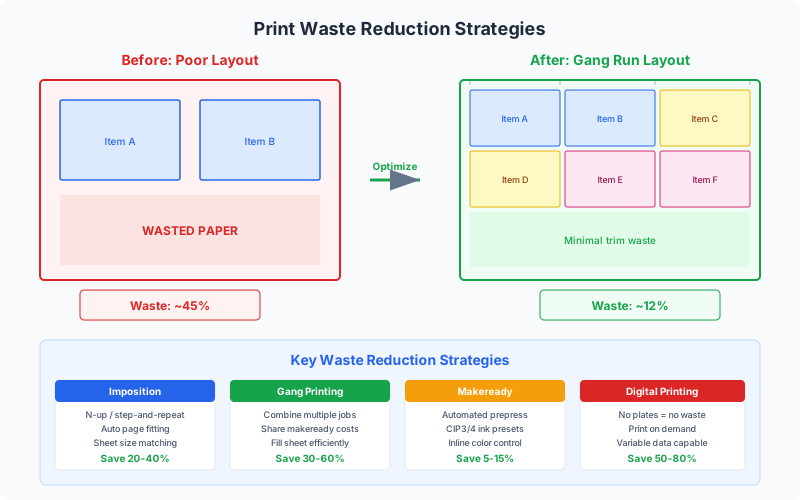
But waste in printing is not a single problem -- it is a cascade of interconnected inefficiencies that compound at every stage of production. Make-ready waste occurs during press setup as the operator brings the press up to color and registration. Running spoilage happens during the actual print run due to misfeeds, ink issues, and registration drift. Trim waste is the material cut away when items are separated from the press sheet. Overrun waste is the excess production built into every job to compensate for spoilage in downstream finishing (folding, binding, cutting).
The good news is that waste reduction in printing has progressed enormously over the past two decades, driven by better imposition software, automated makeready systems, digital printing technology, and a growing environmental awareness across the industry. A print shop that systematically applies the techniques in this guide can realistically reduce total waste from 30-35% down to 12-18% -- cutting material costs by more than half and significantly reducing their environmental footprint.
This guide covers every major strategy for reducing print waste, from the foundational techniques of imposition and gang running to advanced approaches like nesting, substrate optimization, and data-driven production planning. Whether you are a print shop owner looking to improve margins, a prepress operator optimizing layouts, or a print buyer seeking to minimize the environmental impact of your orders, these strategies will help you get more value from every sheet of paper that enters your facility.
How Imposition Reduces Waste: Optimal Page Arrangement
Imposition -- the process of arranging multiple pages or items on a single press sheet in the correct positions for printing, folding, and cutting -- is the single most powerful tool for reducing print waste. Proper imposition ensures that every square inch of the press sheet carries useful content, minimizing the trim waste that results from inefficient layouts.
Consider the simplest example: printing a standard 6"x9" book page. On a 25"x38" press sheet, naive placement might position a single page in the center, wasting 87% of the sheet area. Proper imposition arranges 8 pages (4 on each side for a 16-page signature) on the same sheet, using 76% of the available area. That single change -- from one page per sheet to eight -- reduces paper consumption by 87.5%.
The mathematics of imposition waste are straightforward but often underappreciated:
Sheet utilization = (N x item_width x item_height) / (sheet_width x sheet_height)
Where N is the number of items imposed on the sheet. The goal is to maximize N while maintaining adequate margins for gripper edges, gutters for cutting, and bleed allowances. Professional imposition software like PDF Press automates this optimization, testing multiple arrangements to find the configuration that yields the highest utilization.
Common imposition scenarios and their waste profiles:
| Product | Typical Imposition | Sheet Utilization | Trim Waste |
|---|---|---|---|
| Business cards (3.5"x2") | 10-up on Letter, 20-up on Tabloid | 75-82% | 18-25% |
| Postcards (6"x4") | 4-up on Letter, 8-up on Tabloid | 70-78% | 22-30% |
| Brochures (8.5"x11" folded) | 2-up on Tabloid, 4-up on 23"x29" | 80-88% | 12-20% |
| Book signatures (6"x9") | 16-page sig on 25"x38" | 72-80% | 20-28% |
| Stickers (various shapes) | Nested on sheet | 65-85% | 15-35% |
The key insight is that even a few percentage points of improved utilization compound dramatically over time. A print shop running 100 sheets per hour, 8 hours per day, 250 days per year processes 200,000 sheets annually. Improving utilization from 72% to 80% -- an 8-point gain -- saves the equivalent of 22,000 sheets per year. At $0.15 per sheet for standard coated stock, that is $3,300 in paper savings alone, before accounting for reduced ink consumption, shorter run times, and lower waste disposal costs.
Imposition is not just about fitting more items on a sheet. It also encompasses signature planning for bound products (arranging pages in the correct sequence for folding), work-and-turn layouts that print both sides of a duplex job from a single plate, and reader spreads vs. printer spreads conversion that ensures pages appear in the correct order after binding. Each of these techniques eliminates a category of waste that would otherwise require reprinting, re-plating, or manual correction.
Gang Printing for Waste Reduction
Gang run printing -- combining multiple different jobs on a single press sheet -- is the industrial-scale application of imposition for waste reduction. Where standard imposition optimizes a single job's layout, gang running optimizes across multiple jobs simultaneously, achieving utilization rates that no individual job could match on its own.
The waste reduction from gang running comes from three primary mechanisms:
1. Shared Make-Ready Waste
Every press run requires make-ready sheets -- paper consumed while the operator adjusts ink density, registration, and color balance. Typical make-ready waste is 50-200 sheets for offset and 10-30 sheets for digital presses. When 10 jobs are ganged onto one sheet, the make-ready waste is incurred once instead of ten times, reducing total make-ready waste by 90%.
The math is simple but powerful: 10 individual jobs x 100 make-ready sheets = 1,000 wasted sheets. One gang run x 100 make-ready sheets = 100 wasted sheets. That is a 900-sheet savings per gang batch, and a busy shop may run 10-20 gang batches per day.
2. Eliminated Idle Sheet Area
Small jobs rarely fill an entire press sheet efficiently. A single business card order might use only 15% of a Tabloid-size press sheet (the remaining 85% is cut away as trim waste). By ganging multiple small jobs together, the combined items fill 75-85% of the sheet, converting what would have been 85% waste into productive output.
3. Reduced Running Spoilage Allowance
Printers add a spoilage allowance to every job -- extra sheets beyond the ordered quantity to compensate for sheets lost during printing, cutting, folding, and binding. Industry standard spoilage allowances are 3-8% for offset and 1-3% for digital. When jobs are ganged, the spoilage allowance applies to the gang sheet rather than to each individual job, and the percentage can often be reduced because the larger total quantity provides more statistical buffer.
Real-world gang run waste savings:
A commercial print shop processing 150 short-run business card orders per day can compare two approaches:
- Individual runs: 150 press setups, ~15,000 make-ready sheets, ~150 production sheets = 15,150 total sheets consumed (only 150 are productive output)
- Gang runs: 8 gang sheets, ~800 make-ready sheets, ~8 production sheets = 808 total sheets consumed (all 8 are productive output, containing all 150 orders)
The gang run approach consumes 95% fewer total sheets to produce the same output. While this is an extreme example (business cards are the ideal gang run product), the principle scales across every product category where multiple short-run jobs share the same specifications.
PDF Press's Gang Sheet tool automates this entire process. Upload multiple PDFs, configure the press sheet size and margins, and the tool's strip-based bin-packing algorithm arranges all items for maximum sheet utilization. The preview updates in real time as you adjust parameters, so you can see exactly how changes to margins, gutters, or sheet size affect waste.
Digital vs. Offset Waste: A Detailed Comparison
The waste profiles of digital and offset printing are fundamentally different, and understanding these differences is essential for choosing the right production method for waste-sensitive projects.
Offset Printing Waste Sources
Offset lithography is inherently a high-setup, low-marginal-cost process. The major waste sources are:
- Plate waste: Each plate (one per ink color per side) requires aluminum or polyester, chemicals for processing, and water/solvent for cleaning. A typical 4-color duplex job uses 8 plates. Plates are not reusable.
- Make-ready waste: 100-500 sheets per job depending on press size and complexity. Large format presses (40" and above) waste more because they require more precise adjustment.
- Running spoilage: 2-5% of the total run, higher for jobs with tight registration requirements (multi-color halftones, fine line work, close register).
- Ink waste: Ink remaining in the fountain, on the rollers, and on the plates after the run. The press must be washed between jobs if ink colors change. Wash-up solvent generates additional chemical waste.
- Trim waste: Varies by imposition layout, typically 15-30% of sheet area.
Digital Printing Waste Sources
Digital presses (toner-based and inkjet) eliminate several offset waste categories entirely:
- No plate waste: Digital presses image directly to the substrate, eliminating plates entirely.
- Minimal make-ready: Digital presses require only 5-20 calibration sheets per job (vs. 100-500 for offset). Some modern digital presses achieve accurate color within 2-3 sheets.
- Near-zero running spoilage: Digital output is consistent from the first sheet to the last, with no drift in ink density or registration. Spoilage rates of 0.5-1% are typical.
- No ink wash-up: Digital presses do not require cleaning between jobs (toner cartridges are sealed systems; inkjet heads are self-maintaining).
- Trim waste remains: The same imposition layouts produce the same trim waste regardless of print technology.
Comparative waste breakdown for a typical 500-piece business card order:
| Waste Category | Offset (individual run) | Digital (individual run) | Digital (ganged) |
|---|---|---|---|
| Make-ready sheets | 150 | 10 | 10 |
| Running spoilage | 3% (8 sheets) | 1% (1 sheet) | 1% (1 sheet) |
| Trim waste per sheet | 22% | 22% | 18% |
| Plate/consumable waste | 4 plates + chemistry | None | None |
| Total sheets consumed | ~183 | ~36 | ~11 |
| Sheets reaching customer | 25 | 25 | 25 |
| Overall waste rate | 86% | 31% | ~8% (ganged with other orders) |
The table tells a clear story: digital printing with gang imposition achieves the lowest waste rate by far. Offset printing remains economically superior for long runs (10,000+ impressions) where make-ready costs are amortized across many sheets, but for short-run work, digital plus ganging is both cheaper and dramatically less wasteful.
The crossover point -- where offset becomes more economical than digital -- has been steadily rising as digital press technology improves. In 2010, the crossover was around 1,000-2,000 impressions. By 2026, many digital presses are cost-competitive with offset up to 5,000-8,000 impressions, meaning that digital (with its inherently lower waste) is the better choice for an ever-larger share of print production.
Reducing Make-Ready Waste
Make-ready -- the process of setting up a press for a new job -- is historically the largest single source of waste in offset printing. Every sheet consumed during make-ready is pure waste: it carries ink but never reaches a customer. Reducing make-ready waste requires addressing both the number of make-ready events (how often the press is set up for a new job) and the severity of each event (how many sheets are consumed per setup).
Strategies to Reduce Make-Ready Frequency
The most effective way to reduce make-ready waste is to reduce the number of make-readies. Every technique that combines multiple jobs into fewer press runs directly reduces the total make-ready sheet count:
- Gang running: Combines 5-30 short-run jobs onto one press sheet, replacing 5-30 individual make-readies with a single one. As discussed in the gang run guide, this alone can reduce make-ready waste by 80-95% for shops processing many small jobs.
- Job scheduling and batching: Grouping jobs by paper stock, ink specification, and finishing method minimizes the number of press configuration changes. Running all jobs on 100lb gloss cover back-to-back avoids the make-ready waste of switching between paper stocks.
- Work-and-turn layouts: For duplex jobs, work-and-turn imposition prints both sides using a single plate, halving the number of plate changes and make-readies. The sheet is printed on one side, turned, and run through the press again with the same plate.
- Standardized press configurations: Shops that standardize on a limited set of paper stocks, sheet sizes, and ink configurations spend less time (and waste fewer sheets) on each make-ready because the press is already close to the required settings from the previous job.
Strategies to Reduce Sheets Per Make-Ready
When a make-ready event is unavoidable, the goal shifts to minimizing the number of sheets consumed to achieve production-quality output:
- Automated color control: Modern offset presses with spectrophotometric color measurement systems (like Heidelberg Prinect, Komori KHS-AI, or manroland QuickChange) can achieve target color in 20-40 sheets instead of the 100-200 sheets required for manual color matching. The investment in automated color control typically pays for itself within 6-12 months through paper savings alone.
- Preset management: Saving and recalling press presets for repeat jobs (ink zone settings, impression pressure, registration offsets) dramatically reduces the adjustment needed for returning jobs. A job that required 200 make-ready sheets the first time might need only 30-50 on subsequent runs.
- Plate-to-press registration: Automated plate loading systems (like Heidelberg AutoPlate) position plates with micron-level accuracy, eliminating the manual registration adjustment that consumes the most make-ready sheets.
- Closed-loop feedback: Systems that measure the first few printed sheets and automatically adjust ink zones, registration, and dampening reduce the iterative trial-and-error that drives make-ready waste. Each iteration that the system handles automatically saves 10-20 sheets of manual adjustment.
The combined impact is substantial. A shop that implements gang running (reducing make-ready events by 80%) and automated color control (reducing sheets per event by 60%) can achieve a 92% total reduction in make-ready waste. For a shop that previously consumed 20,000 make-ready sheets per month, that drops to about 1,600 -- saving 18,400 sheets and approximately $2,760 per month in paper costs alone (at $0.15/sheet).
Choosing Optimal Sheet Sizes for Minimum Waste
The relationship between sheet size and waste is one of the most underappreciated factors in print production. Many print shops default to one or two standard sheet sizes for all jobs, leaving significant waste on the table. Systematic sheet size optimization can reduce trim waste by 10-20% without any change to press hardware or workflow.
The Sheet Size Selection Problem
The goal is to find the sheet size that maximizes the number of finished items per sheet (the "out" count) while minimizing the leftover trim area. This is a discrete optimization problem: items fit on sheets in whole numbers, so the relationship between sheet size and utilization is not smooth but jumps at specific size thresholds.
For example, consider a 4"x6" postcard with 0.125" bleed (effective size 4.25"x6.25" including bleed) and 0.25" margins on all sides:
- Letter (8.5"x11"): Fits 1 across x 1 down = 1 item. Utilization: 24.3% (terrible)
- Tabloid (11"x17"): Fits 2 across x 2 down = 4 items. Utilization: 56.9%
- 12"x18": Fits 2 across x 2 down = 4 items. Utilization: 49.1% (larger sheet, same count as Tabloid)
- 13"x19": Fits 2 across x 3 down = 6 items. Utilization: 64.5%
- 17.5"x22.5": Fits 3 across x 3 down = 9 items. Utilization: 60.7%
- 19"x25": Fits 3 across x 4 down = 12 items. Utilization: 67.0%
- 23"x29": Fits 4 across x 4 down = 16 items. Utilization: 63.3%
- 25"x38": Fits 4 across x 6 down = 24 items. Utilization: 66.5%
Notice that bigger is not always better. The 12"x18" sheet is larger than Tabloid but fits the same number of postcards, producing worse utilization. The optimal choice depends on the specific item dimensions, and it often falls on non-obvious sheet sizes.
Strategies for Sheet Size Optimization
- Calculate utilization for all available stock sizes. Most paper merchants offer sheets in 5-10 standard sizes. Run the calculation for each and pick the highest utilization. The 5 minutes this takes can save thousands of dollars per year.
- Consider both orientations. Items and sheets can be rotated 90 degrees. A 4"x6" card might fit better on a sheet in landscape than portrait orientation. Always test both.
- Explore custom cut sizes. Paper merchants will cut parent sheets to custom sizes for a modest fee (or free above certain quantities). If the optimal sheet size for your most common product is 14"x20", ordering custom-cut stock may be cheaper than the trim waste from standard 12"x18" or 17.5"x22.5" sheets.
- Match sheet sizes to product families. If you frequently print business cards (3.5"x2"), postcards (4"x6"), and rack cards (4"x9"), find a sheet size that works well for all three. A 13"x19" sheet accommodates all three products with reasonable utilization, simplifying inventory while maintaining efficiency.
- Account for press constraints. The sheet size must fit your press (within the minimum and maximum sheet dimensions), and the gripper edge must be accommodated. A theoretically optimal sheet size that your press cannot handle is useless.
PDF Press can help with this analysis. Upload your artwork, select different paper sizes from the built-in presets (or enter custom dimensions), and the preview instantly shows how many items fit and how much of the sheet is utilized. Compare configurations side by side to find the optimal balance of utilization and production practicality.
Nesting and Substrate Optimization for Irregular Shapes
Standard grid-based imposition works well for rectangular items, but many print products are not rectangular. Stickers, die-cut packaging, shaped labels, custom tags, and contour-cut graphics all have irregular outlines that leave significant gaps when arranged in a grid. Nesting -- also called 2D bin packing -- solves this by fitting items together like puzzle pieces, filling the gaps that grid layouts waste.
How Nesting Works
Nesting algorithms analyze the contour of each item (not just its bounding rectangle) and find arrangements where items interlock to minimize total consumed area. For example, a triangular hang tag and an arrow-shaped sticker might fit together with their concave and convex edges interlocking, using 30-40% less material than placing them in separate rectangular cells.
The savings from nesting over grid layouts depend on how irregular the item shapes are:
- Rectangles: 0-3% improvement (nesting offers little advantage over a grid for rectangles)
- Simple irregular shapes (rounded corners, mild curves): 5-12% improvement
- Complex irregular shapes (stickers with concave regions, die-cut packaging): 15-30% improvement
- Mixed shapes of different sizes: 20-40% improvement (small items fill gaps between large items)
Nesting for Wide-Format and Specialty Substrates
Nesting is particularly valuable for wide-format printing on expensive substrates. Consider these material costs:
- Standard paper: $0.05-0.20 per square foot
- Adhesive vinyl: $0.50-1.50 per square foot
- Rigid PVC/acrylic: $2-8 per square foot
- Specialty metallic/holographic: $3-12 per square foot
At these prices, every percentage point of waste matters. Nesting 50 custom-shaped stickers on a 24"x48" sheet of premium vinyl at $1.50/sq ft, with nesting improving utilization from 65% to 82%, saves $1.36 per sheet. Run 500 sheets and the savings reach $680 -- from a single imposition optimization on a single product.
Rotation and Mirroring in Nesting
Nesting algorithms achieve their best results when items can be rotated to any angle (or at least in 90-degree increments) and optionally mirrored. Rotation allows items to fit together in arrangements that are impossible with fixed orientation. However, some products cannot be rotated (items with grain direction requirements, or designs with directional text that must read horizontally), and mirroring may not be appropriate for asymmetric designs.
PDF Press's Stickers/Nest tool implements automated nesting with configurable rotation options (none, 90-degree increments, or free rotation), padding between items, and automatic sheet tiling. Upload your artwork, set the substrate dimensions, and the nesting algorithm arranges items for maximum material efficiency. The tool handles both single-design repeat nesting (many copies of one item) and multi-design mixed nesting (different items on the same sheet).
Substrate Optimization Beyond Nesting
Beyond nesting, substrate optimization includes several additional strategies:
- Roll optimization for wide-format: When printing on roll-fed media, optimizing the sequence and arrangement of items along the roll minimizes wasted linear footage. Items are ordered by width to minimize the number of cross-cuts.
- Board optimization for rigid substrates: Rigid materials (foam board, corrugated, acrylic) come in fixed panel sizes. Fitting items on panels to minimize the number of panels consumed is a classic cutting stock problem that nesting algorithms handle well.
- Grain direction consideration: For paper products that will be folded, the fold should run parallel to the paper grain. This constraint limits rotation options but prevents cracking and poor fold quality. Good imposition software lets you specify grain direction as a constraint.
PDF Press's Tools for Waste Reduction
PDF Press provides a comprehensive toolkit for minimizing print waste across every production scenario. Unlike traditional desktop prepress software, PDF Press runs entirely in your browser -- upload your files, configure the layout, and download production-ready output. No installation, no subscription required for basic use. Here are the specific tools that target waste reduction.
Gang Sheet Tool
The Gang Sheet tool arranges multiple different print jobs on a single press sheet using a strip-based bin-packing algorithm optimized for guillotine cutting. Upload multiple PDFs (each representing a different job or design), set quantities per item, configure your press sheet size and margins, and the tool calculates the optimal arrangement. Real-time preview shows utilization percentage, number of output sheets, and cutting guides. Work styles (sheetwise, work-and-turn, work-and-tumble, perfecting) handle double-sided jobs with automatic front-to-back alignment.
Stickers/Nest Tool
The Stickers/Nest tool implements 2D nesting for irregular-shaped items. It analyzes the actual contour of each item (not just the bounding box) and arranges them to minimize substrate consumption. Configure rotation options, padding between items, and the substrate dimensions. The tool is particularly valuable for sticker sheets, die-cut labels, and wide-format signage where material costs are high.
Grid and N-up Tools
For simpler imposition needs -- multiple copies of the same item on a sheet -- the Grid tool provides step-and-repeat layouts with configurable columns, rows, gutters, and margins. The N-up Book tool handles signature-based imposition for booklets and perfect-bound publications, automatically calculating page ordering, creep compensation, and signature nesting. Both tools include paper size selection with common presets and custom dimensions.
Crop and Resize Tools
Waste often originates from poorly sized source files. The Crop and Resize tools let you adjust source page dimensions before imposition, ensuring items fit the target sheet size as efficiently as possible. Cropping away excess whitespace or unnecessary margins in the source file can increase the number of items that fit on each sheet.
Cutter Marks and Color Bar Tools
Accurate cutting marks reduce post-press waste by ensuring clean, precise cuts. PDF Press generates crop marks, registration marks, and color bars with configurable line weight, length, and offset from the trim edge. Clear marks mean fewer mis-cuts, fewer ruined sheets, and less need for overrun allowances.
Pipeline Architecture
PDF Press's pipeline architecture lets you chain multiple tools together. A typical waste-optimized workflow might be: Crop (remove source whitespace) → Gang Sheet (arrange on press sheet) → Cutter Marks (add cutting guides) → Color Bar (add quality control strips). Each step in the pipeline processes the output of the previous step, and changes to any parameter update the preview in real time.
Calculating Your Waste Savings: A Practical Framework
To justify investment in waste reduction (whether in software, equipment, or process changes), you need to quantify the savings. Here is a practical framework for calculating the financial impact of waste reduction in your specific operation.
Step 1: Establish Your Baseline
Track your current waste for one month across all waste categories:
- Make-ready waste: Count the sheets consumed per setup. Log this for every job.
- Running spoilage: Compare sheets fed vs. good sheets delivered for each job.
- Trim waste: Weigh trim waste from the cutter over a week and extrapolate. Compare to total paper consumed.
- Overrun waste: Track how many finished pieces exceed the customer's order. These are either warehoused (costing storage) or recycled.
Step 2: Calculate Current Waste Cost
The total waste cost has three components:
Waste cost = Material cost + Production cost + Disposal cost
- Material cost: Weight of waste paper x price per pound (or sheets wasted x cost per sheet). Include ink and toner consumed on wasted sheets.
- Production cost: Press time spent printing waste sheets x hourly press rate. Make-ready time is typically billed at $150-300/hour for offset.
- Disposal cost: Weight of waste x disposal rate. Paper recycling may offset some cost, but handling and transportation still have a price.
Step 3: Model the Improvement
Apply the expected waste reduction percentages for each technique you plan to implement:
| Technique | Waste Category Affected | Typical Reduction |
|---|---|---|
| Gang running | Make-ready, running spoilage | 70-90% |
| Optimized imposition | Trim waste | 10-25% |
| Sheet size optimization | Trim waste | 5-15% |
| Nesting (irregular items) | Trim/substrate waste | 15-30% |
| Automated color control | Make-ready sheets per event | 50-70% |
| Job batching/scheduling | Make-ready frequency | 20-40% |
| Tighter spoilage allowances | Overrun waste | 15-30% |
Step 4: Project Annual Savings
Annual savings = (Current monthly waste cost - Projected monthly waste cost) x 12
For a concrete example: a shop spending $8,000/month on paper with a 32% total waste rate ($2,560/month in wasted paper) that implements gang running and optimized imposition, reducing waste to 15%, would save:
($2,560 - $1,200) x 12 = $16,320 per year
This does not include the additional savings from reduced ink/toner consumption (typically 60-70% of the paper savings ratio), lower disposal costs, and freed-up press time that can be used for revenue-generating production. The true annual impact for this example is likely $22,000-$25,000.
Environmental Impact of Print Waste Reduction
The environmental case for reducing print waste extends far beyond the obvious fact that less waste means fewer trees harvested. The full environmental footprint of paper production includes water consumption, energy use, chemical processing, transportation, and end-of-life disposal -- every one of which decreases when waste is reduced.
The Carbon Footprint of Paper Waste
Paper production is energy-intensive. Manufacturing one metric ton of virgin coated paper requires approximately 10,000-17,000 kWh of energy and produces 1.5-2.5 metric tons of CO2 equivalent emissions. When a print shop wastes 30% of its paper, it is responsible for the carbon emissions of producing that wasted paper, plus the additional emissions from transporting it to the shop and eventually to a recycling or waste facility.
For a shop consuming 50 metric tons of paper per year with a 30% waste rate, the carbon footprint of waste alone is:
50 tons x 30% waste x 2.0 tons CO2/ton paper = 30 metric tons of CO2
Reducing waste from 30% to 15% eliminates 15 metric tons of CO2 annually -- equivalent to taking 3.3 passenger cars off the road or the annual electricity consumption of 2.6 average US homes.
Water Consumption
Paper manufacturing is one of the most water-intensive industrial processes. Producing one ton of paper requires 10,000-20,000 gallons of water. The 15 metric tons of wasted paper in our example represent 150,000-300,000 gallons of embedded water that was consumed for no productive purpose. Cutting that waste in half saves 75,000-150,000 gallons of water annually.
Forest Resources
While modern paper production increasingly uses sustainably managed forests and recycled fiber, the demand for virgin pulp remains significant. Each ton of paper requires approximately 2-3 tons of wood (depending on the grade and recycled content). Reducing a shop's waste by 15 tons saves 30-45 tons of wood demand, preserving the equivalent of roughly 200-300 mature trees per year.
Chemical and Solid Waste
Paper production uses bleaching agents, sizing chemicals, coating minerals (kaolin, calcium carbonate), and dyes. The waste stream from papermaking includes black liquor (a byproduct of the pulping process), wastewater with chemical residues, and solid waste sludge. Less paper consumed means less of every chemical in the production chain.
Certifications and Customer Expectations
Environmental performance is increasingly a business requirement, not just a moral consideration. Corporate customers evaluating print suppliers often ask about waste rates, FSC/PEFC certification, carbon footprint per printed piece, and recycling programs. A shop that can demonstrate a 15% total waste rate (vs. the industry average of 30-35%) has a compelling competitive advantage in procurement decisions.
Many print shops are now pursuing ISO 14001 (Environmental Management Systems) and FSC Chain of Custody certification, both of which require documented waste reduction programs. The techniques described in this guide -- imposition optimization, gang running, nesting, and sheet size optimization -- provide the measurable, auditable waste reductions that these certifications demand.
The Circular Economy Perspective
Even with recycling, not all paper waste is recovered. Contaminated paper (ink-heavy sheets, coated stocks with plastic lamination, adhesive-backed materials) may not be recyclable, ending up in landfill. The most environmentally effective strategy is waste prevention -- using less paper in the first place -- rather than relying on end-of-life recycling to mitigate the impact. Imposition and layout optimization are the primary tools for waste prevention in print production.
Implementation Roadmap: From 30% Waste to 15%
Reducing print waste is not a one-time project but an ongoing optimization process. Here is a phased roadmap for systematically reducing waste from the industry-average 30-35% to a target of 12-18%, based on the techniques covered in this guide.
Phase 1: Quick Wins (Weeks 1-4)
Start with the changes that require no capital investment and can be implemented immediately:
- Audit your current waste. Track make-ready sheets, running spoilage, and trim waste for 2-4 weeks. Establish your baseline waste rate. You cannot improve what you do not measure.
- Review imposition layouts. For your top 10 most frequently produced items, verify that the current imposition yields the highest possible sheet utilization. Use PDF Press to test alternative layouts and sheet sizes. Even a 5% utilization improvement on your most-run products produces meaningful annual savings.
- Implement gang running for short runs. Identify jobs that can be ganged (same stock, same ink, same finishing) and batch them. Start with business cards and postcards -- the easiest products to gang -- and expand from there.
- Tighten overrun allowances. Review your standard spoilage allowances and compare them to actual spoilage data. If you are building in 8% spoilage but actual spoilage is 3%, you are producing 5% more pieces than needed on every job.
Phase 2: Process Optimization (Months 2-3)
With quick wins captured, focus on systematic process improvements:
- Standardize paper stocks and sheet sizes. Reduce the number of paper stocks you carry to the minimum that serves your customer base. Fewer stocks means more jobs can be ganged together, and inventory management becomes simpler.
- Implement job scheduling by specification. Organize production schedules so that jobs with the same paper, ink, and finishing requirements run consecutively, minimizing the wash-ups and make-ready events between dissimilar jobs.
- Create imposition templates. Build a library of optimized imposition templates for your standard products. Instead of creating a new layout for every job, operators select the appropriate template and drop in the artwork. This ensures consistent best-practice layouts and eliminates the variation that comes from ad-hoc imposition.
- Train operators on waste awareness. Make waste data visible on the shop floor. When press operators see their make-ready sheet count compared to the target and the shop average, competitive motivation drives improvement. Many shops see a 15-20% reduction in make-ready waste simply from making the data visible.
Phase 3: Technology Investment (Months 4-12)
With processes optimized, evaluate technology investments that yield further waste reduction:
- Automated color control. Spectrophotometric measurement and closed-loop color adjustment (Heidelberg Prinect Inpress, Komori KHS-AI, etc.) reduces make-ready sheets by 50-70%.
- Digital printing for short runs. If a significant portion of your work is under 2,000 impressions, a digital press eliminates plates, reduces make-ready to near zero, and enables cost-effective gang running of small jobs.
- Advanced nesting software. For operations that produce die-cut, contour-cut, or irregularly shaped items, nesting software that optimizes layout based on actual item contours (not bounding rectangles) can improve substrate utilization by 15-30%.
Phase 4: Continuous Improvement (Ongoing)
Waste reduction is an ongoing discipline, not a project with a finish line. Track your waste metrics monthly, celebrate improvements, investigate regressions, and continuously test new layout configurations as your product mix evolves. The shops with the lowest waste rates are the ones that treat waste as a KPI (Key Performance Indicator) and review it as rigorously as they review revenue and on-time delivery.
Start today by uploading your most common print file to PDF Press and experimenting with different imposition configurations. You may be surprised by how much paper -- and money -- a smarter layout can save.
Try it yourself
PDF Press runs entirely in your browser. Upload a PDF, pick a tool, and download the result — fast and private.
Open PDF Press22 Professional Imposition Tools
Every tool runs locally in your browser — fast, private, and professional-grade.
Frequently Asked Questions
Related Articles
Ready to try professional PDF imposition?
PDF Press is a browser-based imposition tool with 22 professional tools. No installation required.
Open PDF Press