Work and Turn vs Work and Tumble: Sheet-Turning Methods for Offset Printing
Understand the differences between work and turn, work and tumble, and sheetwise printing. Learn when to use each method, how they affect imposition, registration, and cost, and how PDF Press sets up each layout automatically.
Why Sheet-Turning Methods Matter in Offset Printing
In commercial offset printing, how you turn the sheet between the first and second pass through the press determines how frontside and backside images align, how many plates you need, and ultimately how much the job costs. These sheet-turning methods — work and turn, work and tumble, and sheetwise — are fundamental concepts that every prepress operator, print buyer, and graphic designer working with offset presses should understand.
The choice between these methods has a direct, measurable impact on three things: plate cost (one plate vs. two per color), registration accuracy (how precisely the front and back line up), and paper waste (how much stock goes unused). On a 10,000-sheet run with four-color process, choosing work and turn over sheetwise can save four plates and cut makeready time in half — savings that add up quickly across multiple jobs.
Yet these methods are among the most commonly confused topics in print production. The names sound similar, the visual difference is subtle, and incorrect setup produces sheets that are impossible to trim into correct finished pieces. Getting the imposition wrong for the turning method means every sheet in the run is scrap.
In this guide, we will explain each method in detail, compare them with clear visual descriptions, discuss when to use each one, cover the cost and quality implications, and show how PDF Press handles all three work styles automatically in its Gang Sheet and Grid imposition tools.
What Is Work and Turn?
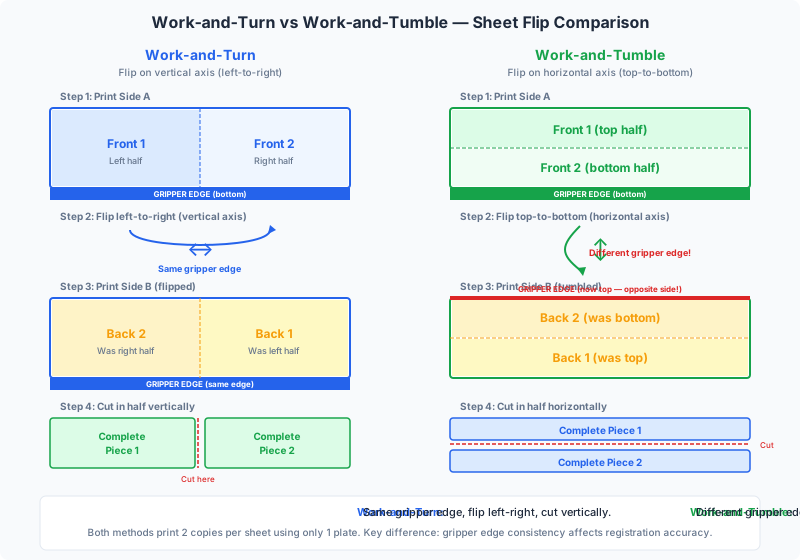
Work and turn is a sheet-turning method where both sides of the final piece are printed on the same plate, and the sheet is flipped along its vertical axis (left to right) between the first and second pass. Critically, the gripper edge remains the same for both passes — the same edge of the sheet feeds into the press each time.
Step-by-step process:
- Layout: The sheet is divided in half. The front image of the final piece is placed on one half, and the back image is placed on the other half. Both images are arranged on a single plate so that when the sheet is turned, they will align perfectly as front and back.
- First pass: The entire sheet is printed in a single pass. One half receives the front image, and the other half receives the back image.
- Turn the sheet: The sheet is flipped left to right (like turning the page of a book). The gripper edge — the leading edge that the press grips to feed the sheet — stays at the same position. The left side of the sheet is now on the right, and vice versa.
- Second pass: The same plate prints the sheet again. Because the sheet has been flipped horizontally, the half that previously received the front image now receives the back image, and vice versa. Both halves of the sheet now have front and back printing.
- Cut: The sheet is cut in half, yielding two identical finished pieces, each printed on both sides.
The key advantage: Because both sides are on one plate, you need only one plate per color instead of two. For a four-color (CMYK) job, that means 4 plates instead of 8 — a 50% reduction in plate costs. For short-run work where plates represent a significant portion of the total cost, this saving is substantial.
Why the gripper edge matters: The gripper edge is the reference edge that the press uses to position the sheet consistently. In work and turn, because the same gripper edge feeds into the press on both passes, front-to-back registration is excellent. The press holds the sheet at the same reference point each time, minimizing the chance of misalignment. This is a significant quality advantage over work and tumble, where the gripper edge changes. For a deeper explanation of gripper mechanics, see our guide on gripper edge in printing.
Common uses for work and turn:
- Business cards (multiple-up on a sheet)
- Postcards and greeting cards
- Flyers and sell sheets
- Rack cards and hang tags
- Any small, two-sided piece where the finished size is half the press sheet or smaller
What Is Work and Tumble?
Work and tumble (sometimes called work and flop) is a sheet-turning method where, like work and turn, both sides of the final piece are printed from the same plate. The difference is in how the sheet is flipped: in work and tumble, the sheet is flipped along its horizontal axis (top to bottom), which means the gripper edge changes between the first and second pass.
Step-by-step process:
- Layout: The sheet is divided in half (usually top and bottom). The front image is placed on one half and the back image on the other, arranged so that flipping top-to-bottom will produce correct front-and-back alignment.
- First pass: The entire sheet is printed. One half gets the front image; the other half gets the back image.
- Tumble the sheet: The sheet is flipped top to bottom — the leading edge (gripper edge) is now the trailing edge, and the trailing edge becomes the new gripper edge. Think of flipping a sheet of paper away from you, rotating it around the horizontal center line.
- Second pass: The same plate prints the sheet again. Because the sheet has been tumbled, each half now receives the opposite image, completing the two-sided printing.
- Cut: The sheet is cut in half, yielding two identical finished pieces with front and back printing.
The critical difference from work and turn: When you tumble the sheet, the gripper edge changes. The edge that was gripped on the first pass is now the trailing edge on the second pass, and the press grips a different edge. This introduces a potential source of registration error because the two reference edges may not be perfectly parallel or identically positioned. If the sheet was cut slightly out of square, or if the opposite edge is not perfectly straight, the second-pass image will shift relative to the first-pass image.
When work and tumble makes sense:
- When the sheet is wider than it is tall (landscape orientation) and a horizontal split produces better paper utilization than a vertical split
- When press size constraints mean the sheet cannot be turned left-to-right because the resulting dimension would exceed the maximum press width
- When the design is non-critical for tight registration — for example, solid-color backgrounds or large text where a half-point shift is invisible
- When the finished piece orientation makes a top-bottom split more natural than a left-right split
Registration consideration: Because the gripper edge changes, work and tumble inherently has slightly less precise front-to-back registration than work and turn. On a well-maintained press with accurately cut stock, the difference is negligible — perhaps 0.1-0.2mm. On older equipment or with poorly trimmed paper, the difference can be 0.5mm or more, which is visible on tightly registered work like multi-color fine art reproduction or forms with front-and-back alignment marks.
What Is Sheetwise Printing?
Sheetwise (also called sheet-work) is the simplest double-sided printing method and the one most people visualize when they think of two-sided printing. In sheetwise printing, two separate plates are used — one for the front of the sheet and one for the back. The entire front is printed in one pass, the sheet is flipped, and the entire back is printed in a second pass with a different plate.
Step-by-step process:
- Layout: Two separate imposition layouts are created — one for the front (side A) and one for the back (side B). Each layout fills the entire sheet.
- First pass: The front plate prints side A on the full sheet.
- Flip the sheet: The sheet is turned over. The turning method (left-to-right or top-to-bottom) is specified by the printer and must match the imposition layout.
- Second pass: A different plate (side B) prints the back of the sheet.
- No cutting for half-sheets: Unlike work and turn/tumble, the entire sheet is the finished piece (or contains one set of imposed pages, not two duplicate sets).
Key characteristics:
- Two plates per color: A CMYK job requires 8 plates (4 front + 4 back), double what work and turn or work and tumble require.
- Full sheet utilization: The entire printable area of the sheet is used for a single set of imposed images, so you get maximum coverage per sheet without needing to cut duplicates apart.
- Standard for booklet signatures: Most booklet and book signatures are printed sheetwise — one plate for the outside of the folded signature and another for the inside.
When sheetwise is the right choice:
- Booklet and book signatures where each side of the sheet carries different pages
- Large-format pieces where the finished size equals the press sheet size
- Jobs where front and back are fundamentally different (e.g., a full-bleed photo on one side and text on the other, requiring different ink densities)
- When using a perfecting press that prints both sides in a single pass (the press internally flips the sheet between units, effectively performing sheetwise printing in one pass)
Perfecting presses have largely eliminated the manual sheet-turning step for sheetwise jobs. A perfecting press has printing units on both sides, so the sheet enters, gets printed on the front, is flipped internally, gets printed on the back, and exits fully printed — all in one pass. This dramatically increases throughput for sheetwise work, but the imposition layout is still sheetwise (two separate plate images, one per side).
Side-by-Side Comparison: Turn vs. Tumble vs. Sheetwise
Understanding the differences between these three methods is easier with a direct comparison. The following table summarizes the key distinctions:
| Factor | Work and Turn | Work and Tumble | Sheetwise |
|---|---|---|---|
| Flip Axis | Vertical (left to right) | Horizontal (top to bottom) | Varies (specified per job) |
| Gripper Edge | Same edge both passes | Different edge each pass | Same edge both passes |
| Plates per Color | 1 | 1 | 2 |
| CMYK Total Plates | 4 | 4 | 8 |
| Sheet After Cutting | 2 identical pieces | 2 identical pieces | 1 piece (or 1 set of pages) |
| Registration Accuracy | Excellent (same gripper) | Good (different gripper) | Excellent (same gripper) |
| Paper Waste | Low | Low | Potentially higher |
| Best For | Small two-sided pieces | Landscape-oriented pieces | Booklet signatures, large pieces |
| Press Passes | 2 (same plate) | 2 (same plate) | 2 (different plates), or 1 on perfecting press |
| Imposition Complexity | Moderate | Moderate | Higher (two separate layouts) |
A useful mnemonic: "Turn = same gripper, Tumble = new gripper." The word "turn" suggests a pivot along the vertical axis while the sheet stays in the same orientation relative to the press. The word "tumble" suggests the sheet rotating end-over-end, changing which edge leads into the press.
Another way to remember: work and turn flips along the long edge of the sheet (typically), while work and tumble flips along the short edge. This is not a strict rule — it depends on the sheet orientation — but it holds for the most common configurations and gives you a quick mental model.
Cost Implications: Why Work and Turn Saves Money
The cost difference between these methods is significant and worth understanding in concrete terms. Here is a breakdown of where the savings come from:
Plate costs:
For a standard four-color (CMYK) job:
- Work and turn / work and tumble: 4 plates total (one per color, each plate prints both sides)
- Sheetwise: 8 plates total (one per color per side)
At typical commercial plate costs of $15-$40 per plate (depending on plate size and type), switching from sheetwise to work and turn saves $60-$160 per job in plate costs alone. For a print shop running dozens of jobs per day, these savings compound rapidly.
Makeready time and waste:
Each plate change on a press requires makeready — the time spent mounting the plate, adjusting ink levels, running test sheets, and dialing in registration. Makeready typically takes 10-20 minutes per plate set on a modern press and wastes 50-150 sheets of stock. With work and turn, you run the same plate set twice, so there is one makeready instead of two. This saves:
- 10-20 minutes of press time (billable at $150-$400/hour for offset presses)
- 50-150 sheets of paper waste
- Ink used during test runs
When sheetwise is still more economical:
Despite the higher plate count, sheetwise can be the better economic choice in specific scenarios:
- High-volume runs where plate cost is a tiny fraction of total cost and press time dominates — sheetwise on a perfecting press is fastest because both sides print in one pass
- Booklet signatures where each side of the sheet contains different page content — work and turn is not possible because the front and back are not duplicates of each other
- Different ink requirements per side — if one side is full-color CMYK and the other is one-color black, sheetwise lets you run each side on the appropriate press (4-color press for front, single-color press for back)
Paper considerations:
Work and turn and work and tumble require a sheet that is twice the finished size (the sheet is cut in half after printing). This means you need larger stock, which can affect cost if the larger size falls outside a standard paper size. However, because you get two finished pieces from each sheet, the paper cost per finished piece is typically the same or lower than sheetwise. The key is ensuring that the double-size sheet fits your press — if it exceeds the maximum press sheet size, you cannot use work and turn or tumble and must use sheetwise.
For a detailed walkthrough of gang-run layouts that leverage these work styles for maximum efficiency, see our gang run imposition guide.
Imposition Layout Differences
The three methods produce fundamentally different imposition layouts. Understanding these differences is essential for creating correct press-ready files and for troubleshooting when printed sheets do not back up correctly.
Work and turn layout:
The sheet is divided into a left half and a right half. The left half carries the front images, and the right half carries the back images (or vice versa, depending on convention). The images on the right half are arranged so that when the sheet is flipped left-to-right, each front image on the left half aligns precisely with its corresponding back image on the right half.
- The images on the backup side (right half) are mirrored horizontally relative to the front side — not in the image content, but in their position on the sheet. If the front image is 2 inches from the left edge, the corresponding back image is 2 inches from the right edge.
- The vertical position remains the same because the sheet does not move vertically during the turn.
- Both gripper margins are identical because the same edge feeds each time.
Work and tumble layout:
The sheet is divided into a top half and a bottom half. The top half carries the front images, and the bottom half carries the back images. When the sheet is tumbled (flipped top-to-bottom), the top and bottom halves switch positions.
- The images on the backup side (bottom half) are mirrored vertically in position relative to the front side. If the front image is 1 inch from the top edge, the corresponding back image is 1 inch from the bottom edge.
- The horizontal position remains the same because there is no left-to-right movement during the tumble.
- Gripper margins differ: the first-pass gripper margin is at the original leading edge, but after tumbling, the opposite edge becomes the gripper edge. This means you need gripper margins on both the top and bottom edges of the sheet, which slightly reduces the printable area.
Sheetwise layout:
Two completely independent layouts are created. The front plate can have any arrangement of images, and the back plate has its own independent arrangement. The only constraint is that images on side B must align with their counterparts on side A after the sheet is flipped.
- For a standard left-to-right flip (turn): backup images mirror horizontally, same as work and turn
- For a top-to-bottom flip (tumble): backup images mirror vertically, same as work and tumble
- Two independent plate files must be generated and tracked
Common mistake: The most frequent imposition error with these methods is getting the backup image mirroring wrong. If you set up a work-and-turn layout but the press operator tumbles the sheet (or vice versa), every page on the back will be misaligned with the front. The result is scrap. Always confirm the turning method with the press operator before finalizing imposition, and mark the sheet layout clearly with the intended work style.
Registration and Quality Considerations
Registration — the alignment of the front and back images — is one of the most important quality factors in two-sided printing. The sheet-turning method directly affects registration accuracy because it determines whether the press references the same or a different edge on the second pass.
Work and turn: best registration
Because the gripper edge stays the same for both passes, the press holds the sheet at the same reference point each time. The only variable is the side guide (the lateral positioning reference), which also remains on the same side of the sheet. This means both the gripper and lateral references are identical between passes, producing the tightest possible front-to-back registration. Typical registration accuracy on modern presses: 0.05-0.1mm.
Work and tumble: slightly less precise
When the sheet is tumbled, the gripper edge changes. The new gripper edge (formerly the trailing edge) may not be cut to exactly the same tolerance as the original gripper edge. Any variation in sheet squareness, edge straightness, or sheet dimension translates directly into registration error. Typical registration accuracy: 0.1-0.3mm — still acceptable for most commercial work, but potentially visible on jobs requiring tight registration.
Factors that magnify registration problems:
- Paper quality: Poorly cut stock with out-of-square edges amplifies tumble registration errors. Premium, precision-cut paper minimizes the difference between turn and tumble.
- Paper grain direction: Paper expands and contracts with humidity changes along the cross-grain direction. If the grain runs parallel to the gripper, turn maintains registration despite humidity changes. If the grain runs perpendicular, tumble can shift registration as the sheet absorbs moisture between passes.
- Press condition: Worn grippers, loose side guides, or inconsistent feed pressure amplify registration errors for all methods but especially for tumble, where the reference edge changes.
- Sheet size: Larger sheets are more susceptible to registration problems because dimensional variations are proportionally larger. A 0.1mm edge variation on an A3 sheet is less significant than the same variation on a B1 sheet.
- Ink coverage: Heavy ink coverage on the first pass can cause the sheet to curl or distort slightly, affecting registration on the second pass. This affects all methods but is harder to compensate for with tumble because the orientation change adds another variable.
Practical recommendation: Use work and turn for any job where front-to-back registration is critical — fine art prints, forms with matching front and back fields, business cards with precise logo placement, and any piece where even a 0.2mm shift would be noticeable. Use work and tumble only when sheet geometry or press constraints require it, and only on jobs where registration tolerance is more forgiving.
Choosing the Right Method for Your Job
Selecting the correct sheet-turning method is a decision that should be made early in the production planning process — ideally before the imposition layout is created. Here is a decision framework based on the key variables:
Choose work and turn when:
- The finished piece is half the press sheet size or smaller — the most common scenario for business cards, postcards, flyers, and rack cards
- Tight front-to-back registration is required — forms, technical drawings, playing cards, or designs with elements that must align precisely when viewed from both sides
- You want to minimize plate costs on short to medium print runs
- The sheet orientation allows a clean vertical (left-right) split
- The press sheet size accommodates two-up of the finished size in the horizontal direction
Choose work and tumble when:
- The finished piece is landscape-oriented and a horizontal split (top-bottom) produces better paper utilization than a vertical split
- The press width is the limiting dimension — you cannot fit two-up horizontally, but you can fit two-up vertically
- Registration requirements are moderate — the design has generous margins and no critical front-to-back alignment
- The sheet format makes a top-bottom split more natural for the specific dimensions of the finished piece
Choose sheetwise when:
- The finished piece is the same size as the press sheet — no cutting needed, one piece per sheet
- You are printing booklet or book signatures where each side carries different imposed pages
- Front and back have different ink requirements (e.g., CMYK front, 1-color back) and will be run on different presses
- You have access to a perfecting press that prints both sides in one pass, eliminating the manual flip
- High-volume runs where plate cost is negligible relative to press time, and perfecting press speed is the dominant cost factor
Decision flowchart summary:
- Is the finished piece the same size as the press sheet? → Sheetwise
- Is this a booklet signature with different content on each side? → Sheetwise
- Can two finished pieces fit side by side on the press sheet? → Work and turn
- Can two finished pieces fit top-to-bottom on the press sheet? → Work and tumble
- Is tight registration required? → Prefer work and turn over tumble
In practice, work and turn is the default choice for the majority of small-format, two-sided commercial printing. It offers the best combination of cost savings and quality. Work and tumble is the fallback when sheet geometry requires it, and sheetwise is used for larger pieces and booklet signatures.
Gang Run Printing and Work Styles
Gang run printing — combining multiple jobs on a single press sheet — is where work style selection becomes especially important. In a gang run, the printer places several different jobs (or multiple copies of the same job) on one large sheet to maximize press utilization and minimize per-piece cost. The work style determines how the sheet is backed up and cut apart.
Gang run with work and turn:
This is the most common gang run configuration. The left half of the sheet carries all front images, and the right half carries all corresponding back images. After printing both sides (using the same plate), the sheet is cut in half, and then each half is further cut into individual pieces. Every piece from the left half is identical to the corresponding piece from the right half.
- Best for: standard gang runs of business cards, postcards, and similar small pieces
- Advantage: one plate set for all front and back content
- Constraint: the combined width of all front images must fit in half the press sheet width
Gang run with work and tumble:
The top half carries front images and the bottom half carries back images. After tumble-printing both sides, the sheet is cut in half horizontally, then further cut into pieces.
- Best for: landscape-oriented gang runs, or when sheet width is the constraint
- Same plate savings as work and turn, but with the tumble registration trade-off
Gang run with sheetwise:
The entire sheet carries front images on one side and back images on the other, using two separate plates. This allows the maximum number of pieces per sheet (no half-sheet division), but requires double the plates.
- Best for: high-volume gang runs where maximum pieces per sheet matters more than plate cost
- Common on perfecting presses where both sides are printed in one pass
For a comprehensive guide to setting up gang-run jobs with proper work styles, see our gang run imposition guide.
How PDF Press Handles Work Styles
PDF Press supports all three work styles — work and turn, work and tumble, and sheetwise — in its Gang Sheet and Grid imposition tools. The software handles the complex layout calculations automatically, so you do not need to manually arrange front and back images or calculate mirroring offsets.
Setting up work and turn in PDF Press:
- Open PDF Press and upload your double-sided PDF (front on page 1, back on page 2)
- Add the Gang Sheet tool (or Grid for fixed layouts)
- Select "Work and Turn" from the work style dropdown
- PDF Press automatically places front images on one half and back images on the other half, with correct horizontal mirroring for the turn
- Adjust sheet size, gutters, and margins as needed
- The real-time preview shows the exact imposed layout — you can verify that front and back images will align correctly after the turn and cut
- Download the press-ready PDF
Setting up work and tumble:
The process is identical, except you select "Work and Tumble" from the work style dropdown. PDF Press adjusts the layout to split the sheet top-to-bottom instead of left-to-right, with vertical position mirroring for correct tumble backup. Gripper margins are automatically applied to both the top and bottom edges.
Setting up sheetwise:
Select "Sheetwise" from the work style dropdown. PDF Press generates a layout where front images fill the entire sheet on side A and back images fill the entire sheet on side B. The output PDF will have pairs of pages — each pair representing side A and side B of one press sheet.
Additional features:
- Automatic gripper margin handling: PDF Press adds the correct gripper-edge margins for each work style — single gripper margin for work and turn and sheetwise, double gripper margin for work and tumble
- Cutter marks: Add crop marks, registration marks, and color bars that are correctly positioned for the chosen work style
- Gang optimization: The gang sheet tool calculates optimal piece placement for maximum yield, respecting the half-sheet constraint of work and turn/tumble layouts
- Preview both sides: Toggle between front and back views to verify alignment before printing
Whether you are a prepress professional setting up dozens of gang runs per week or a designer sending your first offset job, PDF Press removes the manual calculation and guesswork from work-style imposition. Upload, choose your work style, and download a correct press sheet — try it free in your browser.
Common Mistakes and How to Avoid Them
Incorrect work-style setup is one of the most expensive prepress errors because it affects every sheet in the run. Here are the most frequent mistakes and how to prevent them:
1. Confusing turn and tumble
The most common error is setting up imposition for work and turn but instructing the press operator to tumble (or vice versa). The result: every back image is offset from its front image, and the entire run is unusable. Prevention: Always mark the press sheet clearly with the work style, gripper edge, and side guide. Use a laser proof or digital proof to confirm backup alignment before starting the run.
2. Incorrect backup mirroring
If you manually create imposition layouts (in InDesign, Illustrator, or similar tools), it is easy to get the mirroring wrong. For work and turn, back images must be mirrored horizontally (left-right). For work and tumble, back images must be mirrored vertically (top-bottom). Getting this wrong produces sheets where the back of one piece aligns with the front of a different piece. Prevention: Use dedicated imposition software like PDF Press that handles mirroring automatically.
3. Forgetting double gripper margins for tumble
Work and tumble uses a different gripper edge on each pass, which means both the top and bottom edges of the sheet need gripper margins (the unprintable area where the press clamps the sheet). If you only allow gripper margin on one edge, the press will clamp onto the printed area on the second pass, damaging the image. Prevention: Specify gripper margins on both edges in your imposition layout when using work and tumble.
4. Using tumble when registration is critical
Work and tumble produces slightly less precise front-to-back alignment than work and turn. For jobs like business cards with a logo that must appear centered on both sides, forms with matching front-and-back fields, or any piece where the viewer will hold it up to the light and compare alignment, even a 0.2mm shift is noticeable. Prevention: Default to work and turn for registration-critical jobs. Only use tumble when press geometry requires it.
5. Exceeding press sheet size
Work and turn requires a sheet that is twice the finished width; work and tumble requires twice the finished height. If this exceeds the press maximum sheet size, the job cannot be printed as planned. Prevention: Verify that the double-size sheet fits your press before finalizing the imposition layout. If it does not fit, switch to the other method (turn vs. tumble) or use sheetwise.
6. Not communicating work style to the press operator
The imposition file and the press instruction must match. If the prepress department sets up work and turn but the press operator assumes sheetwise, the backup will not align. Prevention: Include the work style prominently on the job ticket, on the press proof, and ideally in the PDF filename (e.g., JobName_WorkAndTurn_4up.pdf).
Summary: Picking the Right Approach
The three sheet-turning methods in offset printing each serve a specific purpose:
- Work and turn — flip left to right, same gripper edge, one plate per color, best registration, ideal for small two-sided pieces. This is the default choice for most commercial print jobs.
- Work and tumble — flip top to bottom, different gripper edge, one plate per color, slightly less precise registration, best when sheet orientation or press width requires a top-bottom split.
- Sheetwise — two plates per color, full sheet utilization, required for booklet signatures and large pieces, most efficient on perfecting presses for high-volume runs.
For most short-to-medium run commercial printing, work and turn is the optimal choice — it halves plate costs, maintains excellent registration, and produces two finished pieces per sheet. Work and tumble is the fallback for jobs where the sheet geometry does not permit a left-right split. Sheetwise is standard for booklet and book production and for high-volume perfecting press work.
The critical rule: the imposition layout must match the turning method used on press. A work-and-turn imposition run as work-and-tumble produces scrap. Confirm the work style with the press operator, mark it clearly on all proofs and job tickets, and use imposition software that handles the layout calculations automatically.
PDF Press supports all three work styles in its Gang Sheet and Grid tools, generating correct press-ready PDFs with proper mirroring, gripper margins, and cutter marks, in your browser, with real-time preview. Whether you are imposing business cards, postcards, or a full gang-run job sheet, start with PDF Press and eliminate the risk of work-style errors.
Try it yourself
PDF Press runs entirely in your browser. Upload a PDF, pick a tool, and download the result — fast and private.
Open PDF Press22 Professional Imposition Tools
Every tool runs locally in your browser — fast, private, and professional-grade.
Frequently Asked Questions
Related Articles
Ready to try professional PDF imposition?
PDF Press is a browser-based imposition tool with 22 professional tools. No installation required.
Open PDF Press