Spine Width Calculator: How to Calculate Book Spine Thickness
Learn how to calculate book spine width using the spine width formula (page count / 2 x paper thickness). Includes PPI tables for common paper stocks, cover wrap calculations, minimum spine widths, and tips for perfect binding and case binding.
Why Spine Width Matters in Book Production
The spine width (also called spine thickness or bulk) of a book is one of the most critical measurements in book production. It determines how wide the spine panel of the cover must be, affects how the book sits on a shelf, influences the cover design layout, and directly impacts the manufacturing process. An incorrect spine width measurement can cascade into a series of expensive problems: cover artwork that does not wrap correctly, spines that are too tight (causing the book to spring open) or too loose (causing the text block to rattle inside the cover), and ISBN barcodes or spine text that are mispositioned.
For perfect-bound books (paperbacks, trade books, catalogs, journals), the spine width determines the exact dimension of the flat spine panel on the cover. The cover wraps from the front panel, across the spine, to the back panel -- and the spine panel must be precisely as wide as the thickness of the text block plus the cover board thickness (for case binding). Even a 1 mm error in spine width is visible: it causes the cover to not fold cleanly at the spine hinge, creates an asymmetric appearance when the book is viewed from the top or bottom, and can cause the spine text to wrap onto the front or back cover.
For case-bound (hardcover) books, the spine width is even more consequential because it determines the width of the spine inlay (the board or hollow tube inside the spine), the spacing of the case boards, and the cloth or dust jacket dimensions. Hardcover production tolerances are tighter because the rigid boards cannot flex to accommodate errors the way a soft cover can.
Even for saddle-stitched booklets (which do not have a flat spine), understanding the document's overall thickness matters when designing packaging, determining shipping weights, or specifying shrink-wrap bundles. While saddle-stitched products do not have a printable spine, their folded thickness affects how they stack, display, and mail.
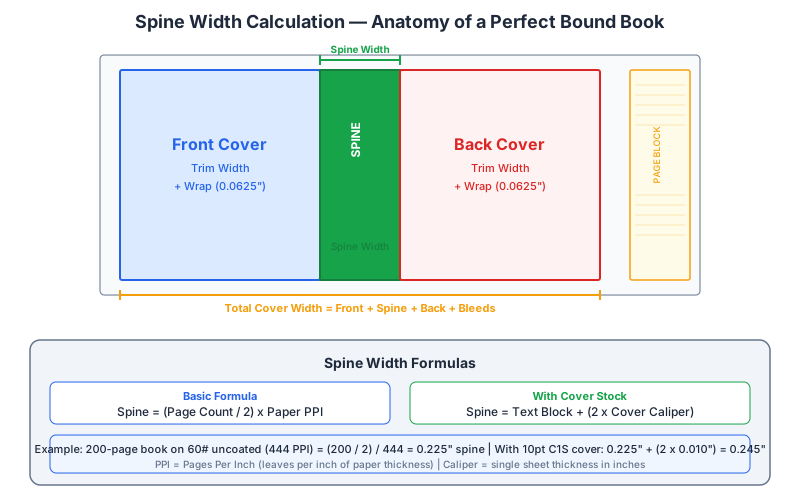
The good news is that spine width is a straightforward calculation once you know the right inputs. The formula is simple, the variables are well-documented by paper mills, and the results are reliable within normal production tolerances. This guide covers the formula, the paper data you need, and the practical considerations that ensure your spine width calculation translates into a correctly manufactured book.
The Spine Width Formula Explained
The fundamental spine width formula for any bound publication is:
Spine Width = (Page Count / 2) x Paper Thickness per Sheet
Here is why the formula works this way. A page is one side of a leaf (sheet). Every leaf has two pages -- a front (recto) and a back (verso). So a 200-page book has 100 leaves. The spine width is the total thickness of those 100 leaves stacked together, which is 100 multiplied by the thickness of a single sheet of the paper stock being used.
The formula can also be expressed using PPI (pages per inch), a value that paper mills and book printers publish for every paper grade:
Spine Width (inches) = Page Count / PPI
PPI already accounts for the two-pages-per-sheet relationship and represents the number of pages (not sheets) that fit in one inch of thickness when the paper is stacked under standard conditions. Using PPI is the most common method in the North American book industry because it eliminates unit conversion and directly connects page count to physical thickness.
For metric measurements, the equivalent formula uses sheets per centimeter or caliper (thickness per sheet in millimeters or microns):
Spine Width (mm) = (Page Count / 2) x Caliper (mm per sheet)
Let us walk through a concrete example. Suppose you have a 256-page book printed on 60 lb uncoated offset paper with a PPI of 478:
- Spine Width = 256 / 478 = 0.5356 inches (approximately 13.6 mm)
That gives you the text block thickness. For a perfect-bound paperback, this is effectively the spine width because the soft cover wraps tightly around the text block with minimal added thickness. For a case-bound book, you need to add the thickness of the cover boards and any spine inlay material, which we cover in a later section.
Important: The page count in this formula is the total number of pages in the book, including front matter (title page, copyright, table of contents), body text, back matter (index, appendices), and any blank pages. It does not include the cover -- the cover wraps around the text block and its dimensions are calculated from the spine width, not included in it.
PPI Tables for Common Paper Stocks
PPI (pages per inch) is the standard measurement for paper bulk in the book industry. It tells you how many pages of a particular paper stock stack to one inch in height. A higher PPI means thinner, denser paper; a lower PPI means thicker, bulkier paper. Here are the PPI values for the most commonly used book papers:
Uncoated Offset (Book Paper)
- 50 lb offset: 526 PPI (thin, lightweight; used for mass-market paperbacks, bibles)
- 55 lb offset: 502 PPI (popular for novels and trade paperbacks)
- 60 lb offset: 478 PPI (standard trade book weight; good opacity, comfortable feel)
- 70 lb offset: 434 PPI (slightly heavier; common for textbooks and non-fiction)
- 80 lb offset: 398 PPI (premium feel; used for coffee table books with uncoated interiors)
Coated Papers
- 60 lb coated (matte/gloss): 620 PPI (thin coated stock; brochures, catalogs)
- 70 lb coated: 564 PPI (standard catalog/magazine weight)
- 80 lb coated: 556 PPI (common for photo books, art catalogs)
- 100 lb coated (gloss): 478 PPI (premium photo book paper; excellent image reproduction)
- 100 lb coated (matte): 446 PPI (coffee table book interiors; less glare than gloss)
Specialty and Text-Weight Papers
- 60 lb opaque (high-bulk): 410 PPI (designed to be thicker than standard 60 lb; used when more bulk is desired without more weight)
- Groundwood / newsprint: 580-640 PPI (thin, inexpensive; mass paperbacks, newspapers)
- 80 lb text (uncoated): 358 PPI (thicker; used for high-end book interiors, annual reports)
- 70 lb vellum: 390 PPI (textured surface; used for literary fiction, poetry)
- Cream/natural offset 60 lb: 454 PPI (slightly bulkier than white offset; popular for novels)
Cover Stocks (for reference; not used in spine width calculation for the text block)
- 10 pt C1S (coated one side): caliper 0.010 inches (0.254 mm) -- standard paperback cover
- 12 pt C1S: caliper 0.012 inches (0.305 mm) -- heavier paperback cover
- 14 pt C2S (coated two sides): caliper 0.014 inches (0.356 mm) -- used for dust jackets, premium covers
- 80 lb cover (uncoated): caliper approximately 0.010 inches
Note on PPI variability: PPI values can vary by 5-10% between paper mills, between different lots of the same grade, and even between different areas of the same lot. The values above are industry averages. For critical applications (especially case-bound books with tight tolerances), request the actual PPI or caliper from your paper supplier for the specific lot that will be used. Some printers maintain a paper sample library with measured PPI for every stock they carry -- always ask if one is available.
For digital print-on-demand services (Amazon KDP, IngramSpark, Lulu), the platform publishes its own PPI values for the papers it offers. These are typically:
- Amazon KDP white paper: approximately 440 PPI
- Amazon KDP cream paper: approximately 400 PPI
- IngramSpark white (50 lb): approximately 526 PPI
- IngramSpark cream (55 lb): approximately 460 PPI
Step-by-Step Spine Width Calculation
Here is a systematic process for calculating spine width accurately. Follow these steps whether you are designing a paperback cover, specifying a hardcover case, or estimating shelf dimensions for a print run.
Step 1: Determine the total page count. Count every page in the book, including blanks. The total must be even (you cannot have an odd number of pages in a bound book, since each leaf has two sides). If your content ends on an odd page, add a blank page to make the total even. For perfect binding, the page count should ideally be divisible by 4 (since signatures are typically 4, 8, 16, or 32 pages), though modern perfect-binding equipment can handle any even page count by trimming partial signatures.
Step 2: Identify the paper stock and find its PPI (or caliper). Get this from your printer, paper supplier, or print-on-demand platform. If only caliper is available (common in metric countries), convert it: PPI = 2 / caliper in inches, or PPI = 50.8 / caliper in mm.
Step 3: Calculate the text block thickness.
- Using PPI:
Text block thickness (inches) = Page count / PPI - Using caliper:
Text block thickness (mm) = (Page count / 2) x Caliper (mm)
Step 4: Add cover board thickness (case binding only). For hardcover books, add the thickness of both cover boards (front and back) to the text block thickness. Standard binder's board is 0.080 to 0.098 inches (2.0 to 2.5 mm) thick. The spine width for the case equals the text block thickness plus two board thicknesses, because the boards sit on either side of the text block and the spine material must span the full distance between the outer faces of the boards.
Case spine width = Text block thickness + (2 x Board thickness)
Step 5: For perfect binding, the spine width equals the text block thickness. The soft cover wraps tightly around the text block, so the cover spine panel should be exactly as wide as the text block is thick. Some printers recommend adding 0.5-1 mm to the spine width as a tolerance buffer, but this varies -- ask your printer for their specific recommendation.
Step 6: Verify with a dummy or sample. For important projects (first editions, premium publications, jobs with spine printing), request a paper dummy (also called a bulking dummy) from your printer. This is a blank book made from the actual paper stock, trimmed and bound the same way the final book will be. Measuring the dummy gives you the exact spine width under real production conditions, accounting for paper compression, adhesive thickness, and binding equipment characteristics that no formula can perfectly predict.
Worked example: A 320-page novel on 55 lb cream offset (460 PPI) with perfect binding:
- Text block thickness = 320 / 460 = 0.696 inches = 17.7 mm
- Spine width (perfect bound) = 0.696 inches (17.7 mm)
Worked example (hardcover): Same 320-page book, case bound with 0.088-inch (2.24 mm) binder's board:
- Text block thickness = 320 / 460 = 0.696 inches
- Case spine width = 0.696 + (2 x 0.088) = 0.696 + 0.176 = 0.872 inches (22.1 mm)
Cover Wrap Calculations: Designing Around the Spine
Once you know the spine width, you can calculate the total cover dimensions. For a perfect-bound paperback, the cover is a single flat piece that wraps around the text block, comprising three panels: the front cover, the spine, and the back cover.
Total cover width:
Cover width = Back cover width + Spine width + Front cover width + (2 x Bleed)
For a standard 6" x 9" (152 x 229 mm) trade paperback with a 0.696-inch spine and 0.125-inch bleed on all sides:
- Cover width = 6.0 + 0.696 + 6.0 + (2 x 0.125) = 12.946 inches
- Cover height = 9.0 + (2 x 0.125) = 9.25 inches
The spine panel begins at the left edge of the front cover and ends at the right edge of the back cover (or vice versa, depending on orientation). In your cover design file, the spine panel is the narrow center strip. Design software like InDesign allows you to set up the cover as a flat spread with the spine width as the center panel.
Hinge allowance. Many printers recommend adding a hinge score or crease line allowance at the transitions between the spine and the front/back panels. This is typically 0.0625 inches (1.59 mm) on each side of the spine -- a zone where the cover material folds. While the fold itself does not add to the spine width, some printers ask you to leave this zone free of critical design elements (text, barcodes, images that must align precisely), because the fold can distort artwork in this area.
Wrap-around elements. If your cover design includes elements that wrap from the front cover onto the spine (or from the spine to the back cover), ensure these elements account for the spine width exactly. An image or pattern that crosses the spine hinge must be positioned based on the calculated spine width. If the actual printed spine is narrower or wider than your calculation, the wrap-around element will shift visibly. This is why printers strongly recommend using a bulking dummy for covers with wrap-around designs.
Dust jacket calculations (hardcover). A dust jacket wraps around the entire case, including the case boards. The dust jacket width is:
Jacket width = Back board width + Back board thickness + Spine width + Front board thickness + Front board width + (2 x Flap width) + (2 x Bleed)
The flap width is typically 3-4 inches (76-102 mm). The board thickness (edge visible when the book is open) is usually 0.080-0.098 inches. For a 6 x 9 hardcover with a 0.872-inch case spine, 0.088-inch boards, 3.5-inch flaps, and 0.125-inch bleed:
- Jacket width = 6.0 + 0.088 + 0.872 + 0.088 + 6.0 + (2 x 3.5) + (2 x 0.125) = 20.298 inches
- Jacket height = 9.0 + 0.5 (overhang) + 0.5 (overhang) + (2 x 0.125) = 10.25 inches
The 0.5-inch overhang (called turn-in or head/tail overhang) is the standard amount that a dust jacket extends beyond the case boards at the top and bottom edges.
Spine Width for Different Binding Types
Different binding methods produce different spine characteristics, and the spine width calculation varies accordingly. Here is how spine width applies to each major binding type:
Perfect binding (PUR / EVA hot-melt). The most common binding for paperback books, catalogs, and thick magazines. The text block pages are milled (roughened) on the spine edge and glued directly into the cover. The spine width equals the text block thickness. PUR (polyurethane reactive) adhesive adds approximately 0.2-0.3 mm to the spine compared to EVA hot-melt, but this difference is within normal tolerance and does not require adjusting your calculation. Perfect binding requires a minimum spine width of approximately 0.125 inches (3 mm) for the adhesive to hold reliably -- below this, the binding may crack or pages may separate. Most printers specify a minimum of 48-64 pages for perfect binding.
Case binding (hardcover / library binding). The text block is sewn and attached to rigid boards via endsheets. As discussed above, the case spine width includes the text block thickness plus both board thicknesses. Additional factors that affect case spine width:
- Spine lining: A strip of crash (mull) fabric plus a kraft paper lining are glued to the spine of the sewn text block before casing-in. These add approximately 0.5-1.0 mm to the spine.
- Round vs flat spine: A rounded spine (standard for most hardcovers) does not change the measurement because rounding redistributes the paper bulk rather than adding to it. However, the case spine panel for a round spine is slightly wider than for a flat spine because the curve requires more material. The standard rule of thumb is to add approximately 3 mm to the calculated flat spine width for a rounded spine.
- Headbands and tailbands: Decorative fabric strips glued at the head and tail of the spine. They add negligible thickness (< 0.5 mm) and do not affect spine width calculations.
Saddle stitching (staple binding). Pages are folded and nested, then stapled through the spine fold. Saddle-stitched booklets do not have a flat spine -- the spine is a curved fold. There is no spine width to calculate for cover design purposes, since the cover wraps around the fold rather than a flat panel. However, the overall thickness of a saddle-stitched booklet matters for mailing (meeting postal thickness requirements) and for creep compensation (the progressive outward shift of inner pages due to paper thickness).
Wire-O / spiral binding. The wire or coil runs through holes punched near the spine edge. There is no spine panel and no spine width calculation. The coil diameter depends on the text block thickness and typically ranges from 6 mm (for up to 45 sheets) to 50 mm (for up to 450 sheets). The text block thickness is still calculated the same way: page count / PPI.
Lay-flat binding (Otabind / Swiss binding). A variation of perfect binding where the cover is attached with a flexible hinge that allows the book to lay flat when open. The spine width calculation is the same as for standard perfect binding, but the cover design must include visible hinge grooves approximately 3-5 mm from each spine edge. These grooves are scored into the cover stock and are a visual feature of the binding style.
Coptic / exposed-spine binding. A hand-binding technique where the spine is exposed and the thread stitching is visible. There is no cover spine panel. The text block thickness depends on the paper stock and the number of signatures, calculated the same way as for any other sewn book.
Minimum Spine Width for Printing on the Spine
A common question from authors and designers is: how thick does the spine need to be before I can print text on it? The answer depends on the printer, the binding method, and the production tolerances involved.
The industry standard minimum for printing text on the spine of a perfect-bound book is approximately 0.25 inches (6.35 mm). Below this width, the spine is too narrow for text to be consistently centered. Here is the reasoning:
- Registration tolerance: In book binding, the cover wraps around the text block with a registration tolerance of approximately +/- 1 mm (0.04 inches). On a 6 mm spine, a 1 mm shift represents a 17% positional error -- enough to make spine text visibly off-center or partially wrapped onto the front or back cover.
- Spine rounding: Even on "flat" spines, there is a slight curvature where the cover bends around the text block edges. On narrow spines, this curvature consumes a significant portion of the printable area, leaving very little flat surface for text.
- Readability: Spine text is typically rotated 90 degrees and must be legible at the actual print size. On a 6 mm spine, text height is limited to approximately 4-5 mm (after allowing for centering margins), which corresponds to about 11-14 pt type -- readable, but at the lower limit of comfortable legibility for body text.
Here are the practical spine width thresholds used by major book printers and print-on-demand services:
- Under 0.0625" (1.6 mm): No spine printing possible. The spine is essentially a fold line. Many printers will not attempt perfect binding below 48 pages; saddle stitching is the appropriate method.
- 0.0625" to 0.25" (1.6 to 6.35 mm): Spine printing is technically possible but not recommended. Some printers allow a thin rule or small graphic element, but text will likely shift between copies. Amazon KDP does not allow spine text below 0.25" (approximately 100 pages on white paper).
- 0.25" to 0.50" (6.35 to 12.7 mm): Spine text is feasible. Keep text small (10-14 pt), use a bold or heavy weight for legibility, and center it carefully. Allow at least 1.5 mm margin on each side of the spine.
- 0.50" to 1.0" (12.7 to 25.4 mm): Comfortable spine printing. Room for title, author name, and publisher logo. Standard spine layout: title at the top (or center), author at the bottom, publisher logo near the tail.
- Over 1.0" (25.4 mm): Full design flexibility. Room for large text, graphics, decorative elements, and complex layouts.
Spine text direction: In English-language publishing, spine text typically reads top-to-bottom (the text is rotated 90 degrees clockwise so that the title is legible when the book is lying face-up). In some European traditions (notably French and German publishing), spine text reads bottom-to-top. Always confirm the convention with your printer or distributor, especially for international editions.
How to Measure Paper Thickness
If PPI data is not available for your paper stock, you can measure paper thickness directly. There are three methods, ranging from highly accurate (laboratory instruments) to practical approximations (desk tools):
Method 1: Micrometer (most accurate). A paper micrometer (also called a caliper gauge or thickness gauge) measures the thickness of a single sheet to a precision of 0.001 mm (1 micron). To use it:
- Place a single sheet between the anvil and spindle of the micrometer.
- Close the spindle until it contacts the paper with light, consistent pressure. Do not over-tighten -- paper compresses under pressure, and excessive force gives a falsely thin reading.
- Read the measurement. Standard micrometer resolution for paper is 0.01 mm (10 microns).
- Measure at least 5 sheets from different locations in the stack and average the results. Paper thickness varies across a sheet and between sheets.
Paper calipers specifically designed for this purpose (e.g., the TMI 49-56, Thwing-Albert ProGage) apply a standardized pressure (typically 50 kPa per TAPPI T411) for repeatable results. General-purpose micrometers work but may give slightly different readings depending on the applied pressure.
Method 2: Stack measurement (practical approximation). If you do not have a micrometer, measure a stack of sheets:
- Take a stack of 50-100 sheets of the paper. Count them precisely.
- Align the stack neatly, tapping the edges on a flat surface to remove air gaps.
- Measure the total stack height with a ruler or calipers.
- Divide by the number of sheets to get the per-sheet thickness.
- To convert to PPI:
PPI = 2 / (per-sheet thickness in inches)
This method is less precise than a micrometer (the stack includes micro-air-gaps between sheets), but for a large enough sample, the error is typically within 5% -- adequate for most spine width calculations.
Method 3: Use the finished book as a reference. If you are reprinting a book or printing a similar book on the same stock, measure the spine of an existing copy:
- Count the pages in the existing book.
- Measure the text block thickness (not including the cover) with calipers.
- Calculate the effective PPI:
PPI = Page count / Text block thickness in inches - Use this PPI for your new book's spine width calculation.
This method automatically accounts for the compression and settling that occur during binding, making it highly accurate for same-stock reprints.
Common caliper values for reference:
- Standard copy paper (20 lb bond / 75 gsm): approximately 0.004 inches (0.1 mm) per sheet
- 60 lb uncoated offset (90 gsm): approximately 0.0042 inches (0.106 mm) per sheet
- 80 lb coated gloss (120 gsm): approximately 0.0036 inches (0.091 mm) per sheet
- 100 lb coated matte (150 gsm): approximately 0.0045 inches (0.114 mm) per sheet
- 10 pt cover stock (C1S): approximately 0.010 inches (0.254 mm) per sheet
Using Spine Width in Imposition and Cover Design
In a professional print workflow, the spine width feeds into two critical downstream processes: cover file setup and imposition. Here is how spine width integrates with each.
Cover file setup. The cover PDF for a perfect-bound or case-bound book is typically a single flat spread (sometimes called a mechanical or cover flat) that includes the back cover, spine, and front cover as adjacent panels. The designer sets up this file with the spine width as the dimension of the center panel. In InDesign, this is done by creating a document with a single page whose width equals:
Document width = Trim width (front) + Spine width + Trim width (back)
Bleed is then added around all four edges. The spine panel is defined by vertical guides at the appropriate positions. Some designers use a two-page spread with the spine as an extra-wide inner margin, but the single-page flat approach is more common because it avoids InDesign's spread-joining behaviors and ensures the file exports as a single continuous page.
Imposition for signatures. When the interior pages of a book are printed in signatures (16-page or 32-page sections that are folded, gathered, and bound together), the imposition software needs to know the binding method and, for perfect binding, the signature count. The spine width does not directly affect imposition page placement, but it indirectly influences creep compensation in saddle-stitched sections and the spine margin (gutter) in perfect-bound signatures.
In PDF Press, you can set up booklet imposition for both saddle-stitched and perfect-bound signatures. The N-up Book tool handles signature-based imposition with creep settings, and the Booklet tool handles simple saddle-stitch layouts. For cover imposition, use the Cards or Grid tool to position the cover flat on a press sheet with appropriate marks.
Spine width and gutter margins. The gutter margin (the inner margin of each page, closest to the spine) should account for the binding method. Perfect binding typically consumes 3-5 mm of the gutter in adhesive, meaning that the effective visible gutter is smaller than the designed gutter. For a 320-page book (17.7 mm spine), approximately 3-4 mm of each page's gutter edge is hidden in the binding. Designers typically set gutter margins 3-5 mm wider than outer margins to compensate.
PDF/X and spine metadata. The PDF/X standard does not include a dedicated field for spine width, but JDF (Job Definition Format) job tickets do. If your workflow uses JDF-based automation, the spine width can be specified in the binding intent and propagated to the cover imposition and binding equipment automatically. PDF Press supports JDF export, allowing spine width and binding parameters to flow through the production chain without manual re-entry.
Common Spine Width Mistakes and How to Avoid Them
Spine width errors are among the most common causes of cover reprints in book manufacturing. Here are the mistakes that occur most frequently, along with their prevention strategies:
1. Using the wrong page count. The most basic error: miscounting pages. Remember that the page count for spine width calculations includes all pages in the text block, including blank pages, front matter, and back matter. It does not include the cover. If your manuscript has 287 pages of content, but the final book will have 288 pages (adding one blank to make an even count), use 288 in your calculation.
2. Confusing pages and leaves. A leaf has two pages (front and back). If your printer says "140 leaves," that is 280 pages. If you use "140" in the PPI formula, you will get exactly half the correct spine width. Always confirm whether the count is in pages or leaves.
3. Using PPI for the wrong paper stock. PPI varies significantly between paper grades. Using 60 lb offset PPI (478) when the book is actually printed on 80 lb offset (398 PPI) gives a spine width that is 17% too thin. Always confirm the exact paper stock with your printer before calculating.
4. Forgetting about inserts and tip-ins. If the book includes tipped-in plates, gatefolds, or inserts on a different paper stock, these pages have a different thickness and must be calculated separately. Calculate the spine contribution of each paper stock independently, then sum them.
5. Not accounting for paper compression in binding. Paper compresses slightly during the binding process, especially in perfect binding where the spine edge is milled and the adhesive is applied under pressure. This compression can reduce the actual spine width by 2-5% compared to the formula. Some experienced production managers apply a 3% reduction factor to the calculated spine width. Others simply rely on the formula and accept the normal tolerance range. For critical jobs, a bulking dummy is the definitive solution.
6. Using digital printer PPI for offset (or vice versa). Digital toner-based printers (HP Indigo, Xerox) may handle paper differently than offset presses. The heat and pressure of the toner-fusing process can alter paper caliper slightly. If your book is printed digitally, use PPI values specific to your digital printer, or measure a printed test sample.
7. Ignoring cover board thickness for case binding. For hardcovers, forgetting to add the two board thicknesses to the text block thickness results in a spine that is approximately 4-5 mm too narrow. The boards sit outside the text block, and the case spine must span the entire distance between the outer faces of the boards.
8. Not verifying with the bindery. Different binderies have different tolerances and recommendations. Some add 0.5 mm to the spine, others subtract. Some round to the nearest 0.5 mm. Always confirm your calculated spine width with the specific bindery that will produce the book -- they are the final authority on what works with their equipment.
Advanced Considerations: Humidity, Grain, and Compression
For production managers, publishers handling large print runs, and designers working on premium publications, several advanced factors can affect spine width accuracy beyond the basic formula.
Humidity and moisture content. Paper is hygroscopic -- it absorbs and releases moisture from the surrounding air. As paper absorbs moisture, its fibers swell, increasing the caliper (thickness) by 2-5%. A book printed and bound in a humid environment (e.g., summer in a non-climate-controlled facility) may have a thicker spine than the same book produced in dry conditions. Climate-controlled print facilities minimize this variability, but it is worth noting for seasonal production or when comparing spine widths across different production runs.
Grain direction and bulk. Paper is slightly thicker when measured across the grain than along the grain, because the fibers are oriented in one direction and stack more compactly when aligned. This difference is small (typically less than 3% of caliper) but can be measurable in thick books. In book production, the grain should run parallel to the spine (grain long for most book sizes), which means the caliper measurement that matters for spine width is the cross-grain measurement. PPI values from paper mills are typically measured under standardized conditions that average out grain effects, so this is rarely a practical concern unless you are measuring caliper yourself.
Compression under load. A stack of paper compresses under its own weight, and more so under applied pressure. The PPI formula assumes a lightly stacked, uncompressed measurement. In the finished book, the pages are under some compression from the binding (especially the clamping force of perfect binding adhesive or the sewing tension in case binding). This compression reduces the actual spine width compared to the uncompressed formula result. The reduction is typically 1-3% for perfect binding and 2-5% for case binding (where sewing and pressing contribute additional compression). Experienced book manufacturers account for this with empirical correction factors specific to their equipment.
Multi-stock books. Some books use different paper stocks for different sections -- for example, coated paper for photo inserts and uncoated paper for text sections. To calculate the spine width:
- Calculate the spine contribution of each stock separately:
Section pages / Section PPI - Sum all section contributions to get the total text block thickness.
For example, a 288-page book with 256 pages on 60 lb offset (478 PPI) and 32 pages of coated inserts on 80 lb coated (556 PPI):
- Offset section: 256 / 478 = 0.535 inches
- Coated section: 32 / 556 = 0.058 inches
- Total spine width: 0.535 + 0.058 = 0.593 inches (15.1 mm)
Endsheets (case binding). Case-bound books include endsheets (also called endpapers) -- folded sheets that attach the text block to the cover boards. A standard endsheet is a single folded leaf (4 pages), one at the front and one at the back. If the endsheet stock is significantly thicker than the text stock (common when using decorative endsheets), include their thickness in the calculation. For standard endsheets on the same stock, the contribution is negligible (4 additional leaves out of hundreds).
Using Online Spine Width Calculators and Print Tools
Several online tools and print-on-demand platforms provide built-in spine width calculators that automate the formula for their specific paper stocks. These are convenient for quick estimates and for generating cover templates with the correct spine width pre-drawn.
Amazon KDP Cover Calculator. Amazon's Kindle Direct Publishing provides a free cover template generator that accepts your trim size, page count, and paper choice (white or cream), then generates a downloadable PDF template with the spine width marked. The template includes safe zones, bleed areas, and spine panel boundaries. This is the definitive tool for KDP paperbacks because it uses Amazon's exact PPI values for their paper stocks.
IngramSpark Cover Template Generator. IngramSpark offers a similar template generator for their print-on-demand books. You select the trim size, page count, paper type, and binding method, and the tool generates a cover template. IngramSpark supports more paper options and binding types than KDP, making their calculator more versatile.
Book printers' specification sheets. Most commercial book printers publish specification sheets or online calculators on their websites. These are tailored to the specific paper stocks the printer carries and include the printer's recommended tolerances. Examples include Lightning Source (owned by Ingram), BookBaby, and 48 Hour Books.
PDF Press for cover imposition. While PDF Press is not a spine width calculator per se, once you have calculated your spine width and designed your cover flat, you can use PDF Press to impose the cover for press output. The Grid or Cards tool positions the cover flat on the press sheet with crop marks, bleed, and registration marks. For multi-up cover printing (e.g., printing 2 or 4 covers per press sheet for shorter runs), PDF Press's step-and-repeat capability handles the layout automatically.
Manual spreadsheet approach. For publishers managing multiple titles, a simple spreadsheet is often the most practical tool. Set up columns for title, page count, paper stock, PPI, calculated spine width, and binding type. The spine width formula is a single-cell calculation: =PageCount/PPI. Add conditional formatting to flag spines below 0.25 inches (no spine text) or above 2 inches (verify paper choice). This gives you an at-a-glance view of your entire catalog's spine dimensions.
InDesign scripting. For high-volume publishers, an InDesign script can read the page count from a data source, look up the PPI for the assigned paper stock, calculate the spine width, and automatically set up the cover document dimensions. This eliminates manual calculation errors and ensures every cover file is dimensionally correct from the start. Adobe's ExtendScript or the newer UXP API can both handle this automation.
Try it yourself
PDF Press runs entirely in your browser. Upload a PDF, pick a tool, and download the result — fast and private.
Open PDF Press22 Professional Imposition Tools
Every tool runs locally in your browser — fast, private, and professional-grade.
Frequently Asked Questions
Related Articles
Ready to try professional PDF imposition?
PDF Press is a browser-based imposition tool with 22 professional tools. No installation required.
Open PDF Press