Signatures in Printing: How Sheets Become Books Through Folding and Gathering
Learn what signatures are in book and booklet printing, how flat sheets become folded sections through imposition, common signature sizes (4, 8, 16, 32 pages), signature notation, collation marks, creep, and how to choose the right signature size for your project.
What Is a Signature in Printing?
A signature in printing is a large sheet of paper that has been printed with multiple pages on both sides and then folded down into a smaller section that, when trimmed, forms a group of sequential pages in a book or booklet. Signatures are the fundamental building blocks of nearly every bound publication -- from paperback novels and magazines to academic journals and children's picture books.
The concept dates back to the earliest days of the printing press. When Gutenberg printed his Bible in the 1450s, he did not print one page per sheet. Instead, he printed multiple pages on each side of a large sheet of vellum, folded the sheet, and gathered these folded sections together for binding. That process -- printing multiple pages on a large sheet, folding, gathering, and binding -- remains essentially unchanged 570 years later, though the machinery is vastly more sophisticated.
The word "signature" itself comes from the practice of marking each folded section with a letter or number (a signum) at the bottom of the first page so the bookbinder could verify the correct assembly order. These marks, called signature marks, are still used today in commercial book production.
Understanding signatures is essential for anyone involved in PDF imposition, book design, prepress production, or print buying. The signature size you choose affects paper waste, print cost, binding method, page count flexibility, and the physical quality of the finished publication. It is not an exaggeration to say that the signature is the single most important structural unit in print production.
How Flat Sheets Become Signatures Through Folding
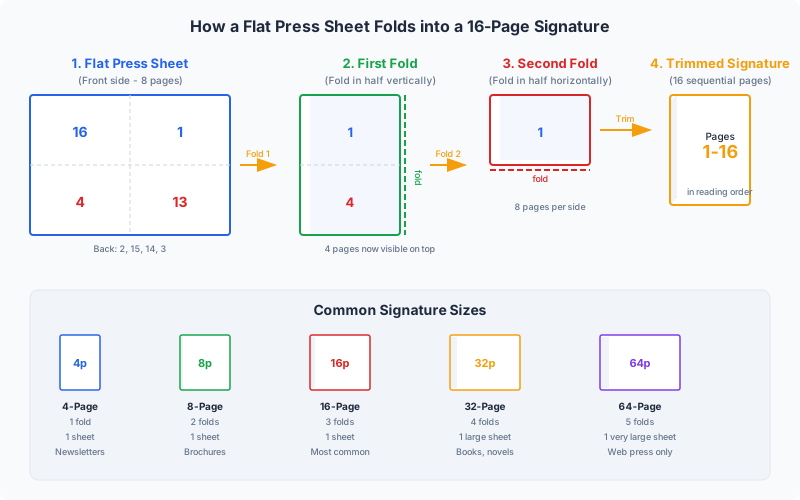
The transformation of a flat printed sheet into a signature is a precise mechanical process governed by simple arithmetic: each fold doubles the number of leaves (and therefore pages) in the resulting section. A single sheet of paper has two sides. One fold creates 4 pages. Two folds create 8 pages. Three folds create 16 pages. Four folds create 32 pages.
The folding sequence:
- 0 folds -- 1 leaf, 2 pages (a broadsheet or single-leaf insert)
- 1 fold -- 2 leaves, 4 pages (a folio or 4-page section)
- 2 folds -- 4 leaves, 8 pages (a quarto)
- 3 folds -- 8 leaves, 16 pages (an octavo -- the most common signature size)
- 4 folds -- 16 leaves, 32 pages (a sextodecimo)
- 5 folds -- 32 leaves, 64 pages (rare, used only on very thin paper)
Each fold must be perpendicular to the previous one. The first fold is typically parallel to the long edge of the sheet (a "right-angle fold"), the second fold is perpendicular to the first, and so on. This alternating fold pattern is what allows the pages to end up in the correct sequential order after folding.
Why the page order is not sequential on the flat sheet:
This is the core challenge of imposition. On a 16-page signature printed on a single sheet, the pages are not arranged 1-2-3-4-5-6 and so on. Instead, they are arranged in a specific non-sequential pattern so that after folding, the pages read in the correct order. For example, on the front of a 16-page signature sheet, you might see pages 16, 1, 4, 13, 8, 9, 12, and 5 -- seemingly random, but mathematically precise. Imposition software like PDF Press calculates this arrangement automatically.
The role of the press sheet:
The physical size of the press sheet determines the maximum signature size. A commercial sheet-fed offset press printing on SRA2 sheets (450 x 640 mm) can produce 16-page signatures from A5 pages. A larger press running SRA1 sheets (640 x 900 mm) can produce 32-page signatures from the same A5 page size. Web presses, which print on continuous rolls, can produce even larger signatures. The relationship between press sheet size, final page size, and signature size is one of the primary considerations in imposition planning.
Common Signature Sizes: 4, 8, 16, and 32 Pages
While the mathematics of folding allows for signatures of any power-of-two page count, commercial printing overwhelmingly uses four standard signature sizes. Each has distinct characteristics, advantages, and ideal use cases.
4-Page Signature (1 fold -- Folio)
A 4-page signature is simply a single sheet folded in half. It is the simplest possible signature and is used for:
- Cover wraps on perfect-bound books (a single folded sheet wrapping the book block)
- Simple greeting cards and invitations
- Inserts and tip-ins added to larger publications
- Church bulletins and single-fold programs
Because it involves only one fold, a 4-page signature has no imposition complexity -- page 4 backs page 1, and page 2 backs page 3. There is no page reordering needed beyond placing the correct page on each side of the sheet.
8-Page Signature (2 folds -- Quarto)
An 8-page signature is created by folding a sheet twice. It is commonly used for:
- Short booklets and pamphlets
- Saddle-stitched newsletters (a single 8-page signature stapled at the fold)
- The final partial signature of a longer book (when the page count does not divide evenly by 16 or 32)
- Digest-size magazines printed on smaller presses
The 8-page signature introduces real imposition complexity. The eight pages must be arranged on the flat sheet so that after two perpendicular folds, they read in order from page 1 through page 8. This is where imposition software becomes essential.
16-Page Signature (3 folds -- Octavo)
The 16-page signature is the workhorse of the book printing industry. It offers an excellent balance between press efficiency (fitting many pages per sheet), folding practicality (three folds are easily handled by standard folding machines), and binding versatility. It is used for:
- Paperback novels and trade books (the vast majority use 16-page signatures)
- Textbooks and academic publications
- Thick magazines (each section is a 16-page signature)
- Corporate annual reports and catalogs
A 320-page novel, for example, consists of 20 signatures of 16 pages each. Each signature is imposed independently, printed, folded, and then all 20 signatures are gathered in order and bound together.
32-Page Signature (4 folds -- Sextodecimo)
A 32-page signature packs the maximum practical number of pages onto a single press sheet. It requires a large press sheet and produces a thick folded section. It is used for:
- High-volume book production where press efficiency is paramount
- Mass-market paperbacks (pocket-size novels on thin paper)
- Reference books and encyclopedias
- Large-format publications where even the folded signature is a manageable size
The 32-page signature requires four folds, which means the paper must be thin enough to fold cleanly four times without cracking or excessive bulk at the spine. Paper weights above approximately 100 gsm are generally too thick for 32-page signatures. The imposition layout for a 32-page signature has 16 pages on each side of the press sheet, and the page arrangement is considerably more complex than smaller signatures.
Signature Notation: Understanding 4to, 8vo, 16mo, and 32mo
The printing and bibliographic trades use a traditional notation system to describe signature sizes. This notation appears in book catalogs, printing specifications, library records, and typographic references. Understanding it helps you communicate precisely with printers, publishers, and rare-book specialists.
The notation is derived from the number of leaves (not pages) that result from folding the sheet:
| Abbreviation | Full Name | Folds | Leaves | Pages | Origin |
|---|---|---|---|---|---|
| fo or 2o | Folio | 1 | 2 | 4 | Latin folium (leaf) |
| 4to | Quarto | 2 | 4 | 8 | Latin quartus (fourth) |
| 8vo | Octavo | 3 | 8 | 16 | Latin octavus (eighth) |
| 12mo | Duodecimo | Special | 12 | 24 | Latin duodecimus (twelfth) |
| 16mo | Sextodecimo | 4 | 16 | 32 | Latin sextus decimus (sixteenth) |
| 32mo | Trigesimo-secundo | 5 | 32 | 64 | Latin trigesimus secundus (thirty-second) |
How to read the notation: The number refers to the fraction of the original sheet that each leaf represents. In a quarto (4to), each leaf is one-quarter of the original sheet. In an octavo (8vo), each leaf is one-eighth. The notation tells you both the number of folds and the resulting page size relative to the press sheet.
The 12mo exception: The duodecimo (12mo) is notable because 12 is not a power of 2. A 12mo signature is created by a combination of folds and cuts -- the sheet is first folded into thirds (creating 3 panels), then each panel is folded in half twice. This produces 12 leaves (24 pages) per signature, which is slightly more efficient than 8vo for certain page sizes. The 12mo format was historically popular for pocket-sized books and devotional texts.
Historical context: Before standardized paper sizes existed, these terms also described the physical dimensions of the finished page. An "octavo" book made from a Crown-size sheet (508 x 381 mm) would produce pages approximately 190 x 127 mm -- roughly what we now call a pocket book. The same "octavo" folding applied to a Royal-size sheet (635 x 508 mm) would produce a larger page. Today, the terms are used primarily to describe the folding scheme rather than the absolute page size, since standardized paper sizes (A4, Letter, etc.) have replaced the old named sheet sizes in most commercial printing.
How Signatures Are Gathered for Binding
Once individual signatures have been printed and folded, they must be assembled in the correct sequence before binding. This assembly process is called gathering (also known as collating in some contexts), and it is one of the critical quality-control steps in book production.
The gathering process:
In a typical commercial bindery, gathering works as follows:
- Each signature type is stacked in its own feeder station (also called a pocket or hopper). A 320-page book made from 20 signatures of 16 pages each would require 20 feeder stations.
- A mechanical gathering machine (also called a collator or assembler) moves a collection point along the line of feeders. At each station, a single signature is picked from the top of the stack and placed onto the growing book block.
- After passing all stations, the assembled book block contains all 20 signatures in the correct order, ready for binding.
- Sensors at each station detect double-feeds (two signatures picked up at once) and missing feeds (no signature picked). A misdetection halts the line to prevent defective books.
Gathering methods by binding type:
- Saddle stitch: Signatures are inserted (nested inside each other) rather than gathered on top of each other. The innermost signature goes on the saddle first, and each subsequent signature wraps around it. For short saddle-stitched booklets (8-16 pages), this is often a single signature that needs no gathering at all.
- Perfect binding: Signatures are gathered sequentially -- stacked spine-to-spine in a book block. The spine edges are then milled (roughened) and adhesive is applied. Gathering accuracy is critical because a misplaced signature means an entire section of the book is in the wrong location.
- Case binding (hardcover): Identical to perfect binding for the gathering step. The book block is gathered, glued, and then the hardcover case is attached. Case binding adds the extra steps of rounding the spine, applying headbands and crash (mull), and casing-in.
- Section sewn (Smyth sewn): Signatures are gathered and then sewn through the fold with thread, linking each signature to the next. This is the most durable binding method and allows the book to lay nearly flat when opened. The sewing machine passes thread through pre-punched holes in the fold of each signature.
Gathering speed: Modern gathering machines operate at 100-200 cycles per minute, meaning they can assemble 100-200 complete book blocks per minute. For a 20-signature book, this means each feeder must reliably deliver 100-200 signatures per minute -- a total throughput of 2,000-4,000 individual signature picks per minute across all stations. This mechanical precision is why consistent signature folding quality matters so much.
Signature Marks and Collation Marks
Signature marks (also called collation marks, back marks, or spine marks) are small printed indicators used to verify that signatures have been gathered in the correct order. They are printed outside the trim area and are removed when the book is trimmed to its final size. These marks are invisible in the finished book but are essential quality-control tools during production.
Types of signature marks:
1. Alphabetic or numeric signature marks. The oldest form of signature identification. A letter (A, B, C...) or number (1, 2, 3...) is printed at the foot of the first page of each signature. In traditional bookbinding, the binder would flip through the gathered block and visually verify that the letters or numbers progressed in sequence. This practice is preserved in modern fine printing and is sometimes visible in scholarly editions and limited-run books.
2. Collation marks (back marks or staircase marks). These are small black rectangles printed on the spine fold of each signature, each at a slightly different vertical position. When signatures are gathered correctly, these marks form a staircase pattern visible on the spine of the ungathered book block. If a signature is missing, duplicated, or out of order, the staircase pattern is broken -- making the error immediately visible to the bindery operator without opening the book block.
- Signature 1: mark at the top of the spine
- Signature 2: mark slightly lower
- Signature 3: mark lower still
- And so on, stepping down the spine in even increments
After all signatures are gathered, the spine shows a diagonal line of marks from top to bottom. A missing step, a duplicated step, or an out-of-sequence step immediately signals a gathering error. This system is fast and reliable -- operators can verify correct gathering at a glance.
3. Section titles or running heads. Some publishers print a small abbreviation of the book title and the signature number at the foot of the first page of each signature (e.g., "MOBY-DICK -- SIG. 12"). This helps both the binder and anyone who later needs to identify a specific signature in a damaged or disbound book.
4. Electronic marks and barcodes. In modern high-speed production, optical sensors replace human visual inspection. Machine-readable barcodes or special marks printed on each signature are scanned by the gathering machine to verify identity and sequence. These systems can detect errors at full gathering speed (200+ signatures per minute) and automatically reject misassembled book blocks.
Where signature marks are positioned:
Signature marks are always printed in the trim waste area -- the part of the sheet that will be cut away during finishing. On a standard signature, the collation mark appears on the spine fold, near the foot (bottom). The alphabetic or numeric mark appears at the foot of the first page. Because these marks are in the trim area, they never appear in the finished book. However, in some older or hand-trimmed books, you can occasionally see faint remnants of signature marks near the bottom of the spine -- a charming artifact of the production process.
Understanding Creep Within Signatures
Creep (also called shingling, push-out, or thrust) is a physical phenomenon that occurs whenever multiple sheets of paper are folded and nested together. It is one of the most important technical considerations in signature-based imposition, and failing to account for it is one of the most common causes of trimming problems in booklet and book production.
What causes creep:
Paper has physical thickness. When you fold a single sheet, the fold itself takes up no significant space. But when you nest multiple folded sheets inside each other -- as in a saddle-stitched booklet or within a single thick signature -- each successive inner sheet is displaced outward by the cumulative thickness of all the sheets surrounding it. The innermost sheet protrudes further from the spine than the outermost sheet.
When the assembled booklet or signature is trimmed to create clean, aligned edges, this protrusion means that inner pages lose more material at the face (outer) edge than outer pages do. If the imposition has not compensated for this, content near the face-edge trim on inner pages may be partially or completely cut off.
How much creep to expect:
- 4-page signature (1 fold): Zero creep -- only one sheet, nothing to nest
- 8-page signature (2 sheets nested): Minimal creep (~0.1 mm with 80 gsm paper). Usually ignorable.
- 16-page signature (4 sheets nested in saddle stitch; or 8 leaves folded in a single signature): Noticeable creep (~0.5 mm). Compensation recommended for high-quality work.
- 32-page signature (8 sheets nested): Significant creep (~1.0-1.5 mm). Compensation mandatory.
- Saddle-stitched booklet with 16 sheets (64 pages): Severe creep (~2.5-3.0 mm). This is near the practical limit for saddle stitch.
Creep compensation in imposition:
Imposition software compensates for creep by progressively shifting page content toward the spine on inner pages. The outermost page gets no shift. Each successive inner page gets a slightly larger shift, calculated from the paper thickness and the number of nested sheets. After trimming, all pages have consistent margins at the face edge.
The formula is straightforward: for page n (counting from the outside), the shift equals n x paper_thickness. For a 32-page saddle-stitched booklet on 0.1 mm paper, the innermost page shifts inward by approximately 0.8 mm (8 sheets x 0.1 mm). PDF Press calculates this automatically when you enable creep compensation in the Booklet tool.
Creep in perfect binding vs. saddle stitch:
In perfect binding, creep is managed differently. Each signature is folded independently and then gathered (stacked, not nested). Because signatures are not nested inside each other, there is no cumulative push-out across signatures. However, creep still occurs within each individual signature -- the inner leaves of a 32-page signature still push out relative to the outer leaves. For perfect-bound books, the per-signature creep is small enough that many printers ignore it, but high-quality work compensates for it nonetheless.
Imposition Layout of Signatures
The imposition layout determines exactly where each page is positioned on the flat press sheet so that after printing and folding, every page appears in the correct location, with the correct orientation, and in the correct reading sequence. Getting this layout right is the central purpose of imposition software.
Key principles of signature imposition:
1. Head-to-head or head-to-foot orientation. Pages on opposite sides of a fold line are rotated 180 degrees relative to each other. This is because when the sheet is folded, one page flips upside-down relative to the other. The imposition layout must account for this rotation so that all pages read right-side-up in the folded signature.
2. Lip pages and crossover alignment. Pages that share a fold (i.e., pages on either side of the fold line) must be precisely aligned. Any misregistration between the front and back of the sheet at the fold line will be visible as a shift at the fold. This is particularly important for designs with images or rules that cross the gutter (the center fold of a spread).
3. Work-and-turn vs. work-and-tumble vs. sheetwise. These terms describe how the sheet is printed on both sides:
- Sheetwise: Different plates for front and back. The most common method for signatures.
- Work-and-turn: The same plate prints both sides. The sheet is turned (flipped on its long axis) between first and second pass. Used for short-run efficiency -- you print two copies of the signature on one large sheet, then cut them apart.
- Work-and-tumble: Similar to work-and-turn, but the sheet is tumbled (flipped on its short axis). Same efficiency benefit, different gripper-edge considerations.
4. Gripper edge allowance. The leading edge of the press sheet (the gripper edge) cannot be printed because the press grippers hold the sheet during printing. A margin of 8-15 mm is typically left blank on the gripper edge. The imposition layout must position pages to avoid this unprintable zone.
Example: 8-page signature layout
For a standard right-angle fold 8-page signature, the flat sheet layout is:
- Front (outer form): Pages 8, 1 (top row); Pages 5, 4 (bottom row)
- Back (inner form): Pages 2, 7 (top row); Pages 3, 6 (bottom row)
After the first fold (bringing 8,1 down onto 5,4 on the front; 2,7 down onto 3,6 on the back), and the second fold (bringing the right half onto the left half), the pages read sequentially 1 through 8.
Example: 16-page signature layout
A 16-page signature has 8 pages on each side of the press sheet, arranged in two rows of four. The page arrangement is more complex, but the principle is the same -- each page is positioned and oriented so that three perpendicular folds produce a section where pages 1 through 16 read in sequence.
For 32-page signatures, the layout has 16 pages per side, arranged in a 4x4 grid, with four folds required. The complexity of hand-calculating these layouts is one of the primary reasons imposition software exists.
Choosing the Right Signature Size for Your Project
Selecting the optimal signature size involves balancing several competing factors: press efficiency, paper waste, folding practicality, paper weight, and total page count. There is no single "best" signature size -- the right choice depends on your specific project parameters.
Factor 1: Press sheet size.
The maximum signature size is limited by the size of paper your press can handle. A desktop printer working with A4/Letter sheets can produce 4-page or 8-page signatures at most. A commercial sheet-fed press running B1 sheets (707 x 1000 mm) can produce 32-page signatures of A5 pages or 16-page signatures of A4 pages. Match your signature size to your available press format.
Factor 2: Total page count and waste.
Your total page count should divide as evenly as possible into your chosen signature size. A 160-page book divides perfectly into 10 signatures of 16 pages. But a 148-page book is more problematic:
- 9 signatures of 16 pages = 144 pages (4 pages short -- need 4 blank pages)
- 18 signatures of 8 pages = 144 pages (same problem)
- 9 signatures of 16 pages + 1 signature of 4 pages = 148 pages (mixed signatures, no waste)
Mixing signature sizes (e.g., mostly 16-page with a final 8-page or 4-page signature) is common practice and minimizes blank page waste. Your imposition software should handle mixed signature sizes seamlessly.
Factor 3: Paper weight and thickness.
Heavier paper is harder to fold cleanly. As a general guide:
- 60-80 gsm: Suitable for 32-page signatures (thin, flexible, folds easily)
- 80-100 gsm: Suitable for 16-page signatures (standard office/book paper)
- 100-150 gsm: Suitable for 8-page signatures (needs fewer folds)
- 150+ gsm: Suitable for 4-page signatures only (heavy card stock, one fold maximum)
Exceeding these guidelines results in cracking at the fold, excessive bulk at the spine, and poor folding accuracy. For heavy paper, score the fold lines before folding to prevent cracking.
Factor 4: Binding method.
- Saddle stitch: The entire booklet is effectively one signature (all sheets nested). Practical limit is about 16 sheets (64 pages). No separate gathering needed.
- Perfect binding: Uses multiple signatures gathered and glued. 16-page signatures are standard. 32-page signatures reduce gathering stations but increase folding complexity. 8-page signatures are sometimes used for the final partial section.
- Section sewn: 16-page or 32-page signatures are standard. Each signature must be robust enough to hold the sewing thread without tearing.
Factor 5: Print run length.
For short runs (under 500 copies), the setup cost of each signature is significant relative to the print cost. Fewer, larger signatures (32 pages) mean fewer makeready cycles and lower overall cost. For long runs (10,000+ copies), the setup cost per signature is amortized across many copies, and the choice is driven more by paper and folding considerations than setup cost.
Practical recommendation: For most book projects, start with 16-page signatures. They work on the widest range of presses, handle standard paper weights well, fold reliably, and are universally supported by bindery equipment. Use 32-page signatures only when your press can handle the large sheet size and your paper is thin enough (under 90 gsm). Use 8-page or 4-page signatures for the final section if your page count does not divide evenly.
Common Folding Schemes for Signatures
Not all signatures with the same page count are folded the same way. The folding scheme describes the specific sequence and direction of folds used to convert the flat printed sheet into the folded signature. Different folding schemes produce different page arrangements on the flat sheet, meaning the imposition layout must match the intended folding scheme exactly.
Right-angle fold (standard):
The most common folding scheme for book signatures. Each fold is perpendicular to the previous one. A 16-page right-angle fold signature is folded three times: first parallel to the long edge, then perpendicular to the first fold, then perpendicular to the second fold. This is the default folding scheme used by most folding machines and supported by all imposition software.
Parallel fold:
All folds are in the same direction (parallel). A parallel-folded 8-page signature has two parallel folds, creating a tall, narrow section. Parallel folds are used for specific products like:
- Accordion-fold (Z-fold) brochures
- Map folds
- Gate folds for premium marketing pieces
Parallel folds are not typically used for book signatures because the resulting section does not bind well at the spine.
Combination folds:
Some signatures use a combination of right-angle and parallel folds. The 12-page (duodecimo) signature mentioned in the notation section uses a combination of a tri-fold (parallel) followed by two right-angle folds. These combination schemes are less common and require specialized folding equipment or manual folding.
French fold:
A special folding technique where the sheet is printed on one side only, then folded twice (right-angle folds) to create the impression of a heavier, more opaque page. French-folded signatures have uncut top edges and are used for high-quality invitations, art books, and certain Japanese-style bindings. The uncut edge at the top means the page count per sheet is halved (only the outer surfaces are visible), but the tactile quality is distinctive.
For a deeper exploration of these techniques, see our complete guide to folding schemes.
Signatures in Digital and Desktop Printing
Signatures are not just for commercial offset presses. The same principles apply to digital production printing and even desktop inkjet and laser printers -- though the scale and terminology differ.
Desktop booklet printing:
When you print a booklet on a standard A4 or Letter printer, you are creating a single saddle-stitched signature. The printer outputs sheets in the correct imposed order for folding and stapling. Each sheet, when folded in half, contributes 4 pages to the booklet. A 20-page booklet printed on A4 paper requires 5 sheets, each with 4 pages imposed in the correct positions. PDF Press calculates this layout automatically -- upload your PDF, select the Booklet tool, and download the imposed file ready for double-sided printing.
Digital production presses:
High-volume digital presses (HP Indigo, Konica Minolta, Xerox) increasingly use signature-based workflows identical to offset. A digital press running SRA3 sheets can produce 16-page A5 signatures just like an offset press. The advantage of digital is that each signature can have different content (variable data), and there is no plate-making step -- the imposition is rendered directly from the digital file.
Print-on-demand (POD):
Print-on-demand services like Amazon KDP, IngramSpark, and Lulu print books one at a time using digital presses. These services handle imposition internally -- you upload a single-page PDF, and their software automatically divides it into signatures, imposes each one, and sends the imposed files to the press. However, understanding signatures helps you make informed decisions about page count (to minimize blank pages), paper weight (which affects signature size), and binding method.
Large-format and wide-format:
Wide-format printers (printing on sheets up to 1300 mm wide) can produce very large signatures. A wide-format press printing on B1 sheets can impose a 32-page A4 signature on a single sheet -- a capability previously reserved for web offset presses. This is increasingly used for short-run book production where the cost of offset plate-making is not justified.
Using PDF Press for signature-based work:
Whether you are producing a simple saddle-stitched booklet on a desktop printer or preparing 16-page signatures for a commercial press, PDF Press handles the imposition. The Booklet tool supports both saddle stitch (single-signature) and perfect binding (multi-signature) workflows. Set your binding method, choose your signature size, enable creep compensation if needed, and preview the imposed layout before downloading -- all free, all in your browser.
Quality Control: Verifying Signature Assembly
Errors in signature production and assembly are among the most costly mistakes in printing. A single misassembled signature in a 10,000-copy book run means 10,000 defective books. Robust quality control at every stage -- imposition, printing, folding, and gathering -- is essential.
Proofing the imposition:
Before committing to a full press run, always produce a physical proof. Print the imposed signature on the actual paper stock, fold it by hand, and verify:
- All pages are in the correct sequence
- All pages are right-side-up (no upside-down pages)
- Page content is correctly positioned relative to the trim marks
- Crossover images align at the fold
- Creep compensation (if enabled) produces consistent face-edge margins
- Signature marks are visible in the trim area and correctly positioned
This physical proof -- called a folding dummy or imposition proof -- catches errors that are invisible in a flat PDF preview. Many experienced prepress operators can spot imposition errors by folding a blank sheet and writing page numbers by hand before printing the proof, but PDF Press's real-time preview makes this step faster and more reliable.
Press-side checks:
During the print run, press operators verify print quality (color, registration, density) on each signature. Spot checks should also verify that the correct plate has been loaded for each form (front and back of the signature). A swapped plate produces a signature where half the pages are from the wrong section of the book -- a catastrophic error.
Folding verification:
After folding, operators check that the fold is clean (no cracking), accurate (pages aligned at the head and spine), and that the collation marks step correctly. Automated folding machines have sensors to detect double-feeds and misfeeds, but manual spot-checks remain important.
Gathering verification:
The staircase pattern of collation marks on the spine is the primary gathering check. Operators (or automated vision systems) inspect the spine of each gathered book block to ensure the marks step in sequence. Missing marks indicate a missing signature; repeated marks indicate a duplicate; out-of-sequence marks indicate a gathering error.
Post-binding checks:
After binding and trimming, a final inspection verifies that the finished book is complete, correctly bound, and cleanly trimmed. For high-value jobs, every copy is inspected. For standard production, statistical sampling (e.g., checking every 50th or 100th copy) is typical.
Try it yourself
PDF Press runs entirely in your browser. Upload a PDF, pick a tool, and download the result — fast and private.
Open PDF Press22 Professional Imposition Tools
Every tool runs locally in your browser — fast, private, and professional-grade.
Frequently Asked Questions
Related Articles
Ready to try professional PDF imposition?
PDF Press is a browser-based imposition tool with 22 professional tools. No installation required.
Open PDF Press