Paper Sizes for Printing: A Complete Guide to A-Series, Letter, Legal, Tabloid & Custom
Master every paper size used in print production. Compare ISO A-series, US Letter, Legal, Tabloid, and custom sizes with exact dimensions in mm, inches, and PDF points.
Why Paper Sizes Matter in Print Production
Paper size is the single most fundamental decision in any print job. It affects layout design, imposition planning, press selection, finishing operations, mailing costs, and ultimately the per-unit price of your printed product. Yet paper sizes are surprisingly confusing -- not because any individual size is complicated, but because the world uses two incompatible systems, each with its own logic, nomenclature, and quirks.
The ISO 216 standard (A-series, B-series, C-series) governs paper sizes in virtually every country except the United States, Canada, and parts of Latin America. The North American system (Letter, Legal, Tabloid, Executive) is used primarily in the US and Canada. These two systems differ not just in dimensions but in their underlying mathematical principles.
For anyone working in PDF imposition, understanding paper sizes is non-negotiable. When you impose pages onto a press sheet, you must know the exact dimensions of both your source pages and your target sheet -- in the correct units, with the correct orientation, and with proper allowances for trim, bleed, and gripper margins. A mismatch of even a few millimeters can result in clipped content, wasted paper, or a job that simply cannot be bound.
This guide covers every paper size you will encounter in professional print production, with exact dimensions in millimeters, inches, and PDF points (the native unit of PDF files, where 1 point = 1/72 inch = 0.3528 mm).
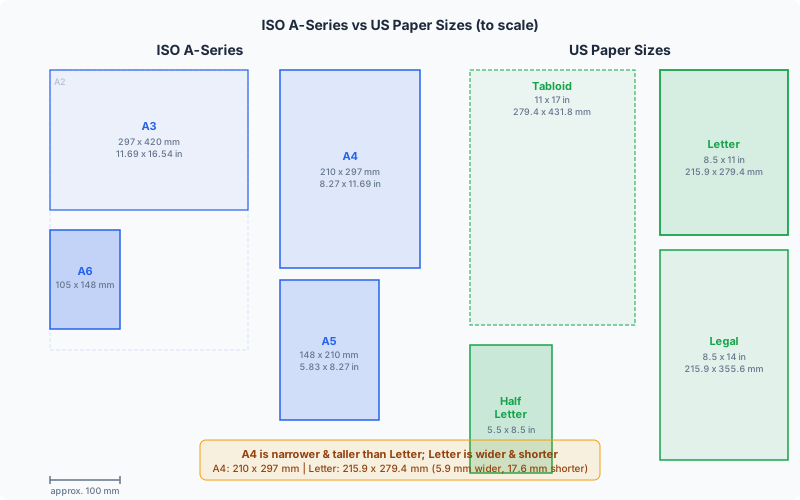
ISO A-Series Paper Sizes (A0 Through A10)
The ISO 216 A-series is an elegant mathematical system based on a single principle: each size is exactly half the area of the next larger size, achieved by cutting the longer dimension in half. This means an A1 sheet cut in half yields two A2 sheets, an A2 cut in half yields two A3 sheets, and so on. The aspect ratio of every A-size sheet is 1:sqrt(2) (approximately 1:1.414), which is the only ratio that preserves itself when the sheet is halved.
The base size, A0, is defined as having an area of exactly 1 square meter (with the 1:sqrt(2) aspect ratio, this works out to 841 x 1189 mm). From there, every subsequent size is derived by halving.
Here are the A-series sizes most commonly used in printing:
| Size | mm | Inches | PDF Points | Common Uses |
|---|---|---|---|---|
| A0 | 841 x 1189 | 33.11 x 46.81 | 2384 x 3370 | Technical drawings, large posters |
| A1 | 594 x 841 | 23.39 x 33.11 | 1684 x 2384 | Architectural plans, event posters |
| A2 | 420 x 594 | 16.54 x 23.39 | 1191 x 1684 | Posters, diagrams, large calendars |
| A3 | 297 x 420 | 11.69 x 16.54 | 842 x 1191 | Tabloid printing, menus, large brochures |
| A4 | 210 x 297 | 8.27 x 11.69 | 595 x 842 | Documents, letters, forms, flyers |
| A5 | 148 x 210 | 5.83 x 8.27 | 420 x 595 | Booklets, notebooks, flyers |
| A6 | 105 x 148 | 4.13 x 5.83 | 298 x 420 | Postcards, pocket books, invitations |
| A7 | 74 x 105 | 2.91 x 4.13 | 210 x 298 | Pocket cards, mini flyers |
The beauty of this system for imposition is its perfect nesting. An A3 sheet can be imposed with exactly two A4 pages. An A2 sheet accommodates four A4 pages. An A1 sheet holds eight A4 pages. There is zero waste from size mismatch -- the geometry is mathematically perfect. This is why the A-series dominates international commercial printing.
SRA sizes (SRA0 through SRA4) are slightly oversized versions of the A-series, designed specifically for commercial printing. SRA3 (320 x 450 mm), for example, is large enough to print an A3 page with full 3mm bleed on all sides plus room for trim marks and gripper edge. If you are sending files to a commercial printer in any ISO-standard country, you should understand SRA sizes because they define the actual press sheet used.
ISO B-Series and C-Series Sizes
The B-series fills the gaps between A-series sizes. Each B-size is the geometric mean of the corresponding A-size and the next larger A-size. For example, B4 (250 x 353 mm) falls between A4 (210 x 297 mm) and A3 (297 x 420 mm). B-series sizes are commonly used for:
- B5 (176 x 250 mm / 6.93 x 9.84 in): Books, magazines, and journals. Many international publishers use B5 as their standard book trim size because it is slightly larger than A5 but more manageable than A4.
- B4 (250 x 353 mm / 9.84 x 13.90 in): Newspapers, atlases, and oversized documents.
- B6 (125 x 176 mm / 4.92 x 6.93 in): Pocket-sized books, passports (passports use a B7 variant).
The C-series is designed specifically for envelopes. Each C-size envelope is sized to hold the corresponding A-size sheet. A C4 envelope (229 x 324 mm) holds an unfolded A4 sheet. A C5 envelope (162 x 229 mm) holds an A4 sheet folded once. A C6 envelope (114 x 162 mm) holds an A4 sheet folded twice, or an unfolded A6 card.
This elegant relationship between the three series -- A for documents, B for intermediate sizes, C for envelopes -- means that a designer working in the ISO system never has to guess what envelope fits what sheet. The entire system is mathematically self-consistent.
US Paper Sizes: Letter, Legal, Tabloid, and More
The North American paper size system is based on historical conventions rather than mathematical principles. The sizes evolved from traditional papermaking and were later standardized (loosely) by ANSI. Unlike the ISO system, US sizes do not have a consistent aspect ratio, and halving one size does not yield the next smaller size.
| Size | Inches | mm | PDF Points | Common Uses |
|---|---|---|---|---|
| Letter | 8.5 x 11 | 215.9 x 279.4 | 612 x 792 | General documents, office printing |
| Legal | 8.5 x 14 | 215.9 x 355.6 | 612 x 1008 | Legal documents, contracts |
| Tabloid (Ledger) | 11 x 17 | 279.4 x 431.8 | 792 x 1224 | Newspapers, large brochures, spreads |
| Half Letter | 5.5 x 8.5 | 139.7 x 215.9 | 396 x 612 | Booklets, flyers, handouts |
| Executive | 7.25 x 10.5 | 184.2 x 266.7 | 522 x 756 | Memos, executive stationery |
| Government Letter | 8 x 10.5 | 203.2 x 266.7 | 576 x 756 | Government forms |
ANSI engineering sizes extend the system for technical drawings: ANSI A (same as Letter), ANSI B (same as Tabloid), ANSI C (17 x 22 in), ANSI D (22 x 34 in), and ANSI E (34 x 44 in). Starting from ANSI B, each size is double the previous one, finally giving the US system some mathematical consistency -- but only for engineering applications.
For imposition purposes, the most important US sizes are Letter and Tabloid. Tabloid is exactly two Letter sheets side by side (11 x 17 = two 8.5 x 11 sheets in landscape). This makes Tabloid the natural press sheet for 2-up Letter impositions and for saddle-stitched booklets with Letter-sized pages.
Note that "Tabloid" and "Ledger" refer to the same physical size (11 x 17 inches). The difference is orientation: Tabloid is portrait (11 wide, 17 tall), Ledger is landscape (17 wide, 11 tall). In PDF and imposition, they are identical -- the orientation is simply a matter of rotation.
A4 vs Letter: The Critical Differences
The A4 vs Letter distinction is the most practically important paper size difference in the world, and it causes more confusion, reprints, and wasted paper than any other paper size issue. If you work internationally -- or if your clients, colleagues, or vendors are in different countries -- you must understand these differences deeply.
Dimensional comparison:
- A4: 210 x 297 mm (8.27 x 11.69 in) -- 595.28 x 841.89 PDF points
- Letter: 215.9 x 279.4 mm (8.5 x 11 in) -- 612 x 792 PDF points
Letter is 5.9 mm wider and 17.6 mm shorter than A4. This means:
- An A4 document printed on Letter paper will have extra space on the sides but clipped content at the bottom (17.6 mm of content lost) if printed at 100% scale without repositioning.
- A Letter document printed on A4 paper will have extra space at the bottom but clipped content on the right side (5.9 mm lost) if printed at 100% scale.
- PDF viewers typically handle this by auto-scaling to "Fit," but this changes the dimensions of your printed output -- potentially ruining precisely sized elements like business cards, labels, or technical drawings.
Impact on imposition: When imposing documents for international distribution, always verify which paper size your source PDF uses and which paper size the recipient will print on. PDF Press lets you set the target paper size independently from the source, and its preview shows you exactly how pages will fit -- preventing costly surprises at the press.
Impact on booklet imposition: An A4 booklet imposed on A3 paper nests perfectly (A3 = 2x A4). A Letter booklet imposed on Tabloid paper also nests perfectly (Tabloid = 2x Letter). But a Letter booklet on A3 paper, or an A4 booklet on Tabloid, will have asymmetric margins and potentially insufficient bleed space. Always match the size families: A-series with A-series, US with US.
PDF default page size: Most PDF creation tools default to the system's regional paper size. A document created on a US-locale system typically defaults to Letter (612 x 792 pt). A document created on a European-locale system defaults to A4 (595.28 x 841.89 pt). Always check the actual PDF page dimensions before imposing -- do not assume.
Press Sheet Sizes for Commercial Printing
Commercial offset presses and large-format digital presses use sheet sizes much larger than the finished product. Understanding press sheet sizes is essential for efficient imposition because the press sheet determines how many finished pages or items can be imposed per impression.
Common commercial press sheet sizes:
| Name | mm | Inches | Typical Press Format |
|---|---|---|---|
| SRA3 | 320 x 450 | 12.6 x 17.7 | Small digital / small offset |
| SRA2 | 450 x 640 | 17.7 x 25.2 | Half-size offset |
| SRA1 | 640 x 900 | 25.2 x 35.4 | Full-size offset |
| SRA0 | 900 x 1280 | 35.4 x 50.4 | Large-format offset |
| 23 x 35 in | 584 x 889 | 23 x 35 | US 25-inch press |
| 25 x 38 in | 635 x 965 | 25 x 38 | US 40-inch press |
| 28 x 40 in | 711 x 1016 | 28 x 40 | Full-size US offset |
When planning an imposition layout, you must account for the non-printable areas on the press sheet: the gripper edge (typically 10-15 mm at the leading edge), side lay margins, and the tail area where color bars are placed. The actual printable area is always smaller than the full sheet size.
For example, on an SRA3 sheet (320 x 450 mm), after subtracting a 12 mm gripper edge, 5 mm side margins, and 8 mm for color bars at the tail, the usable area is approximately 310 x 430 mm. This comfortably fits one A3 page with 3 mm bleed on all sides -- which is exactly why SRA3 exists.
PDF Press supports custom paper sizes up to any dimension, letting you accurately model your press sheet and impose pages with precise control over all margins and allowances.
Custom and Specialty Paper Sizes
Not everything fits neatly into standard sizes. Many printed products use custom dimensions, and understanding how to work with them is essential for professional imposition.
Business cards:
- US/Canada: 3.5 x 2 in (89 x 51 mm) -- the dominant standard
- Europe (ISO 7810 ID-1): 85.6 x 53.98 mm (3.37 x 2.13 in) -- matches credit card size
- Japan: 91 x 55 mm (3.58 x 2.17 in)
Postcards:
- US standard: 4 x 6 in (102 x 152 mm) -- fits 4-up on Tabloid
- A6 postcard: 105 x 148 mm -- the international standard, fits 4-up on A4
- EDDM (Every Door Direct Mail): 6.25 x 9 in, 6.5 x 12 in, or other USPS-approved sizes
Envelopes: #10 (4.125 x 9.5 in), A7 (5.25 x 7.25 in), 6x9 (6 x 9 in), C4, C5, C6, DL (110 x 220 mm)
Book trim sizes:
- Mass market paperback: 4.25 x 6.87 in (108 x 175 mm)
- Trade paperback: 6 x 9 in (152 x 229 mm)
- Digest: 5.5 x 8.5 in (140 x 216 mm)
- Royal: 156 x 234 mm (UK standard)
- Crown Quarto: 189 x 246 mm (UK academic)
When working with custom sizes, always design at the exact trim size plus bleed (typically 3 mm / 0.125 in on each edge). Then use imposition software to arrange these custom-sized pages on your press sheet. PDF Press handles any custom dimension -- you simply enter the width and height, and the tool calculates the optimal arrangement including crop marks and bleed allowances.
Paper Sizes in PDF Files: Points, MediaBox, and TrimBox
PDF files define page dimensions in PDF points, where 1 point = 1/72 inch = 0.3528 mm. This is the native unit of the PDF coordinate system, inherited from PostScript. When you open a PDF in any viewer, the displayed "page size" is derived from these point values.
A PDF page has several "boxes" that define different boundaries:
- MediaBox: The full extent of the page -- the total media size. This is the outermost boundary and defines the coordinate space. For a finished A4 document with bleed, the MediaBox might be 601.28 x 847.89 pt (3 mm bleed on each side beyond the A4 trim).
- TrimBox: The intended finished size after trimming. For our A4 example, the TrimBox would be 595.28 x 841.89 pt (the actual A4 dimensions). This is what imposition software uses to position pages correctly.
- BleedBox: The extent of the bleed area (ink that extends beyond the trim for safety). Typically 3 mm (8.5 pt) larger than the TrimBox on each side.
- CropBox: The region displayed when viewing in a PDF reader. Often the same as the TrimBox or MediaBox.
For imposition, the TrimBox is the most important box. It tells the imposition engine exactly where the finished page boundaries are, allowing it to position pages with correct spacing, add crop marks at the right locations, and calculate bleed overlap. If your PDF does not have a TrimBox defined, most imposition tools will fall back to the MediaBox -- which may include extra bleed area, potentially causing oversize output.
Common PDF point values to memorize:
- A4: 595.28 x 841.89 pt
- Letter: 612 x 792 pt
- A3: 841.89 x 1190.55 pt
- Tabloid: 792 x 1224 pt
- Legal: 612 x 1008 pt
When you use PDF Press, it automatically reads the page dimensions from your PDF and displays them. You can verify the source page size before choosing your target sheet size, ensuring a correct imposition every time.
Choosing the Right Paper Size for Your Project
Selecting the optimal paper size requires balancing multiple factors. Here is a practical decision framework:
1. Determine finished size first. Start with the end product. A business card must be 3.5 x 2 in. A magazine is typically A4 or Letter. A poster might be A2 or 18 x 24 in. The finished size is driven by the product's purpose, industry conventions, and end-user expectations.
2. Work backward to press sheet size. Once you know the finished size, calculate how many units fit on available press sheets. For business cards (3.5 x 2 in) on a Tabloid sheet (11 x 17 in): 11/3.5 = 3 across, 17/2 = 8 down, for 24-up. On an SRA3 sheet: 320/89 = 3 across, 450/51 = 8 down, also 24-up. Use n-up imposition to maximize yield.
3. Account for press requirements. Subtract gripper edge (10-15 mm), side lay margins (3-5 mm), and color bar space (8-12 mm) from the press sheet. The remaining area is your actual printable zone.
4. Include bleed and trim marks. Each imposed page needs bleed (typically 3 mm per edge) and space for crop marks (typically 3-5 mm beyond the bleed). Factor these into your layout calculations.
5. Consider grain direction. Paper has a grain direction (machine direction) that affects folding quality. For booklets, the grain should run parallel to the spine. Your press sheet orientation may need to rotate to achieve correct grain alignment -- affecting how many pages fit per sheet.
6. Think about postal regulations. For mailed pieces, the finished dimensions must comply with postal standards. In the US, USPS letter-rate mail must be between 3.5 x 5 in and 6.125 x 11.5 in, with a minimum thickness of 0.007 in. Oversized pieces incur higher postage.
PDF Press simplifies this entire process. Upload your PDF, select your target paper size (or enter custom dimensions), and the tool instantly shows you the optimal layout with proper margins, bleed, and marks. You can experiment with different paper sizes in seconds to find the most efficient arrangement.
Paper Size Unit Conversions Reference
Print professionals constantly convert between millimeters, inches, and PDF points. Here are the conversion factors:
- 1 inch = 25.4 mm = 72 PDF points
- 1 mm = 0.03937 inches = 2.835 PDF points
- 1 PDF point = 0.3528 mm = 1/72 inch = 0.01389 inches
Quick mental math shortcuts:
- mm to points: multiply by 2.835 (or roughly multiply by 3 and subtract 5%)
- inches to points: multiply by 72
- points to mm: divide by 2.835 (or roughly divide by 3 and add 5%)
- mm to inches: divide by 25.4 (or roughly divide by 25)
Common bleed values across units:
- Standard bleed: 3 mm = 0.125 in = 8.504 pt
- Heavy bleed (packaging): 5 mm = 0.197 in = 14.17 pt
- Minimum bleed (digital): 2 mm = 0.079 in = 5.67 pt
When working with imposition software, always verify which unit system the tool uses. PDF Press supports inches, millimeters, and points, and lets you switch between them at any time without losing precision. Internally, all PDF processing operates in points, ensuring mathematical accuracy regardless of your preferred display unit.
Working with International Paper Sizes
If you produce print materials for international audiences, you will inevitably encounter paper size conflicts. Here are the most common scenarios and how to handle them:
Designing for both A4 and Letter: Create a "safe zone" layout that prints correctly on both sizes. Since A4 is narrower but taller, and Letter is wider but shorter, the common printable area is approximately 210 x 279 mm (8.27 x 11 in). Keep all critical content within this zone. Use at least 15 mm (0.6 in) margins on all sides for safety.
Cross-border booklet production: If the same booklet must be printed in both A4 and Letter markets, design at A4 size (the narrower sheet) and allow the Letter printing to have wider side margins. Alternatively, produce two versions of the imposed file -- one for A3 press sheets (A4 booklets) and one for Tabloid press sheets (Letter booklets).
Japanese and Asian sizes: Japan uses both JIS B-series (slightly different from ISO B-series) and unique sizes like Shiroku-ban (264 x 379 mm) and Kiku-ban (227 x 306 mm). China uses the D-series alongside ISO A-series. Always confirm exact dimensions with your local printer rather than assuming ISO compliance.
PDF submission best practices: When submitting PDFs to an international printer, always include a TrimBox that defines the exact finished size. Embed fonts, convert colors to CMYK, and include 3 mm bleed. These precautions prevent the printer from having to guess your intended size, which is especially important when the recipient's default paper size differs from yours.
Try it yourself
PDF Press runs entirely in your browser. Upload a PDF, pick a tool, and download the result — fast and private.
Open PDF Press22 Professional Imposition Tools
Every tool runs locally in your browser — fast, private, and professional-grade.
Frequently Asked Questions
Related Articles
Ready to try professional PDF imposition?
PDF Press is a browser-based imposition tool with 22 professional tools. No installation required.
Open PDF Press