How to Print Postcards: Sizes, Layout & USPS Mail Requirements
Complete guide to printing postcards from PDF. Covers USPS-compliant sizes (4x6, 5x7, 6x9, 6x11), mailing requirements, address panel layout, barcode clear zones, EDDM, 2-up and 4-up imposition, paper stock, and coating options.
Why Postcards Still Matter in a Digital World
Postcards are one of the most cost-effective forms of direct mail marketing. They require no envelope, no folding, and no opening -- the recipient sees your message the instant they pick up their mail. Response rates for direct mail postcards consistently outperform email marketing, with the Data & Marketing Association reporting a 4.4% response rate for direct mail compared to 0.12% for email. For local businesses, real estate agents, restaurants, event promoters, and nonprofits, postcards deliver measurable return on investment.
Beyond marketing, postcards serve as event invitations, appointment reminders, thank-you notes, save-the-dates, and personal correspondence. The tactile quality of a physical card creates a connection that a digital message cannot replicate.
This guide covers everything you need to know to produce print-ready postcards: USPS-compliant sizes and mailing requirements, international standards, imposition layouts for efficient printing, paper stock selection, coating options, and step-by-step instructions for creating imposed postcard PDFs using PDF Press. Whether you are printing 50 postcards on a home printer or preparing files for a 100,000-piece EDDM campaign, the production fundamentals are the same.
USPS Postcard Sizes and Mailing Classes
The United States Postal Service defines specific size ranges for postcards. Using a non-compliant size means your piece may be reclassified to a higher postage rate -- or rejected entirely. Understanding these requirements before designing saves both money and production headaches.
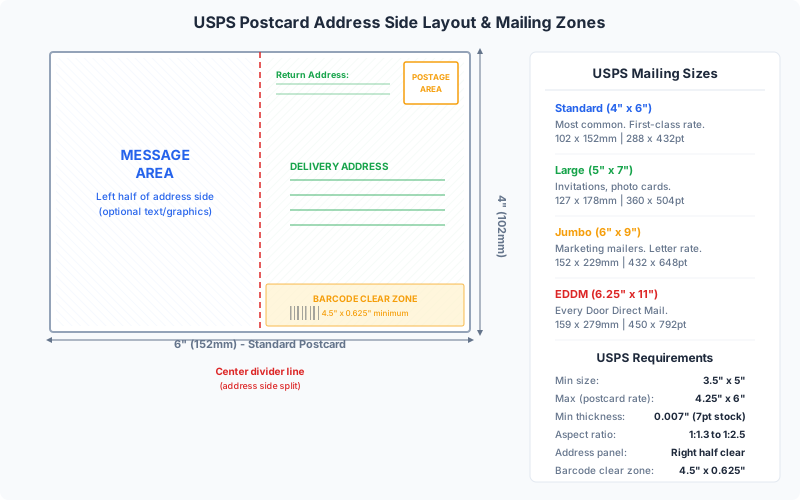
First-Class Mail Postcards (lowest postage rate)
To qualify for the USPS First-Class postcard rate (the cheapest single-piece mailing rate), your piece must meet all of these requirements:
- Minimum size: 3.5 x 5 inches (88.9 x 127 mm)
- Maximum size: 4.25 x 6 inches (107.95 x 152.4 mm)
- Minimum thickness: 0.007 inches (7 pt / approximately 200 gsm)
- Maximum thickness: 0.016 inches (16 pt / approximately 400 gsm)
- Aspect ratio: Length divided by height must be between 1.3 and 2.5
- Must be rectangular with square corners or corners with a radius not exceeding 1/8 inch
The most common postcard sizes used in the US market, with their mailing classifications:
| Size (inches) | Size (mm) | PDF Points | USPS Class | Common Use |
|---|---|---|---|---|
| 4 x 6 | 101.6 x 152.4 | 288 x 432 | First-Class postcard | Standard promotional postcard, the most popular size |
| 4.25 x 6 | 107.95 x 152.4 | 306 x 432 | First-Class postcard (max) | Slightly larger, maximum for postcard rate |
| 5 x 7 | 127 x 177.8 | 360 x 504 | First-Class letter rate | Greeting-card style, event invitations |
| 6 x 9 | 152.4 x 228.6 | 432 x 648 | First-Class flat / Marketing Mail | Large-format direct mail, real estate mailers |
| 6 x 11 | 152.4 x 279.4 | 432 x 792 | First-Class flat / Marketing Mail | Jumbo postcards, high-impact direct mail |
| 6.25 x 9 | 158.75 x 228.6 | 450 x 648 | EDDM (Every Door Direct Mail) | Local mass mailing without address lists |
| 6.5 x 9 | 165.1 x 228.6 | 468 x 648 | EDDM | Exceeds letter-size minimum for EDDM flat |
Important: Postcards larger than 4.25 x 6 inches do NOT qualify for the First-Class postcard rate. A 5 x 7 inch card mails at the First-Class letter rate (more expensive). A 6 x 9 or 6 x 11 inch card mails as a flat or at Marketing Mail (formerly Standard Mail) rates. Always verify current USPS rates at usps.com before finalizing your size, as rates and size classifications are updated periodically.
USPS Mailing Layout Requirements
Beyond size, the USPS has specific requirements for how the address side of a mailed postcard must be laid out. Non-compliant layouts can result in mail being returned, delayed, or surcharged.
Address Panel (Right Half)
The right half of the address side must be reserved for the delivery address, postage, and USPS barcode. Specifically:
- The delivery address block should be positioned in the lower-right portion of the right half. Minimum recommended distance from the bottom edge: 5/8 inch (15.875 mm). Minimum from the right edge: 1/2 inch (12.7 mm).
- The address must be printed in a readable font at a minimum of 8pt size, in dark ink on a light background. The USPS optical character readers (OCR) require high contrast to scan addresses reliably.
- The address should be formatted in all caps with no punctuation for optimal OCR readability, though mixed case is also accepted.
Barcode Clear Zone
A clear zone of 4.75 x 0.625 inches (120.65 x 15.875 mm) must be maintained at the bottom of the address side for the Intelligent Mail Barcode (IMb). This area must be free of printing, images, and design elements. The barcode is either preprinted by a mailing service or applied by USPS sorting equipment. If your design encroaches on this zone, the barcode cannot be read and your mail will be delayed or returned.
Return Address
The return address goes in the upper-left corner of the address side. While not technically required by USPS for postcards, it is strongly recommended -- undeliverable mail with no return address is simply discarded. The return address area should be at least 2 x 0.875 inches (50.8 x 22.225 mm).
Postage Area
The upper-right corner of the address side is reserved for the stamp, meter mark, or permit imprint. This area should be approximately 1.5 x 1 inch (38.1 x 25.4 mm) and left clear in your design. For bulk mailings using a permit imprint (indicia), the imprint is preprinted in this area.
Left Half of Address Side
The left half of the address side is available for your message, promotional content, coupon, or additional branding. There are no USPS restrictions on what appears in the left half, as long as it does not extend into the right-half address panel area. Many marketers use this space for a brief call-to-action, a QR code, or a small version of the front-side imagery.
Design Tip: When designing your postcard in PDF Press or any design tool, create the address side as a separate page in your PDF. Use a light or white background in the right half for optimal address readability. You can use color and imagery in the left half and on the entire front (non-address) side.
International Postcard Sizes and Mailing Standards
If you are mailing postcards internationally or producing cards for non-US markets, different size standards apply:
Universal Postal Union (UPU) International Standard
- Minimum: 90 x 140 mm (3.54 x 5.51 inches)
- Maximum: 120 x 235 mm (4.72 x 9.25 inches)
- Standard recommended size: 105 x 148 mm (A6 format, 4.13 x 5.83 inches)
The A6 size (105 x 148 mm) is the de facto international postcard standard. It is used across Europe, Asia, Africa, and most of the world outside North America. A6 is exactly one-quarter of an A4 sheet, which makes imposition straightforward: four A6 postcards fit perfectly on a single A4 sheet in a 2x2 grid with no waste.
Regional Variations
| Region | Common Size | mm | Inches | Notes |
|---|---|---|---|---|
| UK / Europe | A6 | 105 x 148 | 4.13 x 5.83 | Standard for Royal Mail and most European postal services |
| UK Large | A5 | 148 x 210 | 5.83 x 8.27 | Qualifies as "large letter" rate; popular for marketing |
| Germany | DIN Lang | 105 x 210 | 4.13 x 8.27 | Long format; fits DL envelopes; used for rack cards and mailers |
| Japan | Hagaki | 100 x 148 | 3.94 x 5.83 | Official Japan Post standard; slightly narrower than A6 |
| Australia | Standard | 105 x 148 | 4.13 x 5.83 | A6; Australia Post accepts up to 130 x 240 mm at letter rate |
| Canada | Standard | 102 x 152 | 4 x 6 | Same as US standard; Canada Post allows up to 150 x 245 mm |
When designing postcards for international mailing, always verify the postal service requirements of the destination country. Address formatting, stamp placement, and minimum thickness can vary. The Universal Postal Union website provides guidelines for international mail piece design.
Tip for Multi-Market Campaigns
If you need to produce postcards for both US and international markets, design at 4.25 x 6 inches (107.95 x 152.4 mm). This size qualifies for the USPS First-Class postcard rate AND falls within the UPU international postcard range, making it universally mailable. It is slightly larger than A6, so it stands out in European mailboxes where A6 is standard.
Postcard Imposition Layouts: 2-Up and 4-Up
Postcards are larger than business cards, so fewer fit on a standard sheet. The right imposition layout depends on your postcard size, sheet size, and whether you are printing single-sided or double-sided.
2-Up on US Letter (8.5 x 11 inches)
Two 4 x 6 inch postcards arranged side by side (landscape orientation) on a Letter sheet. Total card area is 8 x 6 inches, leaving 0.25 inches on each side and 2.5 inches top and bottom (or redistributed as margins). This layout is ideal for home and office printing, where Letter paper is the standard stock. With 3mm bleed, the total imposed area is 8.25 x 6.25 inches, still fitting comfortably on Letter. This is the most common layout for short-run postcard printing.
2-Up on A4 (210 x 297 mm)
Two A6 postcards (105 x 148 mm) arranged in a 1-column by 2-row layout on A4. Total card area is 105 x 296 mm, leaving 52.5 mm on each side and 0.5 mm top and bottom. Alternatively, arranged in a 2-column by 1-row layout: 210 x 148 mm, leaving no side margins but 74.5 mm top and bottom. The 1x2 portrait layout is preferred because it leaves room for crop marks on the sides.
4-Up on Tabloid (11 x 17 inches)
Four 4 x 6 inch postcards in a 2-column by 2-row grid on Tabloid. Total card area is 8 x 12 inches, leaving 1.5 inches on each side and 2.5 inches top and bottom. Tabloid 4-up is the standard layout for commercial digital printers handling moderate postcard runs. The generous margins accommodate crop marks, color bars, and gripper margins.
4-Up on A3 (297 x 420 mm)
Four A6 postcards in a 2x2 grid on A3. Total card area is 210 x 296 mm, leaving 43.5 mm on each side and 62 mm top and bottom. Perfect utilization of paper area with room for finishing marks.
4-Up 6x9 on 13x19 (Super B/A3+)
For larger 6 x 9 inch postcards, a 13 x 19 inch sheet accommodates a 2x2 grid: total card area is 12 x 18 inches, leaving 0.5 inches on each side and 0.5 inches top and bottom. This tight layout is used on wide-format digital presses and requires precise cutting. Some printers prefer a 2-up layout on 13 x 19 to allow more margin for crop marks.
Choosing the Right Layout
For quantities under 200, 2-up on Letter or A4 is practical and forgiving. For 200--1,000, 4-up on Tabloid or A3 halves the number of sheets and cuts. For quantities above 1,000, commercial printers typically impose 6-up, 8-up, or more on larger press sheets (12 x 18, 13 x 19, or even 20 x 26 inches) and use industrial cutting equipment. PDF Press supports all of these configurations through its Cards and Grid tools.
Step-by-Step: Creating Postcard Layouts with PDF Press
PDF Press is a browser-based PDF imposition tool. Your files are processed entirely in your browser and never uploaded to any server, ensuring complete privacy for your designs. Here is how to create a print-ready postcard layout:
Step 1: Prepare Your Postcard Design
Design your postcard at the correct trim size with 3mm (0.125 inch) bleed on all four sides. For a 4 x 6 inch postcard, the document size with bleed should be 4.25 x 6.25 inches. If the card is double-sided, create a two-page PDF: page 1 = front, page 2 = back (address side). Export as a high-resolution PDF at 300 DPI with CMYK color and embedded fonts.
Step 2: Upload to PDF Press
Open PDF Press in any modern browser. Drag your postcard PDF onto the upload area, or click to browse files. PDF Press immediately displays a preview of your postcard.
Step 3: Select the Cards Tool
Choose Cards from the tool panel. This tool is designed for step-and-repeat layouts -- the same design repeated in a grid across the sheet. It automatically calculates how many postcards fit on your chosen paper size.
Step 4: Set Paper Size
Select your target sheet: US Letter, A4, Tabloid, A3, or a custom size. For home printing, Letter or A4 is standard. For commercial output or larger postcards (5x7, 6x9), select Tabloid, A3, or enter custom dimensions matching your printer's sheet size.
Step 5: Configure Bleeds
Select "Pull from Document" if your PDF was exported with bleed (recommended). PDF Press will overlap the bleed areas of adjacent postcards, maximizing paper usage and ensuring clean edges after cutting. If your PDF has no bleed, select "No Bleeds" -- but be aware that slight cutting variance may leave white edges.
Step 6: Adjust Margins
Set outer margins to ensure content falls within your printer's printable area. Most desktop printers have a non-printable margin of 5--12mm. For commercial printing, leave at least 6mm for gripper margin on the leading edge. PDF Press lets you set top, bottom, left, and right margins independently.
Step 7: Enable Crop Marks
Turn on crop marks for precise cutting guides. For mailed postcards that must meet exact USPS size requirements, accurate cutting is essential -- a postcard that is even 1/16 inch oversize may be classified at a higher postage rate.
Step 8: Preview, Verify, and Download
PDF Press shows a real-time preview of your imposed layout. Scroll through output sheets to verify alignment, bleed overlap, and crop mark placement. For double-sided postcards, confirm that the front and back sheets are properly paired for duplex printing. Download the final PDF -- it is ready to print or send to your commercial printer.
Paper Stock and Coating for Postcards
Paper choice is even more critical for postcards than for business cards, because postcards are exposed to the elements during mailing -- they pass through sorting machines, sit in mailboxes in varying weather conditions, and are handled multiple times before reaching the recipient. The paper must be durable enough to survive this journey while presenting your message attractively.
Paper Weight Requirements
USPS requires mailed postcards to be at least 0.007 inches thick (7pt), which corresponds to approximately 200 gsm uncoated or 250 gsm coated paper. However, the industry standard for professional mailed postcards is significantly higher:
| Weight | Thickness | Use Case | Notes |
|---|---|---|---|
| 250 gsm / 10pt | 0.010" | Budget postcards, inserts | Meets USPS minimum; feels thin for standalone mailing |
| 300 gsm / 12pt | 0.012" | Standard direct mail postcards | Good balance of cost and durability |
| 350 gsm / 14pt C2S | 0.014" | Professional marketing postcards | Industry standard; C2S = coated two sides |
| 400 gsm / 16pt C2S | 0.016" | Premium postcards, photo cards | Maximum allowed by USPS; feels substantial and premium |
| 130 gsm cover + laminate | varies | Laminated postcards | Thinner stock laminated for durability; can exceed 16pt |
The gold standard for mailed postcards is 14pt C2S (Coated 2 Sides). The "C2S" designation means the paper has a smooth clay coating on both sides, which provides excellent ink holdout, vibrant color reproduction, and a professional feel. For postcards printed on only one side (with the address side left uncoated for easy writing), 14pt C1S (Coated 1 Side) is an option -- glossy front, matte writable back.
Coatings and Finishes
After printing, postcards typically receive a protective coating:
- UV Coating (Ultra-Violet) -- a high-gloss liquid coating cured by UV light. Provides excellent scuff resistance, vibrant color enhancement, and a "wet look" shine. UV coating is the most popular finish for marketing postcards because it protects the card during mail processing and makes colors pop. Can be applied to one side (front only) or both sides. Note: UV-coated surfaces cannot be written on with most pens -- use UV on the front only if the back needs to be writable.
- Aqueous Coating -- a water-based coating that provides moderate protection and a satin or matte finish. Less glossy than UV but more environmentally friendly. Dries quickly and is writeable. A good all-around choice when you want protection without extreme gloss.
- Matte or Silk Laminate -- a thin plastic film bonded to the paper surface. Provides the best protection against moisture, fingerprints, and scuffing. Matte laminate gives a sophisticated, non-reflective finish; silk laminate offers a subtle sheen. More expensive than liquid coatings but significantly more durable. Commonly used for premium real estate mailers and cards that need to withstand rough handling.
- Spot UV -- UV coating applied selectively to specific areas of the design (logos, headlines, photos) while the rest of the card remains matte. Creates a striking contrast between shiny and matte surfaces. Often used for high-end promotional postcards to draw attention to key visual elements.
- No Coating (Uncoated) -- for a natural, tactile feel. Uncoated postcards absorb ink more, resulting in less vivid colors, but they have an organic, handmade quality that works well for artisanal brands, letterpress printing, and personal correspondence. Uncoated stock is fully writable on both sides.
For Home Printing
When printing postcards at home, use card stock rated for your printer type (inkjet or laser). Most office supply stores carry 250--300 gsm card stock in Letter and A4 sizes. After printing, you can apply a clear spray fixative (like Krylon UV-Resistant Clear Coating) to protect the print from smearing and moisture. For mailing, ensure your total card thickness meets the USPS 7pt minimum -- most 250 gsm card stock meets this requirement.
Every Door Direct Mail (EDDM) Postcards
EDDM is a USPS program that allows businesses to send mail to every address on a postal carrier route without needing a mailing list or individual addresses. It is the most accessible entry point for direct mail marketing -- no mailing permit, no address database, no bulk mail sorting. You design your piece, choose the carrier routes you want to target, and the post office delivers to every door on those routes.
EDDM Size Requirements
EDDM pieces must exceed at least one of the following dimensions to qualify as a "flat" (as opposed to a letter):
- Height greater than 6.125 inches, OR
- Length greater than 11.5 inches, OR
- Thickness greater than 0.25 inches
Additionally, EDDM pieces must not exceed: 12 x 15 inches, and must weigh no more than 3.3 ounces.
The most popular EDDM postcard sizes are:
| Size | mm | PDF Points | Why It's Popular |
|---|---|---|---|
| 6.25 x 9 | 158.75 x 228.6 | 450 x 648 | Smallest size that exceeds the 6.125" height threshold |
| 6.5 x 9 | 165.1 x 228.6 | 468 x 648 | Slightly larger; popular for restaurants and salons |
| 8.5 x 11 | 215.9 x 279.4 | 612 x 792 | Full Letter size; maximum visual impact in the mailbox |
| 6.5 x 12 | 165.1 x 304.8 | 468 x 864 | Panoramic format; stands out among standard mail |
EDDM Addressing
EDDM pieces do not have individual recipient addresses. Instead, they are addressed to "Local Postal Customer" or "Residential Customer". This generic address must appear in the delivery address area on the address side. Your return address is still required in the upper-left corner.
EDDM Postage
As of 2026, EDDM Retail postage is approximately $0.223 per piece (verify at usps.com for current rates). There are no annual mailing permit fees for EDDM Retail. You can drop off your mailing at your local post office, or use an EDDM partner like Every Door Direct Mail by USPS.com to manage the process online. Minimum mailing quantity: 200 pieces per carrier route. Maximum: 5,000 pieces per day per zip code.
Imposition for EDDM
Because EDDM postcards are larger (6.25 x 9 inches is the minimum), they require larger press sheets for multi-up imposition. A 6.25 x 9 inch card fits 2-up on a 13 x 19 inch sheet (12.5 x 9 inches of card area plus margins) or 4-up on a 19 x 25 inch commercial press sheet. For home printing, these sizes typically require printing one card per Letter or Tabloid sheet and trimming to size, which is practical only for small proof runs. For EDDM campaign quantities (200+ per route), use a commercial print service.
Double-Sided Postcard Printing and Duplex Alignment
Nearly all postcards are double-sided: a full-color front with imagery and a call-to-action, and a back with the mailing address panel, return address, message area, and postage indicia. Getting both sides to align correctly during printing is essential.
File Preparation for Double-Sided Postcards
Create your postcard as a two-page PDF:
- Page 1: Front (full bleed, typically full-color imagery, headline, and offer)
- Page 2: Back (address side, with right-half address panel, left-half message area, barcode clear zone)
Both pages must be the same dimensions, including identical bleed on all four sides. This ensures that when the sheet is flipped for back-side printing, the front and back align precisely.
Duplex Printing Methods
- Automatic duplex: Many home and office printers support automatic duplexing -- they print one side, pull the paper back in, flip it, and print the second side. The alignment accuracy varies by printer model; expect 1--3mm of registration variance. Test with a single sheet before printing a batch.
- Manual duplex: Print all front sides first, then reload the stack into the paper tray (face up or face down, depending on your printer) and print the back sides. This gives you more control but requires understanding your printer's paper path and which way to reload.
- Commercial printing: Professional printers use sheet-fed or web-fed presses with precision registration systems. They print both sides in a single pass (perfecting press) or in two passes with mechanical pin registration. Front-to-back accuracy is typically within 0.3--0.5mm.
Imposition for Duplex Postcards
When you impose a two-page postcard PDF using PDF Press's Cards tool, the output has the front grid on sheet 1 and the back grid on sheet 2, arranged so that each front card aligns with its corresponding back card when the sheet is printed duplex. The back layout accounts for the flip direction -- if your printer flips along the long edge, the back grid is mirrored horizontally; if along the short edge, it is mirrored vertically.
Registration Tip
For mailed postcards, front-to-back registration matters less than for business cards because the back is mostly text-based (address, message). As long as the address panel falls within the correct zone and the barcode clear area is unobstructed, slight registration variance is acceptable. However, if your back design includes full-bleed imagery or a design that must align with the front (such as a wraparound photo), precision registration becomes critical -- in that case, commercial printing is recommended.
Postcard Design Tips for Maximum Impact
A well-designed postcard communicates its message in under three seconds -- the average time a recipient spends deciding whether to read further or discard it. Here are design principles that directly affect print quality and mail effectiveness:
Front Side (Full Impact)
- One dominant image. Use a single strong photograph or illustration that fills most of the front. Multiple competing images dilute the visual impact. The image should be 300 DPI at final print size.
- One clear headline. Large, bold text that communicates the core message or offer. Keep it to 5--8 words maximum. The headline should be readable from arm's length.
- Call-to-action. A single, specific action you want the recipient to take: "Visit our open house Saturday," "Use code SAVE20 at checkout," or "Scan for 50% off." Place the CTA where the eye naturally travels after the headline.
- Full bleed. Always design postcards with full-bleed artwork extending to all edges. A white border makes the card look like it was printed at home (even if it was printed commercially). Full bleed = professional appearance.
Back Side (Address Panel)
- Respect the USPS layout. Keep the right half reserved for address, postage, and barcode. Do not let design elements encroach on these areas.
- Left half messaging. Use the left half for your secondary message, offer details, QR code, map, hours of operation, or social media handles. Keep the text concise -- this is not a brochure.
- Light background behind the address. The address area must have high contrast for OCR readability. White or very light background with black text is safest.
- Writable surface. If you want recipients (or your staff) to write on the back, leave the coating off the back side or use aqueous coating, which accepts most pen inks.
Color and Resolution
- Design in CMYK color mode for commercial printing. Home printers accept RGB, but CMYK gives more predictable color output.
- All images at 300 DPI minimum at final print size. For a 4 x 6 postcard, that means images should be at least 1200 x 1800 pixels.
- Rich black (C:40 M:30 Y:30 K:100) for large black areas instead of pure K:100 black, which can appear washed out on coated stock.
- Avoid large areas of solid, very light colors (5--10% tint), which can show uneven ink coverage or banding on digital presses.
Tracking Response
Include a tracking mechanism to measure your postcard's effectiveness: a unique URL, QR code, promo code, dedicated phone number, or "mention this postcard" offer. Without tracking, you cannot calculate ROI or compare the performance of different designs, lists, or routes.
Postcard Printing Costs and Quantity Planning
Understanding cost structures helps you plan quantities and choose between home printing and professional services.
Home Printing Cost Breakdown
- Paper: 300 gsm card stock, approximately $0.10--0.25 per Letter sheet (2 postcards per sheet = $0.05--0.13 per card for paper).
- Ink/Toner: Full-coverage color on one side costs approximately $0.15--0.40 per card (inkjet) or $0.08--0.20 per card (laser), depending on coverage and ink/toner cost.
- Total home cost: $0.20--0.55 per 4x6 postcard, single-sided. Double-sided roughly doubles ink cost.
- Software: $0 -- PDF Press is free for imposition, and free design tools like Canva can create the postcard itself.
Commercial Printing Costs (approximate, 2026 US market)
| Quantity | Size | Stock | Cost per Card | Total |
|---|---|---|---|---|
| 250 | 4 x 6 | 14pt C2S gloss UV | $0.08--0.15 | $20--38 |
| 500 | 4 x 6 | 14pt C2S gloss UV | $0.04--0.10 | $20--50 |
| 1,000 | 4 x 6 | 14pt C2S gloss UV | $0.03--0.07 | $30--70 |
| 5,000 | 4 x 6 | 14pt C2S gloss UV | $0.02--0.04 | $100--200 |
| 1,000 | 6 x 9 | 14pt C2S gloss UV | $0.06--0.12 | $60--120 |
| 5,000 | 6.25 x 9 EDDM | 14pt C2S UV front | $0.03--0.06 | $150--300 |
Total Campaign Cost (printing + mailing)
For a direct mail campaign, the total cost includes printing, postage, and any mailing service fees:
- EDDM campaign (5,000 pieces, 6.25 x 9): Printing $150--300 + Postage $1,115 (at $0.223/piece) = $1,265--1,415 total, or approximately $0.25--0.28 per piece delivered.
- First-Class postcard (500 pieces, 4 x 6): Printing $20--50 + Postage $275 (at $0.55/piece) = $295--325 total, or approximately $0.59--0.65 per piece delivered.
EDDM delivers the lowest per-piece cost for local marketing because the postage rate is heavily discounted and there is affordable for address lists. The trade-off is that you cannot target specific demographics -- every address on the carrier route receives the piece.
Quantity Planning
Order 5--10% more postcards than you plan to mail to account for spoilage, test prints, and extras for in-store distribution. For EDDM, check the number of addresses on your target carrier routes at the EDDM website and order accordingly. Most commercial printers offer price breaks at 250, 500, 1,000, 2,500, 5,000, and 10,000 units.
Print-Ready Postcard Checklist
Before imposing or sending your postcard PDF to a printer, verify every item on this checklist:
- Correct trim size. PDF page dimensions match your intended postcard size (e.g., 4 x 6 inches = 288 x 432 points).
- Bleed present. Artwork extends at least 3mm (0.125 inches) beyond the trim on all four sides. Background colors and images must reach the bleed edge -- no white gaps.
- Safe zone. All text, logos, and critical content are at least 3--5mm inside the trim line. Nothing important is at risk of being cut off.
- USPS compliance (if mailing). Address panel in the right half of the back side. Barcode clear zone (4.75 x 0.625 inches) at the bottom. Return address in the upper-left. Postage area clear in the upper-right. Overall size within class requirements.
- CMYK color. Document color space is CMYK for commercial printing. Verify no RGB-only elements remain.
- 300 DPI images. All raster images are at least 300 DPI at final print size. Zoom to 300% and verify sharpness.
- Fonts embedded. All fonts show "Embedded" or "Embedded Subset" in the PDF font list.
- Two pages for double-sided. Page 1 = front. Page 2 = back. Both pages are the same size with identical bleed.
- No printer marks in source. The postcard PDF should be a clean design with no crop marks, registration marks, or color bars. These are added during imposition.
- Test print. Print a single copy at actual size, measure it, verify colors, confirm text readability, and (for mailed pieces) check that the address panel and barcode zone are positioned correctly.
PDF Press previews your imposed layout in real time, so you can catch most layout issues before downloading. But always print a physical test before committing to a full production run -- screen colors and physical colors never match exactly, and dimensional accuracy can only be verified with a ruler on a printed sheet.
Try it yourself
PDF Press runs entirely in your browser. Upload a PDF, pick a tool, and download the result — fast and private.
Open PDF Press22 Professional Imposition Tools
Every tool runs locally in your browser — fast, private, and professional-grade.
Frequently Asked Questions
Related Articles
Ready to try professional PDF imposition?
PDF Press is a browser-based imposition tool with 22 professional tools. No installation required.
Open PDF Press