Imposition Studio Alternative: Modern Web-Based Options in 2026
Looking for an Imposition Studio alternative? Compare DevaliPI's desktop imposition software with modern browser-based options. Features, pricing, system requirements, limitations, and a step-by-step migration guide to PDF Press.
What Is Imposition Studio?
Imposition Studio is a Windows desktop application developed by DevaliPI Software for professional prepress imposition. It arranges PDF pages onto press sheets so they print, fold, cut, and bind in the correct order. The software has been a staple in commercial printing for years, serving offset houses, book manufacturers, packaging converters, and large-format digital shops that need industrial-grade layout control.
At its core, Imposition Studio handles everything from basic n-up layouts to complex 32-page signature imposition for perfect binding. It supports variable data printing (VDP), advanced gang-up optimization, batch processing via hot folders, and integration with JDF-based workflow systems like Fiery, Prinect, and Prinergy. For high-volume offset operations that plate thousands of sheets per week, DevaliPI delivers the kind of automation that keeps presses running on schedule.
The software exposes a deep set of parameters: work-and-turn, work-and-tumble, sheetwise, perfecting configurations, gripper edges, plate identification marks, collation marks, custom slug lines, and more. Every setting a prepress professional might need is available somewhere in the interface — though finding it can require significant navigation through nested dialog boxes.
If you have arrived on this page, you are likely in one of several situations: you searched for "imposition studio download" looking for a quick solution, you are evaluating DevaliPI for the first time, you are an existing user exploring alternatives, or you need imposition software that works on a Mac or in a browser. This guide covers all of these scenarios with an honest comparison between Imposition Studio and modern alternatives — particularly PDF Press, a browser-based imposition tool that takes a fundamentally different approach to the same problem.
Imposition Studio Download and Installation Process
One of the most common searches related to this software is "imposition studio download" and "imposition studio free download." Understanding what is actually involved in getting the software running is important context for anyone evaluating their options.
Obtaining the Software
Imposition Studio is not available through standard software distribution channels like the Microsoft Store or a one-click download page. To obtain it, you typically need to:
- Visit the DevaliPI website and locate the product page for Imposition Studio
- Request a trial or contact the sales team for access to the installer
- Provide your business details and use case information
- Receive a download link and trial license key via email
This process can take anywhere from a few hours to several business days, depending on the sales team's response time and your time zone. For someone who needs to impose a PDF today, this delay is a meaningful barrier.
System Requirements
Imposition Studio runs exclusively on Windows. The typical requirements include:
- Windows 10 or later (64-bit)
- 4 GB RAM minimum (8 GB or more recommended for large files)
- 500 MB of disk space for the application
- Additional disk space for temporary files during processing
- .NET Framework or specific Visual C++ redistributables (varies by version)
Installation Steps
Once you have the installer, the process follows a standard Windows desktop application pattern: run the .exe, accept the license agreement, choose an installation directory, and enter your license key. Some versions require administrator privileges for installation, which can be a hurdle in managed corporate IT environments where users cannot install software without approval.
The "Free Download" Question
Searching for "imposition studio full version free download" is common but misleading. There is no legitimate free version of Imposition Studio. DevaliPI offers a time-limited trial (often with watermarked output), but the full production version requires a paid license. Websites offering "free full version downloads" of commercial software are almost certainly distributing pirated copies bundled with malware, ransomware, or data-harvesting code. Downloading and running such files puts your computer, your clients' confidential PDFs, and your network at serious risk.
If you need a genuinely browser-based imposition tool, PDF Press is a legitimate option — built for professionals, not by circumventing licensing. It runs in your browser, requires no download at all, and provides 23 imposition tools with no watermarks or time limits.
Imposition Studio Features and Capabilities
A fair evaluation requires understanding what Imposition Studio does well. DevaliPI built the software for a specific audience — high-volume commercial printing — and within that domain, it is a capable tool. Here is a breakdown of its core feature set:
Signature-Based Imposition
Imposition Studio excels at arranging pages into signatures for book production. It supports 4-up, 8-up, 16-up, and 32-up signature layouts with automatic page reordering for saddle-stitch binding, perfect binding, nested signatures, and gathered signatures. For book manufacturers producing runs of thousands of copies, this signature planning is essential and well-implemented.
Variable Data Printing (VDP)
The software can merge variable data fields — names, addresses, barcodes, serial numbers — directly into imposed layouts. This eliminates the need for a separate composition step when producing personalized direct mail, event badges, lottery tickets, or serialized packaging. VDP is one of DevaliPI's strongest differentiators.
Gang-Up Optimization
For shops combining multiple jobs on a single press sheet, Imposition Studio provides sophisticated gang-up optimization. The algorithm considers item sizes, quantities, paper waste, cutting patterns, margins, bleed overlap, and finishing requirements to maximize sheet utilization.
Batch Processing and Automation
Production environments need unattended processing. DevaliPI supports hot folder watching, scripted workflows, and command-line execution. Drop a PDF into a watched folder and the software applies a predefined template, processes the file, and outputs the imposed sheet — all without operator intervention.
Press Configuration Support
The software understands offset press configurations: work-and-turn, work-and-tumble, sheetwise, and perfecting. It handles gripper edges, plate planning, and press-specific constraints that simpler tools do not address.
Comprehensive Mark Toolkit
Beyond basic crop marks, Imposition Studio offers registration marks, color bars, fold marks, collation marks, signature marks, plate identification, and custom slug-line text — all configurable per template.
JDF/JMF Integration
For shops running JDF-based workflow systems, DevaliPI reads and writes JDF job tickets, allowing imposition parameters to flow from MIS (Management Information System) to Imposition Studio with reduced manual setup.
Limitations: Why Users Search for Alternatives
Despite its capabilities, Imposition Studio has structural limitations that increasingly push users toward alternatives. These are not minor inconveniences — they are fundamental constraints that affect daily usability for a growing segment of the market.
Windows-Only: No Mac, Linux, or Browser Support
Imposition Studio runs exclusively on Windows. There is no macOS version, no Linux build, no browser-based access, and no mobile support. In 2026, when design teams predominantly use Macs, prepress operators frequently work remotely, and print shops increasingly deploy Linux-based production infrastructure, a Windows-only tool creates workflow bottlenecks. The search volume for "imposition studio for Mac" reflects real demand that DevaliPI does not serve.
Steep Learning Curve
The software exposes hundreds of parameters across deeply nested dialog boxes. For experienced prepress operators with years of training, this depth is a feature. For new hires, freelancers, designers who impose PDFs occasionally, or self-publishers preparing a book for print-on-demand, the interface is overwhelming. Training time is measured in days or weeks, not minutes. The complexity tax applies to every job, regardless of whether you are imposing a 32-page signature or a simple 2-up flyer.
Opaque Pricing
DevaliPI does not publicly list Imposition Studio pricing. You must contact the sales team for a quote, which signals enterprise-level costs. Based on industry reports and user discussions, licenses typically cost several hundred to several thousand dollars, with annual maintenance fees of 15–25% for updates and support. For a small digital shop, freelancer, or occasional user, this investment is difficult to justify when free alternatives now cover the core workflow.
Dated User Interface
The Imposition Studio interface follows Windows desktop conventions from the mid-2000s: toolbar icons, modal dialog boxes, menu-driven navigation, and a fixed window layout. While functional, the density of the interface makes it harder to locate specific settings among dozens of competing options. Users accustomed to modern application design experience a jarring transition.
No Real-Time Interactive Preview
While DevaliPI provides a preview of imposed layouts, the feedback loop is slower than what modern browser-based tools deliver. Changing a parameter requires navigating to the correct dialog, modifying the value, confirming, and then waiting for the preview to regenerate. Compared to a live preview where every slider adjustment instantly updates the visual output, the difference in iteration speed is dramatic — and directly translates to wasted time on every job.
No Remote Access Without IT Infrastructure
There is no web version and no built-in remote access. Using Imposition Studio from home requires setting up Windows Remote Desktop, a VPN, or similar infrastructure — an IT project in itself. In an era when Figma, Canva, and Google Workspace have normalized browser-based creative workflows, a desktop-only tool with no remote capability feels a generation behind.
Overkill for Common Tasks
The vast majority of imposition tasks are straightforward: create a booklet, lay out business cards, impose a flyer 2-up, tile a poster. Imposition Studio's industrial-grade complexity means even these simple tasks require navigating the same interface designed for 32-page signature layouts. There is no simplified mode for basic jobs.
PDF Press: The Modern Web-Based Alternative
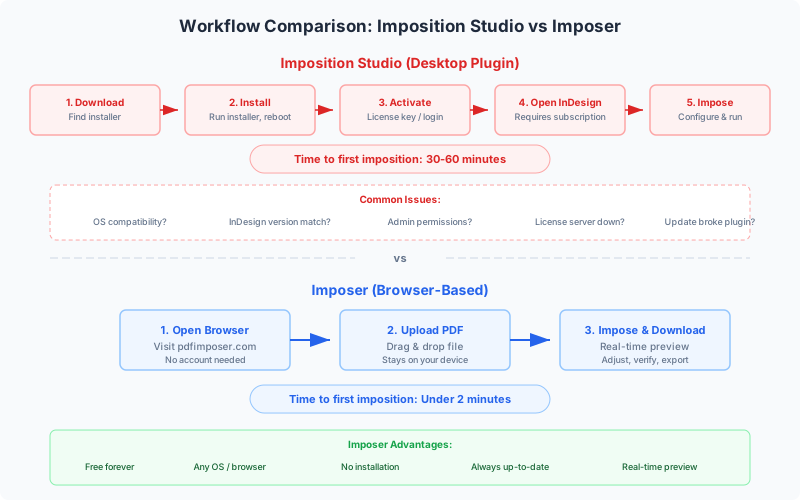
PDF Press represents a fundamentally different approach to PDF imposition. Instead of a Windows desktop application with industrial-era complexity, PDF Press is a browser-based tool powered by a compiled Rust/WebAssembly engine that processes PDFs at near-native speed — entirely on your device, with no file uploads and no server round-trips.
No Download Required
Open pdfpress.app in any browser tab and start imposing. There is no installer, no license key, no administrator privileges, no IT ticket, no Windows requirement, and no wait for a sales team to respond. If you searched for "imposition studio download," PDF Press eliminates the need for a download entirely.
Any Platform: Mac, Windows, Linux, ChromeOS, iPad
PDF Press runs in Chrome, Firefox, Safari, and Edge on every operating system. Your designer on a Mac, your prepress operator on Windows, and your production manager on a Chromebook all access the same tool with identical functionality. No platform lock-in.
Real-Time Visual Preview
Every parameter change — paper size, margins, bleeds, rotation, page order, crop marks — updates the preview instantly. You see the exact imposed layout before generating output. This eliminates the trial-and-error approach and dramatically reduces wasted paper from test prints. For shops that run proof prints to verify imposition, the real-time preview pays for itself immediately (and PDF Press is available).
23 Specialized Tools
PDF Press provides 23 discrete tools that can be chained into pipelines:
- Layout: Cards (N-Up), Grid, Booklet, N-Up Book, Gang Sheet, Stickers/Nest, Expert Grid, Monkey (cut-and-stack)
- Transform: Resize, Rotate, Crop, Flip, Split, Shuffle, Nudge, Insert Pages
- Annotation: Cutter Marks, Color Bar, Header/Footer, Overlay, Toggle Layers
- Utility: Mix (client-side page interleaving)
The pipeline architecture means you can combine a Resize step, then a Booklet step, then Cutter Marks — each operation processes in sequence with the preview showing the final result. This composability lets you build complex prepress workflows from simple, understandable building blocks.
100% Client-Side Privacy
Your PDF files are processed entirely within your browser using WebAssembly. They are never uploaded to any server, never stored, and never accessible to anyone but you. For sensitive client documents — legal filings, financial reports, medical records, unreleased marketing materials — this is an architectural guarantee, not just a privacy policy.
Free: No Limits, No Watermarks, No Trial
PDF Press is available. Not freemium, not a watermarked demo, not a 14-day trial. All 23 tools, real-time preview, and full PDF output are available immediately with . An optional subscription is available for cloud recipe storage and additional features, but the core imposition functionality remains free forever.
Feature-by-Feature Comparison: PDF Press vs Imposition Studio
The following table provides an honest comparison across the features that matter most for PDF imposition. Both tools' strengths and limitations are represented without bias:
| Feature | PDF Press | Imposition Studio (DevaliPI) |
|---|---|---|
| Price | Free (no limitations) | Paid license (quote required, est. $500–$2,000+) |
| Platform | Any browser — Windows, Mac, Linux, ChromeOS, iPad | Windows only |
| Installation | None — opens in browser tab | Desktop installer, license key, potential IT approval |
| Real-Time Preview | Yes — instant interactive preview on every change | Preview available, slower feedback loop |
| Booklet Imposition | Saddle stitch & perfect binding with creep compensation | Full signature support including nested and gathered |
| N-Up Layouts | Any grid (2, 4, 8, 16, 32-up, custom) | Any grid with advanced sheet-planning options |
| Step-and-Repeat | Full support with auto-scaling | Full support with quantity optimization |
| Gang-Up / Nesting | Gang sheet + sticker nesting (bin-packing) | Advanced multi-job gang-up with waste optimization |
| Crop & Registration Marks | Crop marks, center marks, color bars, cutter marks | Full mark suite including fold, collation, and plate marks |
| Variable Data (VDP) | Not supported | Full VDP with data merge |
| Batch Processing | Single file at a time | Hot folders, scripting, command-line automation |
| JDF Integration | JDF download for imposed output | Full JDF/JMF read and write |
| Work-and-Turn / Tumble | Supported | Full offset press configurations |
| Page Manipulation | Rotate, flip, crop, resize, nudge, split, shuffle, insert, overlay | Rotate, crop, scale within imposition context |
| Tool Count | 23 specialized tools with pipeline chaining | Integrated into unified interface |
| Privacy | 100% client-side — files never leave your device | Local desktop processing |
| Learning Curve | Minutes — visual, interactive interface | Days to weeks — dialog-box-driven workflow |
The pattern is clear: Imposition Studio wins on industrial features (VDP, batch automation, JDF/JMF, offset plate planning), while PDF Press wins on accessibility, cost, platform support, speed of use, and modern user experience. Your decision depends on which side of that divide your workflow falls on. For the majority of users who impose PDFs for digital printing, short-run production, or design proofing, PDF Press covers the workflow .
Real-World Workflow Comparisons
Feature tables tell part of the story. Here is how specific common tasks compare in practice:
Scenario 1: Saddle-Stitch Booklet (20 pages, A5 on A4)
Imposition Studio: Launch application → Import PDF → Select booklet template → Navigate to paper size dialog → Set A4 → Configure binding to saddle stitch → Set creep parameters → Configure crop marks → Preview → Export. Estimated time (experienced operator): 3–5 minutes.
PDF Press: Open browser tab → Drop PDF → Click Booklet → Select Saddle Stitch → Preview updates instantly → Add Cutter Marks tool → Download. Estimated time: 30–90 seconds.
Scenario 2: Business Cards 10-Up on Letter
Imposition Studio: Launch → Import → Select step-and-repeat template → Set 2 columns × 5 rows → Configure Letter paper → Set margins and gutters → Add crop marks → Preview → Export. 3–5 minutes.
PDF Press: Open tab → Drop PDF → Click Cards → Select Letter paper → Preview shows 10-up → Add Cutter Marks → Download. 45–120 seconds.
Scenario 3: Poster Tiling for Wide Format
Imposition Studio: Import oversized PDF → Set up tiling layout → Configure tile overlap and cut marks → Export tiles. 5–10 minutes.
PDF Press: Drop PDF → Click Split → Configure tile grid → Preview shows tiles with overlap indicators → Download. 1–3 minutes.
Scenario 4: Variable Data Direct Mail (5,000 personalized postcards)
Imposition Studio: Import template → Link CSV → Map fields → Configure 4-up layout → Batch merge and impose → Export. 15–30 minutes setup, then automated.
PDF Press: Not supported for VDP. Merge variable data first in InDesign, Scribus, or a dedicated VDP tool, then impose the merged PDF in PDF Press.
Scenario 5: Urgent 4:55 PM Job
Imposition Studio: Launch desktop app (if installed) → Navigate dialogs → Export. 3+ minutes if familiar with the software.
PDF Press: Open any browser on any device → Drag PDF → Pick layout → Download. Under 2 minutes, on any machine.
For standard imposition tasks, PDF Press is consistently 2–5 times faster due to the streamlined interface and real-time preview. The speed advantage compounds across a busy day: a shop imposing 20 files per day saves 30–60 minutes daily by switching to a faster workflow.
When to Stay with Imposition Studio
We believe in honest recommendations. There are legitimate scenarios where Imposition Studio is the right tool:
High-Volume Offset Production
If you operate offset presses processing hundreds of jobs daily with complex signature layouts, plate planning, and JDF-integrated workflow systems, Imposition Studio's industrial automation justifies the investment. The software was built for this environment.
Variable Data Printing
If your business depends on integrated VDP — personalized direct mail, serialized documents, data-merged labels — DevaliPI's built-in VDP engine eliminates a separate composition step. This is a genuine capability gap that browser-based tools have not yet closed.
Unattended Batch Processing
Production environments that process 500 files overnight with no operator need hot folder automation, scripted workflows, and command-line batch execution. PDF Press is an interactive tool designed for one-file-at-a-time workflows. If batch automation is essential, desktop software is the appropriate choice.
Existing JDF Workflow Integration
If Imposition Studio is integrated into a JDF-based production chain (Prinect, Prinergy, Apogee), switching carries real migration risk. The JDF integration represents a significant investment in workflow configuration.
Enterprise IT Requirements
Some organizations mandate locally installed, vendor-supported software with formal SLAs. If your IT policy requires a vendor support contract and certified on-premise deployment, DevaliPI's enterprise model fits that requirement.
Migration Guide: Moving from Imposition Studio to PDF Press
If you are currently using Imposition Studio and want to evaluate or switch to PDF Press, the process is straightforward. Your PDF files work identically in both tools — there is no format migration needed.
Step 1: Catalog Your Common Jobs
Before switching, list the imposition tasks you perform most frequently. For most shops, 80% of jobs fall into a handful of patterns: booklets, n-up business cards, flyer step-and-repeat, poster tiling, or simple 2-up layouts. These are exactly the tasks PDF Press handles best.
Step 2: Run Parallel Tests
Pick 5–10 representative recent jobs and run them through both tools. Compare output: page order, positioning, mark placement, and final dimensions. Since PDF Press is available, there is affordable to running these tests. Take screenshots of both outputs side by side for your team to review.
Step 3: Recreate Your Templates as Recipes
Imposition Studio templates map to PDF Press's saved recipes. A recipe preserves your entire tool chain — every tool in the pipeline and all parameter values. Set up your most-used configurations once and they are available for future jobs with a single click. Recipes are stored in your browser or optionally synced to the cloud with an PDF Press subscription.
Step 4: Transition Common Jobs First
Route simple, high-frequency jobs through PDF Press while keeping Imposition Studio available for complex or edge-case work. Most shops find that within a week, 70–90% of their imposition work has naturally migrated simply because PDF Press is faster and easier for standard tasks.
Step 5: Evaluate Remaining Dependencies
After two to four weeks of parallel use, evaluate what still requires Imposition Studio. The most common remaining dependencies are:
- Variable data merging — Keep DevaliPI (or a dedicated VDP tool) for those specific jobs
- Batch automation — Hot folder processing for unattended high-volume runs
- JDF pipeline integration — Replacing one component in a JDF chain affects the entire workflow
Step 6: Hybrid or Full Transition
You do not have to make an all-or-nothing choice. Many shops keep Imposition Studio installed for the 5–10% of jobs that need its enterprise features while using PDF Press for everything else. Over time, as your team gets comfortable and PDF Press continues adding features, you may find the remaining jobs can transition too.
For a detailed comparison with DevaliPI specifically, see our DevaliPI alternative guide. For a broader view of all options, see best imposition software in 2026.
Other Imposition Studio Alternatives Worth Considering
While PDF Press is our top recommendation for most users, the imposition market includes other tools worth evaluating depending on your specific requirements:
Montax Imposer
A standalone Windows desktop application with strong batch processing and hot folder automation. Montax is particularly well-suited for commercial print shops that need unattended processing of standardized repeat jobs. Pricing varies by edition (approximately EUR 199–599). Windows only, no browser access.
Quite Imposing Plus
An Adobe Acrobat Pro plugin (~$499) that adds imposition capabilities directly within Acrobat. Best for users already deeply invested in the Acrobat ecosystem. Requires an ongoing Acrobat Pro subscription ($276/year), making the total first-year cost approximately $775. Windows and Mac, but depends on Acrobat's update cycle for compatibility.
Fiery Impose
The imposition module within EFI's Fiery Command WorkStation suite. Industry standard for production-level imposition in commercial environments, but requires Fiery server hardware and costs $2,000–$5,000+. Appropriate for large-scale operations with existing Fiery infrastructure.
PDFSnake
A browser-based imposition tool similar in approach to PDF Press. It runs in the browser and supports common imposition tasks. More limited feature set compared to PDF Press and less intuitive interface, but a reasonable option for basic layouts.
pdfjam / pdfnup (Command Line)
Open-source command-line tools for basic PDF imposition on Linux and macOS. Free and scriptable, but no GUI, no preview, and limited to simple n-up and booklet layouts. Best for technical users who are comfortable with terminal commands and need to automate simple imposition in scripts.
For a comprehensive comparison of free options specifically, see our browser-based imposition software compared guide.
The Verdict: Which Tool Should You Choose?
After analyzing features, pricing, usability, platform support, and real-world workflows, here is our honest recommendation:
Choose Imposition Studio if you are:
- Running a high-volume offset operation with complex signature planning
- Dependent on integrated variable data printing
- Processing hundreds of files overnight via hot folder automation
- Integrated into a JDF production workflow where Imposition Studio is a component
- Bound by enterprise IT policies requiring vendor-supported, locally installed software
Choose PDF Press if you are:
- Running a digital print shop that processes files one at a time
- A freelance designer, self-publisher, or occasional imposition user
- On a Mac, Linux, ChromeOS, or need cross-platform access
- Looking for real-time visual preview of imposed layouts
- Budget-conscious — need professional imposition for $0
- Searching for "imposition studio free download" and want a legitimate free tool
- Working remotely and need a tool accessible from any device without VPN
- Training new staff or students who need an intuitive interface
For most users reading this article, PDF Press is the right choice. It covers the imposition tasks that 90% of users need, costs nothing, works everywhere, and provides a modern experience that no desktop application can match for accessibility and speed. The real-time preview alone saves enough time and paper to justify the switch from day one.
Imposition Studio is a capable, respected tool that earns its place in high-end commercial print production. We are not suggesting it is bad software. But for the broader market — digital shops, freelancers, educators, self-publishers, and anyone who wants to impose a PDF without navigating a complex desktop application on Windows — there is now a better way.
Try PDF Press right now at pdfpress.app — no account, no download, no payment. Upload a PDF and see the difference in 30 seconds.
Try it yourself
PDF Press runs entirely in your browser. Upload a PDF, pick a tool, and download the result — fast and private.
Open PDF Press22 Professional Imposition Tools
Every tool runs locally in your browser — fast, private, and professional-grade.
Frequently Asked Questions
Related Articles
Ready to try professional PDF imposition?
PDF Press is a browser-based imposition tool with 22 professional tools. No installation required.
Open PDF Press