Fiery Impose Alternative in 2026: Save Thousands Without Sacrificing Quality
Looking for a Fiery Impose alternative? Compare EFI Fiery Command WorkStation pricing ($2,000-$5,000+) with free and affordable imposition tools. Find the best replacement for small to mid-size print shops.
What Is Fiery Impose?
Fiery Impose is the imposition module within EFI's (now part of Siemens Digital Industries) Fiery Command WorkStation suite. It is the industry standard for production-level imposition in commercial printing environments, and it has been for over two decades. If you have worked in a mid-to-large print shop at any point since the early 2000s, you have almost certainly encountered a Fiery controller.
Fiery Impose is not a standalone application you install on a laptop and run. It is a component of the Fiery ecosystem, which typically includes:
- Fiery Server -- a hardware RIP (Raster Image Processor) that sits between your prepress workstation and your digital press or copier
- Fiery Command WorkStation -- the desktop client software used to manage jobs, queues, color profiles, and imposition
- Fiery Impose -- the imposition module within Command WorkStation, licensed separately
- Fiery JobFlow / Fiery Automation -- optional automation modules for hot folder and rules-based workflows
When Fiery Impose works, it works exceptionally well. It communicates directly with the Fiery RIP, which means imposed layouts can be sent to the press with precise color management, screening, and registration -- all handled by the same system. This tight vertical integration is the core value proposition of the Fiery ecosystem, and it is difficult to replicate with standalone tools.
However, the Fiery ecosystem carries a price tag, complexity level, and infrastructure requirement that make it wildly disproportionate for many of the people and businesses who simply need to impose a PDF. If you are a freelance designer creating a saddle-stitch booklet, a small print shop doing business cards and flyers, or a self-publisher preparing a book for a print-on-demand service, Fiery Impose is the equivalent of chartering a cargo ship to cross a river.
This guide provides an honest, detailed look at Fiery Impose -- what it does well, what it costs, where it falls short for smaller operations -- and the alternatives that may serve you far better.
Fiery Impose License Price: The Full Cost Breakdown
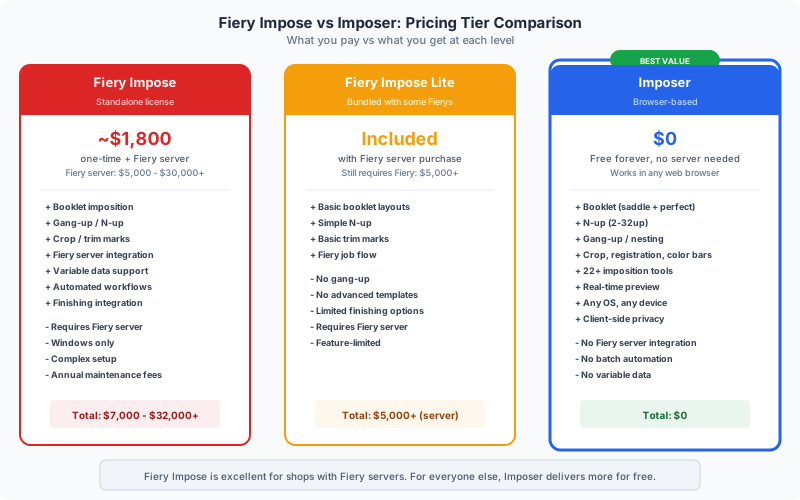
Understanding the true cost of Fiery Impose requires looking at the entire ecosystem, not just the Impose module license. The pricing is not always transparent -- EFI sells through authorized dealers, and prices vary by region, press manufacturer partnership, and negotiation. Here is what a typical deployment costs in 2026:
Fiery Server Hardware: $2,000 -- $15,000+
The Fiery RIP is typically a dedicated hardware box (or embedded controller) sold with or alongside your digital press. Entry-level external Fiery servers start around $2,000 for older or refurbished models. Current-generation embedded Fiery controllers (like those bundled with Xerox, Ricoh, Canon, or Konica Minolta presses) are often factored into the press purchase price, ranging from $5,000 to $15,000 as a line item. If you do not already own a Fiery server, you cannot use Fiery Impose at all.
Fiery Impose License: $1,500 -- $3,500
The Impose module itself is a separately licensed add-on to Fiery Command WorkStation. Pricing depends on the Fiery server model and the dealer. Common price points seen in the market range from $1,500 for basic Impose licensing to $3,500 for Impose bundled with Compose and JobMaster (the full "Fiery Makeready" suite). These are perpetual licenses tied to a specific Fiery server serial number.
Fiery Software Maintenance / SMA: $300 -- $800/year
EFI offers a Software Maintenance Agreement that provides software updates, new features, and technical support. While technically optional, skipping SMA means you stop receiving compatibility updates when Apple or Microsoft release new OS versions, or when EFI improves the imposition engine. Most production environments maintain SMA.
Total First-Year Cost (Typical): $3,500 -- $8,000+
If you already have a Fiery server and just need the Impose license: $1,500 -- $3,500. If you need to acquire the full stack from scratch: $5,000 -- $20,000+, depending on whether the Fiery server is bundled with a press purchase. For a single-operator print shop doing a few hundred jobs per month, these numbers are staggering.
Hidden Costs
- Training -- Fiery Command WorkStation is a professional tool with a steep learning curve. EFI offers certification courses ($500 -- $2,000), and most shops need at least one trained operator.
- IT infrastructure -- Fiery servers run on a local network. They need Ethernet, IP configuration, and sometimes dedicated firewall rules. This is IT overhead that browser-based tools eliminate entirely.
- Downtime during upgrades -- Fiery server firmware updates can take 30 -- 90 minutes and require the press to be offline. In a production environment, this is lost revenue.
- Lock-in -- Your Fiery Impose license is tied to a specific server serial number. If you replace the press (and its embedded Fiery), you typically need a new Impose license. Some dealers offer transfer credits, but it is not guaranteed.
Compare all of this to PDF Press, which costs $0, requires no hardware, no server, no training certification, and works the moment you open a browser tab.
What Fiery Impose Does Well
It would be dishonest to discuss Fiery Impose alternatives without acknowledging what makes Fiery genuinely excellent in the right context. This is industrial-grade software built for industrial-grade printing, and in that environment it earns its keep.
Deep RIP Integration
Fiery Impose communicates directly with the Fiery RIP, which means the imposition layout is processed as part of the same rendering pipeline that handles color management (spot color matching, ICC profiles, G7 calibration), screening (AM/FM/hybrid), trapping, and registration. The imposed output is not a separate PDF that gets re-rasterized -- it is natively integrated into the RIP's processing pipeline. For high-end commercial and packaging work where color accuracy to Delta E < 2 is contractually required, this integration is valuable.
Enterprise Automation
When combined with Fiery JobFlow or third-party workflow tools (Enfocus Switch, Caldera, etc.), Fiery Impose can be triggered automatically by hot folders, JDF/JMF tickets, or MIS/ERP system integrations. A job can arrive via email, be automatically preflighted, imposed according to template rules, and queued for printing -- all without a human touching it. For shops processing hundreds or thousands of jobs daily, this automation pays for itself quickly.
Advanced Signature Management
Fiery Impose handles complex signature layouts for book printing, including mixed signature sizes (e.g., 16-page signatures combined with 8-page and 4-page signatures to reach an exact page count), custom creep tables, and sophisticated binding compensation. For long-run book production with web or sheetfed offset finishing, these features matter.
Hot Folder Workflows
Fiery hot folders allow operators to drop PDFs into a designated folder and have them automatically imposed and printed according to preconfigured templates. Multiple hot folders can serve different product types -- one for business cards, one for booklets, one for posters -- each with its own imposition template, paper tray mapping, and finishing settings. This is a powerful workflow for shops with repetitive job types.
Variable Data Integration
Fiery's VDP (Variable Data Printing) engine can impose variable data jobs -- personalized direct mail, serialized labels, variable-image catalogs -- while maintaining RIP efficiency through intelligent caching of reusable elements. This is a specialized capability that few standalone imposition tools can match.
Press-Specific Finishing Integration
Fiery Impose understands your specific press and finisher. It knows the minimum margins your device requires, which paper trays support which weights, and how your inline finisher (stapler, folder, trimmer) expects sheets to be oriented. This press-aware imposition reduces setup time and waste on production runs.
Fiery Impose Limitations and Pain Points
For all its strengths in production environments, Fiery Impose carries significant limitations that affect a large portion of potential users:
Requires a Fiery Server -- No Exceptions
This is the fundamental constraint. Fiery Impose is not a software application you can install on your laptop. It requires an active, network-connected Fiery server. If you are a freelance designer, a self-publisher, a school or church office, or a small shop with a non-Fiery printer, Fiery Impose is simply not available to you at any price. This single requirement eliminates the vast majority of people who need imposition tools.
Extremely Expensive for What Most People Need
Most imposition tasks are straightforward: arrange pages for a saddle-stitch booklet, set up 2-up or 4-up business cards, add crop marks, create a step-and-repeat layout. These are operations that take seconds in modern tools. Paying $2,000 -- $5,000+ (plus ongoing maintenance) for the privilege of doing these same tasks through a Fiery server is a cost that cannot be justified for low-to-medium volume operations.
Complex Setup and Administration
Setting up a Fiery server involves network configuration, driver installation, color calibration, template creation, and operator training. A new Fiery deployment typically requires a service technician visit or a half-day of remote setup with EFI support. Compare this to opening a browser tab.
No Remote or Cloud Access (by Default)
Fiery Command WorkStation connects to a Fiery server over a local network. If you are working from home, at a client site, or traveling, you cannot access your imposition tools unless your IT team has set up VPN access to the Fiery server. EFI has introduced Fiery IQ (a cloud monitoring platform), but the core imposition workflow remains local-network-dependent.
Single-Vendor Lock-In
Your Fiery Impose license is tied to a specific Fiery server, which is typically tied to a specific press. If you switch press vendors (e.g., from Xerox to Canon), your Fiery Impose license may not transfer. You could end up repurchasing the same software capability every time you change hardware. This creates a financial incentive to stay with the same press vendor even when better options exist.
Overkill UI for Simple Tasks
Fiery Command WorkStation's interface is designed for production operators managing queues of hundreds of jobs across multiple presses. For someone who just needs to impose a single PDF, the interface is overwhelming. Finding the Impose module, loading a job, configuring settings, and exporting the result involves navigating through job properties dialogs, layout panels, mark editors, and finishing tabs that are irrelevant for simple tasks.
Slow for One-Off Jobs
Fiery's strength -- tight RIP integration -- becomes a weakness for quick, one-off imposition. The workflow is designed around submitting jobs to a queue, applying settings, and processing them through the RIP pipeline. If you just want to impose a booklet and download the PDF without printing, Fiery makes you work through the same production pipeline. Browser-based tools like PDF Press give you the imposed PDF in seconds.
When Fiery Impose Is the Right Choice
Despite the cost and complexity, there are genuine scenarios where Fiery Impose is the correct tool. Being honest about this helps you make a better decision:
High-Volume Commercial Print Production
If your shop processes 500+ jobs per day on digital presses, the automation capabilities of Fiery (hot folders, JDF integration, automated imposition templates) pay for themselves through labor savings. At this volume, manual imposition in any tool -- even a fast one -- becomes a bottleneck. Fiery's ability to automatically apply the right imposition template based on job metadata is powerful at scale.
Color-Critical Work with Contractual Requirements
If your clients require certified color accuracy (brand color matching, Pantone spot color verification, G7 compliance documentation), Fiery's integrated color pipeline provides verifiable, measurable results. Standalone imposition tools process the layout but do not control the color pipeline -- that responsibility shifts to your printer driver or separate RIP. For packaging, pharmaceutical labels, and premium brand work, this integration matters.
Complex Book Signatures
If you routinely produce books with 200+ pages that require mixed signature sizes, precise creep compensation calculated from measured caliper data, and web-offset-specific imposition schemes (e.g., 16-page work-and-turn with perfecting), Fiery Impose's advanced signature management is purpose-built for this use case.
Inline Finishing Integration
If your digital press has an inline finisher (booklet maker, trimmer, folder) and you need the imposition to communicate finishing instructions directly to the hardware, Fiery's press-aware imposition handles this natively. Standalone tools produce an imposed PDF, but the finishing instructions must be configured separately on the press -- adding a step and a potential error point.
Existing Fiery Infrastructure
If your shop already owns Fiery servers and has trained operators, adding the Impose license is an incremental cost ($1,500 -- $3,500) on top of infrastructure you already maintain. In this scenario, the marginal cost of Fiery Impose is much lower than starting from scratch, and your operators already know the interface.
If none of these scenarios describe your situation, you are likely overpaying for capabilities you do not use. Keep reading for alternatives that cover the imposition needs of 90% of print professionals at a fraction of the cost -- or free.
PDF Press: The Best Fiery Impose Alternative
PDF Press is a browser-based PDF imposition tool that delivers the core imposition capabilities most users need from Fiery Impose -- , with zero infrastructure, and zero learning curve.
This is not a toy or a limited demo. PDF Press is powered by a production-grade WebAssembly (WASM) engine that runs entirely in your browser. Your PDF files are processed on your device -- they are never uploaded to any server, never stored in any cloud, and never visible to anyone but you. The same engine handles booklet imposition, n-up layouts, step-and-repeat, gang sheets, crop marks, color bars, creep compensation, and 20+ other imposition operations.
Why PDF Press Replaces Fiery Impose for Most Users
Instant Setup vs Hours of Configuration
With PDF Press, you open a browser tab and start imposing. There is no server to configure, no network to set up, no software to install, no license to activate, and no training course to complete. You upload your PDF, choose your layout, adjust settings with a real-time preview, and download the imposed output. The entire workflow takes seconds for simple jobs and minutes for complex ones.
Real-Time Visual Preview
PDF Press shows you exactly how every page will appear on every output sheet, updating in real time as you change settings. This is a fundamental advantage over Fiery Impose, where you typically configure imposition settings through property dialogs and then process the job to see the result. In PDF Press, you see the imposed layout before you commit -- eliminating waste from test prints and trial-and-error configuration.
23 Imposition Tools in One Interface
PDF Press includes tools for booklet imposition (saddle stitch and perfect binding), n-up layouts, grid arrangements, step-and-repeat, gang sheets, sticker nesting, crop marks, cutter marks, color bars, page numbering, rotation, resizing, cropping, overlay, split, shuffle, nudge, flip, and more. For the vast majority of jobs that Fiery Impose handles in a typical small-to-medium shop, PDF Press covers the same ground.
Works on Any Device, Anywhere
Chrome, Firefox, Safari, Edge -- any modern browser on Windows, macOS, Linux, ChromeOS, or iPadOS. No VPN needed. No server dependency. No single-machine licensing. If you can open a web browser, you can impose a PDF. This is transformative for freelancers, remote workers, and multi-location operations.
Privacy by Architecture
PDF Press processes PDFs entirely in-browser using WebAssembly. Your files never touch a server. For print shops handling confidential client work (legal documents, financial reports, medical materials), this provides stronger privacy guarantees than even a local Fiery server, which typically logs job metadata and may retain spooled files.
Try it now at pdfpress.app -- , professional-grade tools, no watermarks.
Feature Comparison: Fiery Impose vs PDF Press
The following table provides a direct comparison of the features that matter most for daily imposition work. This is an honest comparison -- Fiery Impose wins in some areas, and PDF Press wins in others. The question is which features matter for your workflow.
| Feature | Fiery Impose | PDF Press |
|---|---|---|
| Price | $1,500 -- $3,500 (+ Fiery server) | Free |
| Infrastructure Required | Fiery server (hardware) | Any web browser |
| Setup Time | Hours to days | Instant (open browser) |
| Platform | Windows, macOS (local network) | Any browser, any OS |
| Real-Time Preview | Limited (process to see result) | Full interactive real-time preview |
| Saddle-Stitch Booklet | Yes | Yes |
| Perfect Binding | Yes (advanced signature mgmt) | Yes |
| N-Up / Grid Layouts | Yes | Yes (Grid, Cards, Expert Grid) |
| Step-and-Repeat | Yes | Yes |
| Gang Sheet / Nesting | Yes (basic) | Yes (bin-packing algorithm) |
| Crop / Cutter Marks | Yes | Yes (thru-cut, kiss-cut, crease, perf) |
| Creep Compensation | Yes (caliper-based) | Yes (automatic) |
| Color Bars | Yes | Yes |
| Hot Folder Automation | Yes (JDF/JMF, Fiery JobFlow) | No |
| RIP Integration | Yes (native Fiery RIP) | No (outputs standard PDF) |
| Variable Data Imposition | Yes | No |
| Press Finishing Integration | Yes (inline finishers) | No (separate finishing setup) |
| Batch Processing | Yes (queue-based) | Single file (pipeline chaining) |
| Client-Side Processing | Yes (Fiery server) | Yes (browser WASM) |
| Overlay / Watermark | Limited | Yes |
| Page Manipulation | Via Fiery JobMaster (extra cost) | Rotate, resize, crop, flip, split, shuffle, nudge |
| Learning Curve | Steep (training recommended) | Minimal (intuitive UI) |
Where Fiery Impose Wins: Hot folder automation, RIP-integrated color management, variable data printing, inline finisher integration, and advanced signature management for long-run books. These are enterprise and production capabilities.
Where PDF Press Wins: Cost (free vs thousands), accessibility (any browser vs Fiery server), ease of use (seconds vs hours), real-time preview, broader page manipulation tools, and privacy. For the day-to-day imposition tasks that make up 90% of a typical shop's workload, PDF Press delivers equivalent results with dramatically less friction and cost.
Other Fiery Impose Alternatives Worth Considering
Depending on your specific requirements, several other tools can serve as Fiery Impose replacements:
Montax Imposer
A standalone desktop imposition application for Windows. Montax is well-suited for commercial print shops that want advanced imposition without Fiery's server dependency. It supports gang-up, booklet, n-up, and custom template layouts with batch processing capabilities.
- Pros: Standalone (no server needed), batch processing, comprehensive templates, one-time purchase
- Cons: Windows only, paid license, desktop installation required, no real-time browser access
Quite Imposing Plus
An Adobe Acrobat plugin for imposition. If your workflow already centers on Acrobat Pro, Quite Imposing integrates directly into Acrobat's interface. However, it adds the Acrobat Pro subscription cost ($276/year) on top of the plugin price (~$499).
- Pros: Familiar Acrobat environment, solid booklet and n-up features
- Cons: Requires Acrobat Pro subscription, Acrobat update compatibility issues, ~$775 first-year cost
See our detailed Quite Imposing alternative comparison for more.
Ultimate Impoze
A Windows-based imposition tool focused on digital printing workflows. It offers an interactive visual editor, template management, and supports JDF output for workflow integration. Pricing is mid-range compared to Fiery.
- Pros: Visual editor, JDF support, reasonable pricing vs Fiery
- Cons: Windows only, paid license, desktop-only, smaller user community
Imposition Wizard
A standalone imposition application available for Windows and macOS. It supports booklets, n-up, step-and-repeat, and custom layouts. Known for a clean interface and reasonable pricing.
- Pros: Cross-platform desktop app, intuitive interface, one-time purchase
- Cons: Desktop-only, no browser access, paid software, no automation features
For a comprehensive comparison of all these tools and more, see our best imposition software in 2026 guide.
Who Should Switch from Fiery Impose (And Who Should Stay)
Making the right decision depends on understanding your actual workflow, not just your aspirational one. Here is a straightforward framework:
You SHOULD switch to PDF Press if:
- You are a freelance designer or self-publisher who needs to impose PDFs occasionally. Fiery Impose was never designed for you.
- You run a small print shop (under 100 jobs/day) doing business cards, booklets, flyers, postcards, and similar commodity work. PDF Press handles all of these instantly and .
- You do not own a Fiery server and have been looking at Fiery Impose as a standalone imposition solution. It is not one -- save your money.
- You need imposition tools that work remotely -- from home, from client sites, from multiple locations. Browser-based tools eliminate the VPN-to-Fiery-server dependency.
- You are cost-sensitive and cannot justify $2,000 -- $5,000+ for a capability that free tools now handle competently.
- You value simplicity and speed over enterprise automation. If your workflow is "open PDF, impose, download, print," PDF Press does this in seconds versus Fiery's minutes.
You should KEEP Fiery Impose if:
- You process 500+ jobs per day and rely on hot folder automation to eliminate manual operator intervention.
- You do color-critical packaging or brand work that requires RIP-integrated color management with measurable Delta E compliance.
- You produce long-run books requiring mixed signature sizes and caliper-based creep compensation from measured paper thickness data.
- Your digital press has an inline finisher that receives finishing instructions from the Fiery controller, and you need the imposition to communicate directly with that hardware.
- You have significant existing investment in Fiery infrastructure, trained operators, and automated workflows that depend on Fiery's JDF/JMF integration.
For many shops, the answer is both. Keep Fiery for your high-volume automated production runs, and use PDF Press for the quick one-off jobs, remote work, proofing, and the 80% of daily tasks that do not need enterprise infrastructure. PDF Press costs nothing, so there is no reason not to add it to your toolkit.
How to Move Your Imposition Workflow from Fiery to PDF Press
Transitioning common imposition tasks from Fiery Impose to PDF Press is straightforward. Here is how your most common Fiery workflows translate:
Saddle-Stitch Booklet
In Fiery: Open Command WorkStation, import job, open Impose, select "Booklet" product type, configure "Saddle" binding, set paper size, adjust creep, process and hold. In PDF Press: Upload PDF, click Booklet, select Saddle Stitch, pick paper size -- done. The real-time preview shows every signature instantly.
Business Cards (Step-and-Repeat)
In Fiery: Open Impose, select "Gangup Repeat," set rows and columns, configure gutter and marks, process. In PDF Press: Upload PDF, click Grid or Cards, set columns and rows, enable crop marks -- the preview updates live as you adjust spacing and margins.
N-Up Layout
In Fiery: Select "Gangup Unique" or manually configure Impose layout. In PDF Press: Click N-Up Book or Grid, select your page arrangement (2-up, 4-up, 8-up, etc.), choose paper size. PDF Press automatically calculates scaling and page order.
Gang Sheet with Mixed Sizes
In Fiery: Limited gang-up automation; often requires manual positioning. In PDF Press: Click Gang Sheet, upload files, set sheet size and margins. The bin-packing algorithm optimizes placement automatically.
Adding Crop Marks and Color Bars
In Fiery: Navigate to the Marks editor within Impose, configure mark type, length, weight, offset. In PDF Press: Click Cutter Marks or Color Bar as a pipeline step. Stack multiple operations -- impose first, then add marks -- using PDF Press's chained pipeline architecture.
Exporting the Imposed PDF
In Fiery: Process the job, then use "Preview" or route to a virtual printer to capture the imposed output as PDF. In PDF Press: Click Download. The imposed PDF is ready immediately. No processing queue, no hold-and-release, no virtual printer workaround.
The key difference is time. Tasks that take 3 -- 5 minutes in Fiery (navigate UI, load job, configure, process, export) take 10 -- 30 seconds in PDF Press (upload, select tool, adjust, download). Over hundreds of jobs per month, this adds up to hours of saved operator time.
5-Year Cost Analysis: Fiery Impose vs PDF Press
The financial case for switching becomes stark when you project costs over a typical 5-year equipment lifecycle:
| Cost Item | Fiery Impose (5 Years) | PDF Press (5 Years) |
|---|---|---|
| Impose License | $2,500 (one-time, midpoint estimate) | $0 |
| Software Maintenance (SMA) | $2,500 ($500/yr x 5) | $0 |
| Fiery Server (prorated) | $4,000 (share of server cost) | $0 |
| Training | $1,000 (initial + refresher) | $0 |
| IT Support | $1,000 (network, updates) | $0 |
| Downtime (upgrades) | $500 (estimated lost productivity) | $0 |
| Total | $11,500 | $0 |
That is $11,500 in imposition-related costs over 5 years for a single Fiery seat. For a shop with 3 operators who occasionally need imposition access, multiply accordingly -- though Fiery Impose typically shares a single server license across operators on the same network.
Even if you conservatively attribute only half of those costs directly to imposition (sharing the Fiery server across other functions like color management and print queue management), the comparison is still $5,750 vs $0.
For shops that decide they need automated imposition features beyond what free tools offer, the middle ground is a standalone desktop tool like Montax ($500 -- $1,500) -- still saving $4,000 -- $10,000 over the Fiery path. But for the majority of imposition work, PDF Press at $0 handles the job.
The Verdict: Fiery Impose Is for Factories, PDF Press Is for Everyone Else
Fiery Impose is an excellent tool -- in the same way that a CNC machine is an excellent tool. It is precise, powerful, integrated into a larger production ecosystem, and worth its price when operated at scale. But you would not buy a CNC machine to cut a shelf bracket, and you should not invest in Fiery Impose to make a saddle-stitch booklet.
The printing industry has reached an inflection point where browser-based, WebAssembly-powered tools deliver production-quality imposition and zero complexity. For the freelancer, the small shop, the mid-size operation doing mixed work, and even the large shop that needs a quick tool alongside its production workflow, PDF Press is the practical choice.
The savings are not marginal -- they are measured in thousands of dollars per year, hours of setup time eliminated, and the freedom to impose PDFs from any device, anywhere, without infrastructure dependencies.
If you are currently evaluating Fiery Impose, start with PDF Press first. It takes 30 seconds to test with your own files. If it covers your needs -- and for 90% of users it will -- you have just saved yourself $2,000 to $5,000 and weeks of setup. If your requirements genuinely demand Fiery's enterprise capabilities, you will know that too, and you can make the investment with confidence that it is justified.
Either way, make the decision based on your actual workflow, not on the assumption that more expensive must mean better. In imposition, as in most things, the best tool is the one that solves your specific problem with the least friction.
Try it yourself
PDF Press runs entirely in your browser. Upload a PDF, pick a tool, and download the result — fast and private.
Open PDF Press22 Professional Imposition Tools
Every tool runs locally in your browser — fast, private, and professional-grade.
Frequently Asked Questions
Related Articles
Ready to try professional PDF imposition?
PDF Press is a browser-based imposition tool with 22 professional tools. No installation required.
Open PDF Press